
About ACFS:
In this article I will demostrate how to configure Oracle ACFS on Exadata Database machine. Before start with the actual configuration, let’s discuss the few important points about ACFS and configure it on Exadata.
Oracle Automatic Storage Management Cluster File System (ACFS) on Exadata Database Machine:
Starting with Oracle Grid Infrastructure version 12.1.0.2, Oracle ACFS supports all database files and general purpose files on Oracle Exadata Database Machine running Oracle Linux on database servers.
The following database versions are supported by Oracle ACFS on Exadata Database Machine:
Some important information about using Oracle ACFS with Exadata
Patches required
Oracle ACFS restriction
Performance Optimization
Uses of ACFS on Exadata Database Machine
Steps to configure ACFS
It consists of 4 steps:
Current Environment Details:
I – Load ACFS/ADVM module on all the nodes
uid=1000(oracle) gid=1001(oinstall) groups=1001(oinstall),1002(dba),1003(oper),1004(asmdba)
dm01db01-orcldb1 {/home/oracle}:. oraenv
ORACLE_SID = [orcldb1] ? +ASM1
The Oracle base remains unchanged with value /u01/app/oracle
dm01db01-+ASM1 {/home/oracle}:env | grep ORA
ORACLE_SID=+ASM1
ORACLE_BASE=/u01/app/oracle
ORACLE_HOME=/u01/app/12.1.0.2/grid
dm01db01-+ASM1 {/home/oracle}:export DISPLAY=10.30.201.137:0.0
dm01db01-+ASM1 {/home/oracle}:which asmca
/u01/app/12.1.0.2/grid/bin/asmca
dm01db01-+ASM1 {/home/oracle}:asmca


Here ACFS/ADVM module is not load on node 1.
Execute the following command to load acfs module.
[root@dm01db01 ~]# /u01/app/12.1.0.2/grid/bin/acfsload -h
ACFS-9228: usage: acfsload [-h] {start|stop} [-s]
[root@dm01db01 ~]# /u01/app/12.1.0.2/grid/bin/acfsload start
ACFS-9391: Checking for existing ADVM/ACFS installation.
ACFS-9392: Validating ADVM/ACFS installation files for operating system.
ACFS-9393: Verifying ASM Administrator setup.
ACFS-9308: Loading installed ADVM/ACFS drivers.
ACFS-9327: Verifying ADVM/ACFS devices.
ACFS-9156: Detecting control device ‘/dev/asm/.asm_ctl_spec’.
ACFS-9156: Detecting control device ‘/dev/ofsctl’.
ACFS-9322: completed
[root@dm01db01 ~]# lsmod | grep oracle
oracleacfs 3310765 0
oracleadvm 506070 0
oracleoks 508392 2 oracleacfs,oracleadvm
On all nodes:
[root@dm01db01 ~]# dcli -g dbs_group -l root ‘lsmod | grep oracle’
dm01db01: oracleacfs 3310765 0
dm01db01: oracleadvm 506070 0
dm01db01: oracleoks 508392 2 oracleacfs,oracleadvm
dm01db02: oracleacfs 3310765 0
dm01db02: oracleadvm 506070 0
dm01db02: oracleoks 508392 2 oracleacfs,oracleadvm
dm01db03: oracleacfs 3310765 0
dm01db03: oracleadvm 506070 0
dm01db03: oracleoks 508392 2 oracleacfs,oracleadvm
dm01db04: oracleacfs 3310765 0
dm01db04: oracleadvm 506070 0
dm01db04: oracleoks 508392 2 oracleacfs,oracleadvm
dm01db05: oracleacfs 3310765 0
dm01db05: oracleadvm 506070 0
dm01db05: oracleoks 508392 2 oracleacfs,oracleadvm
dm01db06: oracleacfs 3310765 0
dm01db06: oracleadvm 506070 0
dm01db06: oracleoks 508392 2 oracleacfs,oracleadvm
dm01db07: oracleacfs 3310765 0
dm01db07: oracleadvm 506070 0
dm01db07: oracleoks 508392 2 oracleacfs,oracleadvm
dm01db08: oracleacfs 3310765 0
dm01db08: oracleadvm 506070 0
dm01db08: oracleoks 508392 2 oracleacfs,oracleadvm
[root@dm01db01 ~]# vi acfs_validate_module.sh
[root@dm01db01 ~]# cat acfs_validate_module.sh
#################################################
###
### ACFS/ADVM modules validation
###
#################################################
###
### Author: Esteban D Bernal
###
#################################################
/u01/app/12.1.0.2/grid/bin/acfsdriverstate loaded
/u01/app/12.1.0.2/grid/bin/acfsdriverstate installed
/u01/app/12.1.0.2/grid/bin/acfsdriverstate supported
/u01/app/12.1.0.2/grid/bin/acfsdriverstate version
/u01/app/12.1.0.2/grid/bin/acfsroot version_check
lsmod | grep oracle
## Where: “/u01/app/12.1.0.2/grid” is the Grid Infrastructure Home directory,
## thus you need to replace this value with your Grid Infrastructure Home directory path.
[root@dm01db01 ~]# chmod +x acfs_validate_module.sh
[root@dm01db01 ~]# ls -l acfs_validate_module.sh
-rwxr-xr-x 1 root root 673 Jan 25 05:02 acfs_validate_module.sh
[root@dm01db01 ~]# sh -x acfs_validate_module.sh
+ /u01/app/12.1.0.2/grid/bin/acfsdriverstate loaded
ACFS-9203: true
+ /u01/app/12.1.0.2/grid/bin/acfsdriverstate installed
ACFS-9203: true
+ /u01/app/12.1.0.2/grid/bin/acfsdriverstate supported
ACFS-9200: Supported
+ /u01/app/12.1.0.2/grid/bin/acfsdriverstate version
ACFS-9325: Driver OS kernel version = 2.6.39-400.3.0.el6uek.x86_64(x86_64).
ACFS-9326: Driver Oracle version = 140611.5.
+ /u01/app/12.1.0.2/grid/bin/acfsroot version_check
ACFS-9316: Valid ADVM/ACFS distribution media detected at: ‘/u01/app/12.1.0.2/grid/usm/install/Oracle/EL6UEK/x86_64/2.6.39-400/2.6.39-400-x86_64/bin’
+ lsmod
+ grep oracle
oracleacfs 3310765 0
oracleadvm 506070 0
oracleoks 508392 2 oracleacfs,oracleadvm

I still see that ACFS/ADVM is “Not Installed” on node 1 though we have enabled/loaded it manually on node 1 and verified. Let’s move on and see if it is just a BUG. If there is no issue we should be able to configure ASM Volume and ACFS without any issues.
II – Create ASM diskgroup for ACFS


SQL> select inst_id, name, total_mb, group_number from gv$asm_diskgroup where name like ‘ACFS_DG’;
INST_ID NAME TOTAL_MB GROUP_NUMBER
———- —————————— ———- ————
1 ACFS_DG 4145536 3
3 ACFS_DG 4145536 3
6 ACFS_DG 4145536 3
5 ACFS_DG 4145536 3
7 ACFS_DG 4145536 3
4 ACFS_DG 4145536 3
2 ACFS_DG 4145536 3
8 ACFS_DG 4145536 3
8 rows selected.
SQL> col value for a30
SQL> col name for a30
SQL> select name, value from v$asm_attribute where GROUP_NUMBER=3 and name like ‘compatible%’;
NAME VALUE
—————————— ——————————
compatible.asm 12.1.0.0.0
compatible.rdbms 12.1.0.0.0
compatible.advm 12.1.0.0.0
dm01db01-+ASM1 {/home/oracle}:/u01/app/12.1.0.2/grid/bin/crsctl stat res ora.ACFS_DG.dg -t
——————————————————————————–
Name Target State Server State details
——————————————————————————–
Local Resources
——————————————————————————–
ora.ACFS_DG.dg
ONLINE ONLINE dm01db01 STABLE
ONLINE ONLINE dm01db02 STABLE
ONLINE ONLINE dm01db03 STABLE
ONLINE ONLINE dm01db04 STABLE
ONLINE ONLINE dm01db05 STABLE
ONLINE ONLINE dm01db06 STABLE
ONLINE ONLINE dm01db07 STABLE
ONLINE ONLINE dm01db08 STABLE
——————————————————————————–
III – Create ASM Volume


ASMCMD> volinfo –all
Diskgroup Name: ACFS_DG
Volume Name: ACFSVOL
Volume Device: /dev/asm/acfsvol-228
State: ENABLED
Size (MB): 2056448
Resize Unit (MB): 64
Redundancy: MIRROR
Stripe Columns: 8
Stripe Width (K): 1024
Usage:
Mountpath:
dm01db01-+ASM1 {/home/oracle}:/u01/app/12.1.0.2/grid/bin/crsctl stat res ora.ACFS_DG.ACFSVOL.advm -t
——————————————————————————–
Name Target State Server State details
——————————————————————————–
Local Resources
——————————————————————————–
ora.ACFS_DG.ACFSVOL.advm
ONLINE ONLINE dm01db01 STABLE
ONLINE ONLINE dm01db02 STABLE
ONLINE ONLINE dm01db03 STABLE
ONLINE ONLINE dm01db04 STABLE
ONLINE ONLINE dm01db05 STABLE
ONLINE ONLINE dm01db06 STABLE
ONLINE ONLINE dm01db07 STABLE
ONLINE ONLINE dm01db08 STABLE
——————————————————————————–
dm01db01-+ASM1 {/home/oracle}:dcli -g ~/dbs_group -l oracle ‘ls -l /dev/asm/*’
dm01db01: brwxrwx— 1 root dba 251, 116737 Jan 25 06:14 /dev/asm/acfsvol-228
dm01db02: brwxrwx— 1 root dba 251, 116737 Jan 25 06:14 /dev/asm/acfsvol-228
dm01db03: brwxrwx— 1 root dba 251, 116737 Jan 25 06:14 /dev/asm/acfsvol-228
dm01db04: brwxrwx— 1 root dba 251, 116737 Jan 25 06:14 /dev/asm/acfsvol-228
dm01db05: brwxrwx— 1 root dba 251, 116737 Jan 25 06:14 /dev/asm/acfsvol-228
dm01db06: brwxrwx— 1 root dba 251, 116737 Jan 25 06:14 /dev/asm/acfsvol-228
dm01db07: brwxrwx— 1 root dba 251, 116737 Jan 25 06:14 /dev/asm/acfsvol-228
dm01db08: brwxrwx— 1 root dba 251, 116737 Jan 25 06:14 /dev/asm/acfsvol-228
IV – Create ASM Cluster File system
[root@dm01db01 ~]# dcli -g ~/dbs_group -l root ‘mkdir /acfs’
[root@dm01db01 ~]# dcli -g ~/dbs_group -l root ‘chown oracle:oinstall /acfs’
[root@dm01db01 ~]# dcli -g ~/dbs_group -l root ‘chmod 775 /acfs’
[root@dm01db01 ~]# dcli -g ~/dbs_group -l root ‘ls -ld /acfs’
dm01db01: drwxrwxr-x 2 oracle oinstall 4096 Jan 25 06:28 /acfs
dm01db02: drwxrwxr-x 2 oracle oinstall 4096 Jan 25 06:28 /acfs
dm01db03: drwxrwxr-x 2 oracle oinstall 4096 Jan 25 06:28 /acfs
dm01db04: drwxrwxr-x 2 oracle oinstall 4096 Jan 25 06:28 /acfs
dm01db05: drwxrwxr-x 2 oracle oinstall 4096 Jan 25 06:28 /acfs
dm01db06: drwxrwxr-x 2 oracle oinstall 4096 Jan 25 06:28 /acfs
dm01db07: drwxrwxr-x 2 oracle oinstall 4096 Jan 25 06:28 /acfs
dm01db08: drwxrwxr-x 2 oracle oinstall 4096 Jan 25 06:28 /acfs


[root@dm01db01 ~]# cat /u01/app/oracle/cfgtoollogs/asmca/scripts/acfs_script.sh
#!/bin/sh
/u01/app/12.1.0.2/grid/bin/srvctl add filesystem -d /dev/asm/acfsvol-228 -m /acfs -u oracle -fstype ACFS -description ‘ACFS File System’ -autostart ALWAYS
if [ $? = “0” -o $? = “2” ]; then
/u01/app/12.1.0.2/grid/bin/srvctl start filesystem -d /dev/asm/acfsvol-228
if [ $? = “0” ]; then
chown oracle:oinstall /acfs
chmod 775 /acfs
/u01/app/12.1.0.2/grid/bin/srvctl status filesystem -d /dev/asm/acfsvol-228
exit 0
fi
/u01/app/12.1.0.2/grid/bin/srvctl status filesystem -d /dev/asm/acfsvol-228
fi
[root@dm01db01 ~]# /u01/app/oracle/cfgtoollogs/asmca/scripts/acfs_script.sh
ACFS file system /acfs is mounted on nodes dm01db01,dm01db02,dm01db03,dm01db04,dm01db05,dm01db06,dm01db07,dm01db08


dm01db01-+ASM1 {/home/oracle}:/u01/app/12.1.0.2/grid/bin/crsctl stat res ora.acfs_dg.acfsvol.acfs -t
——————————————————————————–
Name Target State Server State details
——————————————————————————–
Local Resources
——————————————————————————–
ora.acfs_dg.acfsvol.acfs
ONLINE ONLINE dm01db01 mounted on /acfs,STA
BLE
ONLINE ONLINE dm01db02 mounted on /acfs,STA
BLE
ONLINE ONLINE dm01db03 mounted on /acfs,STA
BLE
ONLINE ONLINE dm01db04 mounted on /acfs,STA
BLE
ONLINE ONLINE dm01db05 mounted on /acfs,STA
BLE
ONLINE ONLINE dm01db06 mounted on /acfs,STA
BLE
ONLINE ONLINE dm01db07 mounted on /acfs,STA
BLE
ONLINE ONLINE dm01db08 mounted on /acfs,STA
BLE
——————————————————————————–
V – Test ACFS Cluster file system
dm01db01-+ASM1 {/home/oracle}:cd /acfs
dm01db01-+ASM1 {/acfs}:ls -ltr
total 64
drwx—— 2 root root 65536 Jan 25 07:11 lost+found
dm01db01-+ASM1 {/acfs}:mkdir test
dm01db01-+ASM1 {/acfs}:cd test/
dm01db01-+ASM1 {/acfs/test}:vi myfile.txt
dm01db01-+ASM1 {/acfs/test}:cat myfile.txt
this is a test
dm01db01-+ASM1 {/home/oracle}:dcli -g ~/dbs_group -l oracle ‘cat /acfs/test/myfile.txt’
dm01db01: this is a test
dm01db02: this is a test
dm01db03: this is a test
dm01db04: this is a test
dm01db05: this is a test
dm01db06: this is a test
dm01db07: this is a test
dm01db08: this is a test
dm01db01-+ASM1 {/home/oracle}:dcli -g ~/dbs_group -l oracle ‘df -h /acfs’
dm01db01: Filesystem Size Used Avail Use% Mounted on
dm01db01: /dev/asm/acfsvol-228
dm01db01: 2.0T 4.3G 2.0T 1% /acfs
dm01db02: Filesystem Size Used Avail Use% Mounted on
dm01db02: /dev/asm/acfsvol-228
dm01db02: 2.0T 4.3G 2.0T 1% /acfs
dm01db03: Filesystem Size Used Avail Use% Mounted on
dm01db03: /dev/asm/acfsvol-228
dm01db03: 2.0T 4.3G 2.0T 1% /acfs
dm01db04: Filesystem Size Used Avail Use% Mounted on
dm01db04: /dev/asm/acfsvol-228
dm01db04: 2.0T 4.3G 2.0T 1% /acfs
dm01db05: Filesystem Size Used Avail Use% Mounted on
dm01db05: /dev/asm/acfsvol-228
dm01db05: 2.0T 4.3G 2.0T 1% /acfs
dm01db06: Filesystem Size Used Avail Use% Mounted on
dm01db06: /dev/asm/acfsvol-228
dm01db06: 2.0T 4.3G 2.0T 1% /acfs
dm01db07: Filesystem Size Used Avail Use% Mounted on
dm01db07: /dev/asm/acfsvol-228
dm01db07: 2.0T 4.3G 2.0T 1% /acfs
dm01db08: Filesystem Size Used Avail Use% Mounted on
dm01db08: /dev/asm/acfsvol-228
dm01db08: 2.0T 4.3G 2.0T 1% /acfs
dm01db01-+ASM1 {/home/oracle}:dcli -g ~/dbs_group -l oracle ‘ls -ld /acfs’
dm01db01: drwxrwxr-x 4 oracle oinstall 4096 Jan 25 07:11 /acfs
dm01db02: drwxrwxr-x 4 oracle oinstall 4096 Jan 25 07:11 /acfs
dm01db03: drwxrwxr-x 4 oracle oinstall 4096 Jan 25 07:11 /acfs
dm01db04: drwxrwxr-x 4 oracle oinstall 4096 Jan 25 07:11 /acfs
dm01db05: drwxrwxr-x 4 oracle oinstall 4096 Jan 25 07:11 /acfs
dm01db06: drwxrwxr-x 4 oracle oinstall 4096 Jan 25 07:11 /acfs
dm01db07: drwxrwxr-x 4 oracle oinstall 4096 Jan 25 07:11 /acfs
dm01db08: drwxrwxr-x 4 oracle oinstall 4096 Jan 25 07:11 /acfs
Conclusion
In this article we have learned basic concepts about ACFS and it works on Exadata. We also seen a practicle demonstration on how to Load ACFS/ADVM module on all the nodes, Create ASM diskgroup for ACFS, Create ASM Volume and Create ASM Cluster File system.
- ACFS stands for Oracle Automatic Storage Management Cluster File System
- ACFS extends ASM functionality to support all kind of files like database files, application files and general purpose files.
- Oracle ACFS is a High Availability Cluster File system and it is tightly coupled with Oracle Clusterware technology.
- It can manage large number of file systems and files.
- One can manage ACFS/ADVM using: ASMCA, ASMCMD, SQL*PLUS, OEM and ACFS Plug-ins
In this article I will demostrate how to configure Oracle ACFS on Exadata Database machine. Before start with the actual configuration, let’s discuss the few important points about ACFS and configure it on Exadata.
Oracle Automatic Storage Management Cluster File System (ACFS) on Exadata Database Machine:
Starting with Oracle Grid Infrastructure version 12.1.0.2, Oracle ACFS supports all database files and general purpose files on Oracle Exadata Database Machine running Oracle Linux on database servers.
The following database versions are supported by Oracle ACFS on Exadata Database Machine:
- Oracle Database 10g Rel. 2 (10.2.0.4 and 10.2.0.5)
- Oracle Database 11g (11.2.0.4 and higher)
- Oracle Database 12c (12.1.0.1 and higher)
Some important information about using Oracle ACFS with Exadata
- Oracle ACFS supports all database file types and general purpose files
- All Oracle ACFS advanced functionality is supported on Exadata including:
- Snapshots, replication, tagging, security, encryption, audit and HANFS.
Patches required
- Please refer to the MOS note for important fixed required for Oracle ACFS on Exadata Database Machine.
- 2022172.1
Oracle ACFS restriction
- Smart Scan, Storage Indexes, IO Resource Manager (IORM) are currently not supported.
- Smart FC read operation are cached.
- Smart FC write operations is not supported
- Smart Flash Logging is not supported.
- HCC is supported with fix for bug 19136936
- Hardware Assisted Resilient Data (HARD) checks are not performed.
- Oracle ACFS replication or security/encryption/audit is only supported with general purpose files.
- Database files in ACFS doesn’t support replication or security/encryption/audit
Performance Optimization
- When storing database data files on Oracle ACFS, Initialization parameter FILESYSTEMIO_OPTIONS must be set to ‘setall’. Other settings are not supported.
- For each disk group that contains an Oracle ADVM volume that is intended to hold data files, set ASM and ADVM compatibility attributes to 12.1 or higher as this will ensure optimized performance.
Uses of ACFS on Exadata Database Machine
- Since Oracle ACFS support database version 10.2.0.4 and 10.2.0.5, Customers can migrate their 10g database to Exadata. Later they upgrade their 10g database to 11g or higher database version.
- Oracle ACFS can be used as a shared Oracle Home for RDBMS, Middleware, GoldenGate binaries.
- Oracle ACFS can be used to store Oracle GoldenGate related files such as trail file, checkpoint files, parameter files and so on.
Steps to configure ACFS
It consists of 4 steps:
- Load ACFS/ADVM module on all the nodes
- Create ASM diskgroup for ACFS
- Create ASM Volume
- Create ASM Cluster File system
Current Environment Details:
- Exadata Database Machine X5-2 Full Rack
- Exadata Storage Software version 12.1.2.1.1
- Oracle Grid/Database Version 12.1.0.2
I – Load ACFS/ADVM module on all the nodes
- Login as Oracle Grid Infrastructure software owner and start asmca.
uid=1000(oracle) gid=1001(oinstall) groups=1001(oinstall),1002(dba),1003(oper),1004(asmdba)
- Set the ORACLE HOME and SID to ASM
dm01db01-orcldb1 {/home/oracle}:. oraenv
ORACLE_SID = [orcldb1] ? +ASM1
The Oracle base remains unchanged with value /u01/app/oracle
dm01db01-+ASM1 {/home/oracle}:env | grep ORA
ORACLE_SID=+ASM1
ORACLE_BASE=/u01/app/oracle
ORACLE_HOME=/u01/app/12.1.0.2/grid
- Set DISPLAY
dm01db01-+ASM1 {/home/oracle}:export DISPLAY=10.30.201.137:0.0
- Start asmca utility
dm01db01-+ASM1 {/home/oracle}:which asmca
/u01/app/12.1.0.2/grid/bin/asmca
dm01db01-+ASM1 {/home/oracle}:asmca


- Make sure ACFS/ADVM modules loaded on every node in a standard cluster.

Here ACFS/ADVM module is not load on node 1.
Execute the following command to load acfs module.
[root@dm01db01 ~]# /u01/app/12.1.0.2/grid/bin/acfsload -h
ACFS-9228: usage: acfsload [-h] {start|stop} [-s]
[root@dm01db01 ~]# /u01/app/12.1.0.2/grid/bin/acfsload start
ACFS-9391: Checking for existing ADVM/ACFS installation.
ACFS-9392: Validating ADVM/ACFS installation files for operating system.
ACFS-9393: Verifying ASM Administrator setup.
ACFS-9308: Loading installed ADVM/ACFS drivers.
ACFS-9327: Verifying ADVM/ACFS devices.
ACFS-9156: Detecting control device ‘/dev/asm/.asm_ctl_spec’.
ACFS-9156: Detecting control device ‘/dev/ofsctl’.
ACFS-9322: completed
- Verify ACFS/ADVM module is loaded.
[root@dm01db01 ~]# lsmod | grep oracle
oracleacfs 3310765 0
oracleadvm 506070 0
oracleoks 508392 2 oracleacfs,oracleadvm
On all nodes:
[root@dm01db01 ~]# dcli -g dbs_group -l root ‘lsmod | grep oracle’
dm01db01: oracleacfs 3310765 0
dm01db01: oracleadvm 506070 0
dm01db01: oracleoks 508392 2 oracleacfs,oracleadvm
dm01db02: oracleacfs 3310765 0
dm01db02: oracleadvm 506070 0
dm01db02: oracleoks 508392 2 oracleacfs,oracleadvm
dm01db03: oracleacfs 3310765 0
dm01db03: oracleadvm 506070 0
dm01db03: oracleoks 508392 2 oracleacfs,oracleadvm
dm01db04: oracleacfs 3310765 0
dm01db04: oracleadvm 506070 0
dm01db04: oracleoks 508392 2 oracleacfs,oracleadvm
dm01db05: oracleacfs 3310765 0
dm01db05: oracleadvm 506070 0
dm01db05: oracleoks 508392 2 oracleacfs,oracleadvm
dm01db06: oracleacfs 3310765 0
dm01db06: oracleadvm 506070 0
dm01db06: oracleoks 508392 2 oracleacfs,oracleadvm
dm01db07: oracleacfs 3310765 0
dm01db07: oracleadvm 506070 0
dm01db07: oracleoks 508392 2 oracleacfs,oracleadvm
dm01db08: oracleacfs 3310765 0
dm01db08: oracleadvm 506070 0
dm01db08: oracleoks 508392 2 oracleacfs,oracleadvm
[root@dm01db01 ~]# vi acfs_validate_module.sh
[root@dm01db01 ~]# cat acfs_validate_module.sh
#################################################
###
### ACFS/ADVM modules validation
###
#################################################
###
### Author: Esteban D Bernal
###
#################################################
/u01/app/12.1.0.2/grid/bin/acfsdriverstate loaded
/u01/app/12.1.0.2/grid/bin/acfsdriverstate installed
/u01/app/12.1.0.2/grid/bin/acfsdriverstate supported
/u01/app/12.1.0.2/grid/bin/acfsdriverstate version
/u01/app/12.1.0.2/grid/bin/acfsroot version_check
lsmod | grep oracle
## Where: “/u01/app/12.1.0.2/grid” is the Grid Infrastructure Home directory,
## thus you need to replace this value with your Grid Infrastructure Home directory path.
[root@dm01db01 ~]# chmod +x acfs_validate_module.sh
[root@dm01db01 ~]# ls -l acfs_validate_module.sh
-rwxr-xr-x 1 root root 673 Jan 25 05:02 acfs_validate_module.sh
[root@dm01db01 ~]# sh -x acfs_validate_module.sh
+ /u01/app/12.1.0.2/grid/bin/acfsdriverstate loaded
ACFS-9203: true
+ /u01/app/12.1.0.2/grid/bin/acfsdriverstate installed
ACFS-9203: true
+ /u01/app/12.1.0.2/grid/bin/acfsdriverstate supported
ACFS-9200: Supported
+ /u01/app/12.1.0.2/grid/bin/acfsdriverstate version
ACFS-9325: Driver OS kernel version = 2.6.39-400.3.0.el6uek.x86_64(x86_64).
ACFS-9326: Driver Oracle version = 140611.5.
+ /u01/app/12.1.0.2/grid/bin/acfsroot version_check
ACFS-9316: Valid ADVM/ACFS distribution media detected at: ‘/u01/app/12.1.0.2/grid/usm/install/Oracle/EL6UEK/x86_64/2.6.39-400/2.6.39-400-x86_64/bin’
+ lsmod
+ grep oracle
oracleacfs 3310765 0
oracleadvm 506070 0
oracleoks 508392 2 oracleacfs,oracleadvm
- Refresh or Exit and start ASMCA again.

I still see that ACFS/ADVM is “Not Installed” on node 1 though we have enabled/loaded it manually on node 1 and verified. Let’s move on and see if it is just a BUG. If there is no issue we should be able to configure ASM Volume and ACFS without any issues.
II – Create ASM diskgroup for ACFS
- On Disk Groups page click on “Create”

- On Create Disk Group page, specify:
- Disk Group Name: ACFS_DG
- Redundancy: Normal
- Select Member Disk: Show Eligible
- Select all candidate disks to be part of ACFS_DG disk group
- In Exadata each Storage cell is a failure Group
- Click on Show Advanced Options, specify:
- Allocation Unit Size: 4 (MB)
- Minimun software version for ASM/Database/ADVM: 12.1.0.0.0
- Click Ok


- Click Ok

- We can see our ACFS_DG Disk Group created

- Verify newly created ACFS_DG Disk Group as follows:
SQL> select inst_id, name, total_mb, group_number from gv$asm_diskgroup where name like ‘ACFS_DG’;
INST_ID NAME TOTAL_MB GROUP_NUMBER
———- —————————— ———- ————
1 ACFS_DG 4145536 3
3 ACFS_DG 4145536 3
6 ACFS_DG 4145536 3
5 ACFS_DG 4145536 3
7 ACFS_DG 4145536 3
4 ACFS_DG 4145536 3
2 ACFS_DG 4145536 3
8 ACFS_DG 4145536 3
8 rows selected.
SQL> col value for a30
SQL> col name for a30
SQL> select name, value from v$asm_attribute where GROUP_NUMBER=3 and name like ‘compatible%’;
NAME VALUE
—————————— ——————————
compatible.asm 12.1.0.0.0
compatible.rdbms 12.1.0.0.0
compatible.advm 12.1.0.0.0
dm01db01-+ASM1 {/home/oracle}:/u01/app/12.1.0.2/grid/bin/crsctl stat res ora.ACFS_DG.dg -t
——————————————————————————–
Name Target State Server State details
——————————————————————————–
Local Resources
——————————————————————————–
ora.ACFS_DG.dg
ONLINE ONLINE dm01db01 STABLE
ONLINE ONLINE dm01db02 STABLE
ONLINE ONLINE dm01db03 STABLE
ONLINE ONLINE dm01db04 STABLE
ONLINE ONLINE dm01db05 STABLE
ONLINE ONLINE dm01db06 STABLE
ONLINE ONLINE dm01db07 STABLE
ONLINE ONLINE dm01db08 STABLE
——————————————————————————–
III – Create ASM Volume
- Click on “Volumes” tab
- On Volumes page click on “Create”
- On Create Volume page, specify:
- Volumn name: acfsvol
- Disk Group name: ACFS_DG
- Size: 2008.25 (it can be anything based on your requirement from usable space avaialble.)
- Click Ok


- Click Ok

- We can see our Volume created

- Verify newly created Volume as follows:
ASMCMD> volinfo –all
Diskgroup Name: ACFS_DG
Volume Name: ACFSVOL
Volume Device: /dev/asm/acfsvol-228
State: ENABLED
Size (MB): 2056448
Resize Unit (MB): 64
Redundancy: MIRROR
Stripe Columns: 8
Stripe Width (K): 1024
Usage:
Mountpath:
dm01db01-+ASM1 {/home/oracle}:/u01/app/12.1.0.2/grid/bin/crsctl stat res ora.ACFS_DG.ACFSVOL.advm -t
——————————————————————————–
Name Target State Server State details
——————————————————————————–
Local Resources
——————————————————————————–
ora.ACFS_DG.ACFSVOL.advm
ONLINE ONLINE dm01db01 STABLE
ONLINE ONLINE dm01db02 STABLE
ONLINE ONLINE dm01db03 STABLE
ONLINE ONLINE dm01db04 STABLE
ONLINE ONLINE dm01db05 STABLE
ONLINE ONLINE dm01db06 STABLE
ONLINE ONLINE dm01db07 STABLE
ONLINE ONLINE dm01db08 STABLE
——————————————————————————–
dm01db01-+ASM1 {/home/oracle}:dcli -g ~/dbs_group -l oracle ‘ls -l /dev/asm/*’
dm01db01: brwxrwx— 1 root dba 251, 116737 Jan 25 06:14 /dev/asm/acfsvol-228
dm01db02: brwxrwx— 1 root dba 251, 116737 Jan 25 06:14 /dev/asm/acfsvol-228
dm01db03: brwxrwx— 1 root dba 251, 116737 Jan 25 06:14 /dev/asm/acfsvol-228
dm01db04: brwxrwx— 1 root dba 251, 116737 Jan 25 06:14 /dev/asm/acfsvol-228
dm01db05: brwxrwx— 1 root dba 251, 116737 Jan 25 06:14 /dev/asm/acfsvol-228
dm01db06: brwxrwx— 1 root dba 251, 116737 Jan 25 06:14 /dev/asm/acfsvol-228
dm01db07: brwxrwx— 1 root dba 251, 116737 Jan 25 06:14 /dev/asm/acfsvol-228
dm01db08: brwxrwx— 1 root dba 251, 116737 Jan 25 06:14 /dev/asm/acfsvol-228
IV – Create ASM Cluster File system
- Create ACFS mount point directory on all nodes
[root@dm01db01 ~]# dcli -g ~/dbs_group -l root ‘mkdir /acfs’
[root@dm01db01 ~]# dcli -g ~/dbs_group -l root ‘chown oracle:oinstall /acfs’
[root@dm01db01 ~]# dcli -g ~/dbs_group -l root ‘chmod 775 /acfs’
[root@dm01db01 ~]# dcli -g ~/dbs_group -l root ‘ls -ld /acfs’
dm01db01: drwxrwxr-x 2 oracle oinstall 4096 Jan 25 06:28 /acfs
dm01db02: drwxrwxr-x 2 oracle oinstall 4096 Jan 25 06:28 /acfs
dm01db03: drwxrwxr-x 2 oracle oinstall 4096 Jan 25 06:28 /acfs
dm01db04: drwxrwxr-x 2 oracle oinstall 4096 Jan 25 06:28 /acfs
dm01db05: drwxrwxr-x 2 oracle oinstall 4096 Jan 25 06:28 /acfs
dm01db06: drwxrwxr-x 2 oracle oinstall 4096 Jan 25 06:28 /acfs
dm01db07: drwxrwxr-x 2 oracle oinstall 4096 Jan 25 06:28 /acfs
dm01db08: drwxrwxr-x 2 oracle oinstall 4096 Jan 25 06:28 /acfs
- Click on “ASM Cluster File Systems” tab

- On ASM Cluster File Systems page click on “Create”

- On Create ASM Cluster File System page, specify:
- Type of ACFS: Cluster File System
- Mount point: /acfs
- Auto Mount: check
- User Name: oracle
- Group Name: oinstall
- Description: ACFS File System
- Select Volume: ACFSVOL – /dev/asm/acfsvol-228 – 2008.25
- Click Ok


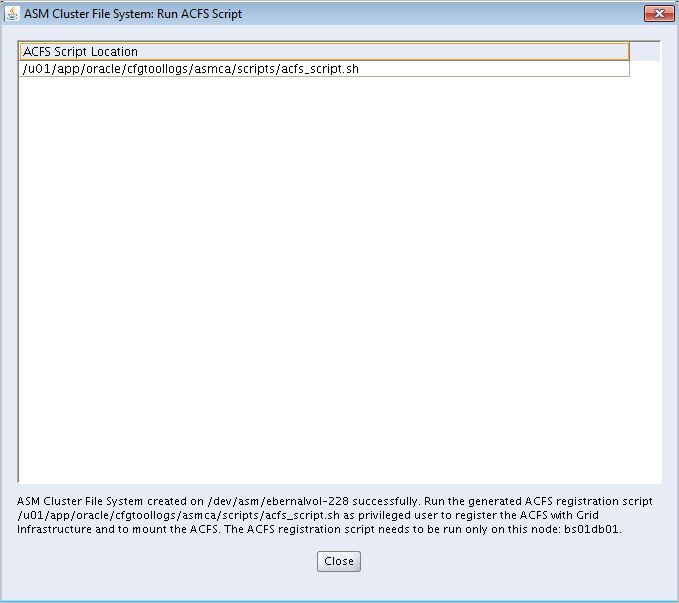
- Run the ACFS script on Node 1 only to register ACFS with Grid Infrastructure and to mount the ACFS file system.

- Contents of ACFS script looks like this:
[root@dm01db01 ~]# cat /u01/app/oracle/cfgtoollogs/asmca/scripts/acfs_script.sh
#!/bin/sh
/u01/app/12.1.0.2/grid/bin/srvctl add filesystem -d /dev/asm/acfsvol-228 -m /acfs -u oracle -fstype ACFS -description ‘ACFS File System’ -autostart ALWAYS
if [ $? = “0” -o $? = “2” ]; then
/u01/app/12.1.0.2/grid/bin/srvctl start filesystem -d /dev/asm/acfsvol-228
if [ $? = “0” ]; then
chown oracle:oinstall /acfs
chmod 775 /acfs
/u01/app/12.1.0.2/grid/bin/srvctl status filesystem -d /dev/asm/acfsvol-228
exit 0
fi
/u01/app/12.1.0.2/grid/bin/srvctl status filesystem -d /dev/asm/acfsvol-228
fi
- Execute the script
[root@dm01db01 ~]# /u01/app/oracle/cfgtoollogs/asmca/scripts/acfs_script.sh
ACFS file system /acfs is mounted on nodes dm01db01,dm01db02,dm01db03,dm01db04,dm01db05,dm01db06,dm01db07,dm01db08
- Click Close

- We can see our Volume created

- Verify newly created Volume as follows:
dm01db01-+ASM1 {/home/oracle}:/u01/app/12.1.0.2/grid/bin/crsctl stat res ora.acfs_dg.acfsvol.acfs -t
——————————————————————————–
Name Target State Server State details
——————————————————————————–
Local Resources
——————————————————————————–
ora.acfs_dg.acfsvol.acfs
ONLINE ONLINE dm01db01 mounted on /acfs,STA
BLE
ONLINE ONLINE dm01db02 mounted on /acfs,STA
BLE
ONLINE ONLINE dm01db03 mounted on /acfs,STA
BLE
ONLINE ONLINE dm01db04 mounted on /acfs,STA
BLE
ONLINE ONLINE dm01db05 mounted on /acfs,STA
BLE
ONLINE ONLINE dm01db06 mounted on /acfs,STA
BLE
ONLINE ONLINE dm01db07 mounted on /acfs,STA
BLE
ONLINE ONLINE dm01db08 mounted on /acfs,STA
BLE
——————————————————————————–
V – Test ACFS Cluster file system
dm01db01-+ASM1 {/home/oracle}:cd /acfs
dm01db01-+ASM1 {/acfs}:ls -ltr
total 64
drwx—— 2 root root 65536 Jan 25 07:11 lost+found
dm01db01-+ASM1 {/acfs}:mkdir test
dm01db01-+ASM1 {/acfs}:cd test/
dm01db01-+ASM1 {/acfs/test}:vi myfile.txt
dm01db01-+ASM1 {/acfs/test}:cat myfile.txt
this is a test
dm01db01-+ASM1 {/home/oracle}:dcli -g ~/dbs_group -l oracle ‘cat /acfs/test/myfile.txt’
dm01db01: this is a test
dm01db02: this is a test
dm01db03: this is a test
dm01db04: this is a test
dm01db05: this is a test
dm01db06: this is a test
dm01db07: this is a test
dm01db08: this is a test
dm01db01-+ASM1 {/home/oracle}:dcli -g ~/dbs_group -l oracle ‘df -h /acfs’
dm01db01: Filesystem Size Used Avail Use% Mounted on
dm01db01: /dev/asm/acfsvol-228
dm01db01: 2.0T 4.3G 2.0T 1% /acfs
dm01db02: Filesystem Size Used Avail Use% Mounted on
dm01db02: /dev/asm/acfsvol-228
dm01db02: 2.0T 4.3G 2.0T 1% /acfs
dm01db03: Filesystem Size Used Avail Use% Mounted on
dm01db03: /dev/asm/acfsvol-228
dm01db03: 2.0T 4.3G 2.0T 1% /acfs
dm01db04: Filesystem Size Used Avail Use% Mounted on
dm01db04: /dev/asm/acfsvol-228
dm01db04: 2.0T 4.3G 2.0T 1% /acfs
dm01db05: Filesystem Size Used Avail Use% Mounted on
dm01db05: /dev/asm/acfsvol-228
dm01db05: 2.0T 4.3G 2.0T 1% /acfs
dm01db06: Filesystem Size Used Avail Use% Mounted on
dm01db06: /dev/asm/acfsvol-228
dm01db06: 2.0T 4.3G 2.0T 1% /acfs
dm01db07: Filesystem Size Used Avail Use% Mounted on
dm01db07: /dev/asm/acfsvol-228
dm01db07: 2.0T 4.3G 2.0T 1% /acfs
dm01db08: Filesystem Size Used Avail Use% Mounted on
dm01db08: /dev/asm/acfsvol-228
dm01db08: 2.0T 4.3G 2.0T 1% /acfs
dm01db01-+ASM1 {/home/oracle}:dcli -g ~/dbs_group -l oracle ‘ls -ld /acfs’
dm01db01: drwxrwxr-x 4 oracle oinstall 4096 Jan 25 07:11 /acfs
dm01db02: drwxrwxr-x 4 oracle oinstall 4096 Jan 25 07:11 /acfs
dm01db03: drwxrwxr-x 4 oracle oinstall 4096 Jan 25 07:11 /acfs
dm01db04: drwxrwxr-x 4 oracle oinstall 4096 Jan 25 07:11 /acfs
dm01db05: drwxrwxr-x 4 oracle oinstall 4096 Jan 25 07:11 /acfs
dm01db06: drwxrwxr-x 4 oracle oinstall 4096 Jan 25 07:11 /acfs
dm01db07: drwxrwxr-x 4 oracle oinstall 4096 Jan 25 07:11 /acfs
dm01db08: drwxrwxr-x 4 oracle oinstall 4096 Jan 25 07:11 /acfs
Conclusion
In this article we have learned basic concepts about ACFS and it works on Exadata. We also seen a practicle demonstration on how to Load ACFS/ADVM module on all the nodes, Create ASM diskgroup for ACFS, Create ASM Volume and Create ASM Cluster File system.
2