Good Contents Are Everywhere, But Here, We Deliver The Best of The Best.Please Hold on!
Oracle Database Appliance X7-2 HA – First look

October 2017 Oracle announced Oracle Database Appliance X7-2 (Small, Medium and HA). ODA X7-2 comes with more computing resources compared with X6-2 Models.
Let’s take a quick look at few benefits of ODA followed by the technical specification on ODA X7-2 Small/Medium and HA.

Benfits of ODA:

  • Software, server, storage, and networking engineered and optimized to run Oracle Database and applications.
  • Supports Oracle Database Standard Edition, Standard Edition One, Standard Edition 2, and Enterprise Edition.
  • Optimized for Cloud
  • Capacity on Demand Licensing – Reduced Cost
  • Easy Deployment and management


Oracle Database Appliance X7-2 HA specification
  • 32 cores per server (72 cores in total for 2 servers)
  • 384 GB physical memory per server expandable upto 1.5TB (768 GB memory in total for 2 servers)
  • Storage Shelf
    • High Capacity: 150 TB HDD raw capacity per shelf
    • High Performance: 64 TB SDD raw capacity per shelf
  • 3.2 TB raw capacity for redo log storage per shelf
  • Choice of 10GBase-T or 10/25 GbE SFP28 public networking


For more information on the technical specification loot at the ODA X7-2 HA Data Sheet at:
http://www.oracle.com/technetwork/database/database-appliance/learnmore/odax7-2-ha-ds-3933489.pdf
https://www.oracle.com/engineered-systems/database-appliance/x7-2-ha/index.html#ct07tabcontent2

Oracle Database Appliance X7-2 Small specification

  • One server 
  • 1 Intel Xeon processor, 10 Cores
  • 192GB Physical memory expandable upto 384GB 
  • Choice of 10GBase-T or 10/25 GbE SFP28 public networking
  • 12.8TB NVMe raw storage


Oracle Database Appliance X7-2 Medium specification

  • One server 
  • 2 Intel Xeon processor, 36 Cores
  • 384 GB Physical memory expandable upto 768GB 
  • Choice of 10GBase-T or 10/25 GbE SFP28 public networking
  • 12.8 TB NVMe raw storage with optional expansion to 51.2 TB NVMe raw storage


For more information on the technical specification loot at the ODA X7-2 S/M Data Sheet at:

http://www.oracle.com/technetwork/database/database-appliance/learnmore/odax7-2sm-ds-3933491.pdf


0

Exadata Database Machine X7-2

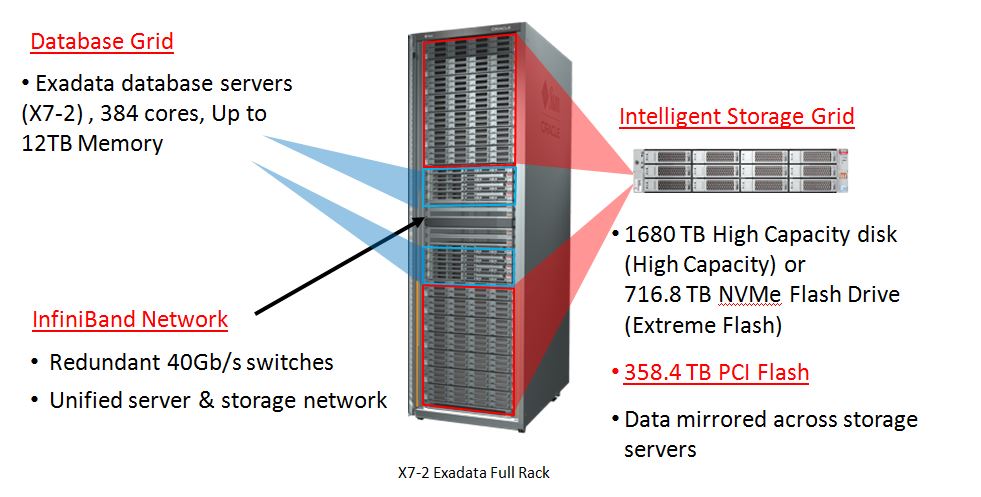
On October 2nd at Oracle Open World, Oracle announced the next-generation Oracle Exadata Database Machine X7 with significant hardware and software enhancements in overall performance, storage capacity, network bandwidth, and automation. Exadata X7 delivers extreme performance and reliability to run the largest, most business-critical database workloads.

Exadata X7-2 quick glance:
  • Latest Intel Xeon Scalable Processors (384 core in a Full Rack)
  • 50% increase in Physical memory (upto 12TB in a full Rack)
  • 100% increase in the capacity of Extreme Flash storage (716.8TB in a full Rack)
  • 25% increase in disk capacity (1680TB in a full Rack)
  • A full rack Exadata X7 system has: 
    • Raw capacity of 1.7 petabytes of disk storage or
    • 720 terabytes of NVMe all-Flash storage.
  • Ethernet network bandwidth has increased by 150 percent from 10 to 25Gb/s

Exadata X7-2 pictorial representation


For detail on Exadata X7-2 and it’s models visit:

https://www.oracle.com/corporate/pressrelease/oow17-oracle-exadata-x7-100217.html

http://www.oracle.com/technetwork/database/exadata/exadata-x7-2-ds-3908482.pdf

0

Oracle Database Appliance

Oracle Database Appliance (ODA) is a pre-configured, highly available Oracle Database Engineered system. ODA system consists of hardware, software, storage and networking. The hardware configuration is designed to provide redundancy and protection against single points of failures in the system.

The Oracle Database Appliance saves time and money by simplifying deployment, maintenance, and support of high availability Database solutions.

ODA consists of two physical servers (Node 0 and Node 1), a storage shelf and optionally an additional storage shelf. The two independent physical servers are interconnected and direct attached to SAS and SSD storage.

ODA is basically a 2-node RAC cluster database system running Oracle Linux operating (OEL), Oracle Database, Oracle Grid Infrastructure (Clusterware and ASM). All these together provides the Oracle Database high availability running on ODA.

Advantages of Oracle Database Appliance

Oracle marketed ODA using the tagline “Simple, Reliable and Affordable”.

  • Simple: The ODA deployment made simple and easy to use by using the wizard based deployment.
  • Reliable: The ODA platform provide complete high availability for Database and Application
  • Affordable: With ODA you have the benefit of using Capacity-on-Demand Licensing. Pay for what you use.

Few other benefits includes

  • Saves Time and Money
  • Single Vendor Support
  • High Performance and High Availability
  • End to End Monitoring for all components
  • Reduced Cost
  • Easy management and Supporting


History of ODA Generation

  • V1      – Released in 2011 –  First ODA model 
  • X3-2    – Released in 2013 –  First Generation ODA model
  • X4-2    – Released in 2013 –  Second Generation ODA model
  • X5-2    – Released in 2015 –  Third Generation ODA model
  • X6-2    – Released in 2016 –  Fourth Generation ODA model

Below picture provides few details on the Oracle Database Appliance Hardware generation and enhancement.


In my next article I will touch base on Oracle Database Appliance X6-2 Small, Medium and Large.

Conclusion
In this article we have learned about Oracle Database Appliance and different hardware generations. The Oracle Database Appliance saves time and money by simplifying deployment, maintenance, and support of high availability Database solutions. 

0

Introduction

Oracle introduced odachk with ODA version 2.3. Later in ODA 12.10 it was renamed to orachk.
Oracle ORAchk tool provides a lightweight and non-intrusive health check framework for the Oracle stack of software and hardware components.
ORAchk is available for Oracle Database and Oracle Database Appliance. For all other Engineered systems use EXAchk.


ORAchk Utility

ORAchk is a Configuration Audit tool developed by Oracle to audit various important configuration settings within Real Application Clusters (RAC), Oracle Clusterware (CRS), Automatic Storage Management (ASM) and Grid Infrastructure environments.

Benefits of ORAchk

  • Automates risk identification and proactive notification before business is impacted
  • Runs health checks based on critical and reoccurring problems
  • No risk involved as the report is stored on the server locally
  • Automate health check reports

In this article we will demonstrate how to execute orachk on Oracle Database Appliance


Running ORAchk On Oracle Database Appliance

Execute oakcli orachk -h command to list different options available with orachk

[root@odanode1 ~]# oakcli orachk -h
Usage : ./orachk [-abvhpfmsuSo:c:t:]

        -h      Prints this page.
        -a      All (Perform best practice check and recommended patch check)
        -b      Best Practice check only. No recommended patch check
        -v      Show version
        -p      Patch check only
        -m      exclude checks for Maximum Availability Architecture (MAA) scorecards(see user guide for more details)
        -u      Run orachk to check pre-upgrade or post-upgrade best practices for 11.2.0.3 and above
                -o pre or -o post is mandatory with -u option like ./orachk -u -o pre
        -f      Run Offline.Checks will be performed on data already collected from the system
        -o      Argument to an option. if -o is followed by v,V,Verbose,VERBOSE or Verbose, it will print checks which passs on the screen
                if -o option is not specified,it will print only failures on screen. for eg: orachk -a -o v

        -clusternodes
                Pass comma separated node names to run orachk only on subset of nodes.
        -output
               Create orachk collection zip file and ouptut directory to non-default(current) location.
        -dbnames
                Pass comma separated database names to run orachk only on subset of databases
        -localonly
                Run orachk only on local node.
        -debug
                Run orachk in debug mode. Debug log will be generated.
                eg:- ./orachk -debug
        -dbnone
                Do not prompt database selection and skip all database related checks.
        -dball
                Do not prompt database selection and run database related checks on all databases discovered on system.

        -c      Used only under the guidance of Oracle support or development to override default components

        -upgrade
                Used to force upgrade the version of orachk being run.
        -noupgrade
                Do not prompt for an upgrade even if a later version is available under the location specified by RAT_UPGRADE_LOC.
        -syslog
               Write JSON results from orachk run to syslog.
        -skip_usr_def_checks
                Do not run checks present in user defined xml file.


Execute the following command to run an ODA health check for all components which include checking best practice and recommended patch check

[root@odanode1 ~]# oakcli orachk

Checking for prompts on odanode1 for grid user…

Checking ssh user equivalency settings on all nodes in cluster

Node odanode2 is configured for ssh user equivalency for root user

Checking for prompts for grid user on all nodes…

Searching for running databases . . . . .

. . . . . . . . . . . . . .
List of running databases registered in OCR
1. odatest
2. odauat
3. odadev
4. odaprod
5. All of above
6. None of above

Select databases from list for checking best practices. For multiple databases, select 5 for All or comma separated number like 1,2 etc [1-6][5].5

Searching out ORACLE_HOME for selected databases.

. .
Checking for prompts for oracle user on all nodes…

. . . . . . . . . . . . . . . . . . . . . . . .

.
Checking Status of Oracle Software Stack – Clusterware, ASM, RDBMS

. . . . . . . . . . . . . . . . . . . . . . . . . . . . . . . . . . . . . .
Checking for prompts for oraoem user on all nodes…

. . . . . . .. . . . . . . . . . . . . . . . . . . . . . . . . . . . . . . . . . . .. . . . . . . . . . . . . . . . . . . . . . . . . . . . .
——————————————————————————————————-
                                                 Oracle Stack Status
——————————————————————————————————-
Host Name  CRS Installed  RDBMS Installed  CRS UP    ASM UP    RDBMS UP  DB Instance Name
——————————————————————————————————-
odanode1 Yes             Yes             Yes        Yes      Yes      odatest odauat odadev odaprod
odanode2 Yes             Yes             Yes        Yes      Yes      odatest odauat odadev odaprod
——————————————————————————————————-

*** Checking Best Practice Recommendations (PASS/WARNING/FAIL) ***


Collections and audit checks log file is
/opt/oracle/oak/orachk/orachk_odanode1_odatest_091117_153015/log/orachk.log

Checking for prompts in /root/.bash_profile on odanode1 for root user…

Checking for prompts in /root/.bash_profile on odanode2 for root user…

Starting to run orachk in background on odanode2

. .
=============================================================
                    Node name – odanode1
=============================================================
. . . . .

Collecting – ASM Diskgroup Attributes
Collecting – ASM initialization parameters
Collecting – Database Parameters for odatest database
Collecting – Database Parameters for odauat database
Collecting – Database Parameters for odadev database
Collecting – Database Parameters for odaprod database
Collecting – Database Parameters for odatest database
Collecting – Database Parameters for odauat database
Collecting – Database Parameters for odadev database
Collecting – Database Parameters for odaprod database
Collecting – Database Undocumented Parameters for odatest database
Collecting – Database Undocumented Parameters for odauat database
Collecting – Database Undocumented Parameters for odadev database
Collecting – Database Undocumented Parameters for odaprod database
Collecting – RDBMS Feature Usage for odatest database
Collecting – RDBMS Feature Usage for odauat database
Collecting – RDBMS Feature Usage for odadev database
Collecting – RDBMS Feature Usage for odaprod database
Collecting – Kernel parameters
Collecting – Maximum number of semaphore sets on system
Collecting – Maximum number of semaphores on system
Collecting – Maximum number of semaphores per semaphore set
Collecting – OS Packages
Collecting – Patches for Grid Infrastructure
Collecting – Patches for RDBMS Home
Collecting – number of semaphore operations per semop system call
Collecting – CRS user limits configuration
Collecting – Firmware and software versions
Collecting – Network and Bonding Interfaces Status
Collecting – OS Disk Storage Status
Collecting – System Component Status
Collecting – Validate Shared storage


Data collections completed. Checking best practices on odanode1.
————————————————————————————–

 INFO =>    Oracle Database Appliance Best Practice References
 WARNING => ORA_CRS_HOME environment variable is set
 INFO =>    $CRS_HOME/log/hostname/client directory has too many older log files.
 INFO =>    user_dump_dest has trace files older than 30 days for odauat
 INFO =>    user_dump_dest has trace files older than 30 days for odadev
 INFO =>    background_dump_dest has files older than 30 days for odauat
 INFO =>    background_dump_dest has files older than 30 days for odadev
 INFO =>    Some data or temp files are not autoextensible for odatest
 INFO =>    Number of SCAN listeners is NOT equal to the recommended number of 3.
 WARNING => NIC bonding is NOT configured for public network (VIP)
 FAIL =>    ASM Audit file destination file count > 100,000
 FAIL =>    Database parameter DB_LOST_WRITE_PROTECT is NOT set to recommended value on odauat instance
 FAIL =>    Database parameter DB_LOST_WRITE_PROTECT is NOT set to recommended value on odadev1 instance
 FAIL =>    Database parameter GLOBAL_NAMES is NOT set to recommended value on odauat instance
 FAIL =>    Database parameter GLOBAL_NAMES is NOT set to recommended value on odatest instance
 FAIL =>    Database parameter GLOBAL_NAMES is NOT set to recommended value on odadev1 instance
 FAIL =>    One or more errors for network and bonding interface checks
 INFO =>    Some custom (non-default) RPM are installed
 WARNING => Database parameter DB_BLOCK_CHECKING is NOT set to the recommended value. on odatest instance
 WARNING => Database parameter _DISABLE_INTERFACE_CHECKING is NOT set to recommended value on odatest instance
 INFO =>    Parallel Execution Health-Checks and Diagnostics Reports for odatest

Best Practice checking completed.Checking recommended patches on odanode1.
———————————————————————————

Collecting patch inventory on CRS HOME /u01/app/12.1.0.2/grid
Collecting patch inventory on ASM HOME /u01/app/12.1.0.2/grid
Collecting patch inventory on ORACLE_HOME /u01/app/oracle/product/11.2.0.4/dbhome1
Collecting patch inventory on ORACLE_HOME /u01/app/oracle/product/11.2.0.4/dbhome2
Collecting patch inventory on ORACLE_HOME /u01/app/oracle/product/11.2.0.4/dbhome3
Collecting patch inventory on ORACLE_HOME /u01/app/oracle/product/12.1.0.2/dbhome4

Copying results from odanode2 and generating report. This might take a while. Be patient.

. .
=============================================================
                    Node name – odanode2
=============================================================
. . . . .

Collecting – Kernel parameters
Collecting – Maximum number of semaphore sets on system
Collecting – Maximum number of semaphores on system
Collecting – Maximum number of semaphores per semaphore set
Collecting – OS Packages
Collecting – Patches for Grid Infrastructure
Collecting – Patches for RDBMS Home
Collecting – number of semaphore operations per semop system call
Collecting – CRS user limits configuration
Collecting – Firmware and software versions
Collecting – Network and Bonding Interfaces Status
Collecting – OS Disk Storage Status
Collecting – System Component Status
Collecting – Validate Shared storage

Data collections completed. Checking best practices on odanode2.
————————————————————————————–

 INFO =>    $CRS_HOME/log/hostname/client directory has too many older log files.
 INFO =>    user_dump_dest has trace files older than 30 days for odaprod
 INFO =>    user_dump_dest has trace files older than 30 days for odadev
 INFO =>    background_dump_dest has files older than 30 days for odaprod
 INFO =>    background_dump_dest has files older than 30 days for odadev
 INFO =>    Number of SCAN listeners is NOT equal to the recommended number of 3.
 WARNING => NIC bonding is NOT configured for public network (VIP)
 FAIL =>    ASM Audit file destination file count > 100,000
 FAIL =>    Database parameter DB_LOST_WRITE_PROTECT is NOT set to recommended value on odaprod instance
 FAIL =>    Database parameter DB_LOST_WRITE_PROTECT is NOT set to recommended value on odadev2 instance
 FAIL =>    Database parameter GLOBAL_NAMES is NOT set to recommended value on odaprod instance
 FAIL =>    Database parameter GLOBAL_NAMES is NOT set to recommended value on odadev2 instance
 FAIL =>    One or more errors for network and bonding interface checks
 INFO =>    Some custom (non-default) RPM are installed

Best Practice checking completed.Checking recommended patches on odanode2.
———————————————————————————

Collecting patch inventory on CRS HOME /u01/app/12.1.0.2/grid
Collecting patch inventory on ASM HOME /u01/app/12.1.0.2/grid
Collecting patch inventory on ORACLE_HOME /u01/app/oracle/product/11.2.0.4/dbhome1
Collecting patch inventory on ORACLE_HOME /u01/app/oracle/product/11.2.0.4/dbhome2
Collecting patch inventory on ORACLE_HOME /u01/app/oracle/product/11.2.0.4/dbhome3
Collecting patch inventory on ORACLE_HOME /u01/app/oracle/product/12.1.0.2/dbhome4

———————————————————————————
                      CLUSTERWIDE CHECKS
———————————————————————————
———————————————————————————

Detailed report (html) – /opt/oracle/oak/orachk/orachk_odanode1_odatest_091117_153015/orachk_odanode1_odatest_091117_153015.html
UPLOAD(if required) – /opt/oracle/oak/orachk/orachk_odanode1_odatest_091117_153015.zip

Review the report for FAILURE, WARNING and take necessary action to fix the issue by following the recommendation provided within the report. You can also work with Oracle Support if don’t understand a particular issue or if you want to clarify with them before taking an action.


Conclusion

In this article we have learned to perform an Oracle Database Appliance Health check using orachk. Oracle introduced odachk with ODA version 2.3. Later in ODA 12.10 it was renamed to orachk. Oracle ORAchk tool provides a lightweight and non-intrusive health check framework for the Oracle stack of software and hardware components.
0

Introduction

oakcli stands for Oracle Appliance Kit Command Line Interface. oakcli utility is used to manage Oracle Database Applaince. It used to carry out management tasks such as, Deploying, Patching, validating, monitoring, troubleshooting, Create Database, Create database homes, Configuring core key, manage Virtual machines and so on. 

oakcli utility is located under the direcoty /opt/oracle/oak/bin/oakcli
oakcli logs oakcli commands output under the directory /opt/oracle/oak/log/<hostname>/client/oakcli.log

Few things that you can do with oakcli but not limited to are:

  • Deploy Oracle Database Appliance
  • Configure network for Oracle Database Appliance deployment
  • Patching Oracle Database Appliance
  • Unpacking packages into oakcli repository
  • Troubleshoot Oracle Database Appliance
  • Monitor Oracle Database Appliance
  • Validate Oracle Database Appliance
  • Applying the Core Configuration key
  • Copying the deployment configuration file
  • Locate a disk on ODA
  • Manage ODA Repository
  • Manage ODA diagnostics collection


Execute the oakcli -h command to list the different options available with oakcli:

[root@odanode1 ~]# oakcli -h
Usage:  oakcli show       – Shows disk, diskgroup, expander, controller, server, processor, memory, power, cooling, network, enclosure, storage, version, fs, raidsyncstatus, dbhomes, dbstorage, databases, db_config_params, core_config_key, env_hw, ASR
        oakcli configure  – Configures the Network or ASR or additional Net
        oakcli apply      – Applies the core_config_key
        oakcli locate     – Locates a disk
        oakcli deploy     – Deploys the Database Appliance
        oakcli update     – Updates the Database Appliance
        oakcli validate   – Validates the Database Appliance
        oakcli manage     – Manages the OAK repository, diagcollect etc.,
        oakcli unpack     – Unpack the given package to OAK repository
        oakcli copy       – Copies the deployment config file
        oakcli upgrade    – Upgrades database
        oakcli stordiag   – Run storage diagnostic tool on both Nodes
        oakcli test       – Test ASR
        oakcli orachk     – Performs configuration settings check on ODA
        oakcli create     – Creates Database, DB storage, snapshotdb, dbhome, db_config_params file
        oakcli delete     – Deletes Database, DB storage, dbhome, db_config_params file
        oakcli modify     – Performs modify opeartions on Database
        oakcli resize     – Resizes DB storage

Commonly used Oracle Database Appliance Commands used on daily basis and their Output 


  • Execute the following command to list all the options that can be used with oakcli show

[root@odanode1 ~]# oakcli show -h
Usage:
oakcli show {disk|diskgroup|expander|fs|raidsyncstatus|controller|server|processor|memory|iraid|power|cooling|network|ib|enclosure|storage|core_config_key|version|dbhomes|dbstorage|databases|db_config_params|asr|env_hw} [<options>]
where:
        disk                     – About the disk
        diskgroup                – ASM disk group
        expander                 – Expander
        fs                       – Filesystem
        controller               – Controller
        storage                  – All storage components
        version                  – Running software version
        dbhomes                  – Installed oracle database homes
        dbstorage                – Details of ACFS storage setup for the databases
        databases                – Database names
        db_config_params         – db_config_params file
        asr                      – ASR configuration
        env_hw                   – Environment and Hardware information
        server                   – Details of server sub-system
        processor                – Details of processor sub-system
        memory                   – Details of memory sub-system
        iraid                    – Details of internal RAIDs sub-system
        power                    – Details of power supply sub-system
        cooling                  – Details of cooling sub-system
        network                  – Details of network sub-system
        ib                       – Details of infiniband sub-system
        enclosure                – Details of enclosure sub-system
        raidsyncstatus           – RAID sync status information
        core_config_key          – Core configuration
For detailed help on each command and object and its options use:
oakcli <command> <object> -h


  • To check if whether ODA deployment is Bare Metal or Virtualized

[root@odanode1 ~]# oakcli show env_hw
BM ODA X5-2
Public interface : COPPER
or
[root@odanode1 ~]# lsmod |grep net
( If no reply, It means the ODA is Bare Metal)


  • To get the ODA software version

[root@odanode1 ~]# oakcli show version
Version
——-
12.1.2.9.0


  • To get the ODA software and component version

[root@odanode1 ~]# /opt/oracle/oak/bin/oakcli show version -detail
Reading the metadata. It takes a while…
System Version  Component Name            Installed Version         Supported Version
————–  —————           ——————        —————–
12.1.2.10.0
                Controller_INT            11.05.03.00               Up-to-date
                Controller_EXT            11.05.03.00               Up-to-date
                Expander                  0018                      Up-to-date
                SSD_SHARED                944A                      Up-to-date
                HDD_LOCAL                 A72A                      Up-to-date
                HDD_SHARED                A72A                      Up-to-date
                ILOM                      3.2.8.25 r114493          Up-to-date
                BIOS                      25040100                  Up-to-date
                IPMI                      1.8.12.4                  Up-to-date
                HMP                       2.3.5.2.8                 Up-to-date
                OAK                       12.1.2.10.0               Up-to-date
                OL                        6.8                       Up-to-date
                GI_HOME                   12.1.0.2.170117(2473      Up-to-date
                                          2082,24828633)
                DB_HOME                   12.1.0.2.170117(2473      Up-to-date
                                          2082,24828633)


  • To list the shared disks on ODA

[root@odanode1 ~]# oakcli show disk
        NAME            PATH            TYPE            STATE           STATE_DETAILS
        e0_pd_00        /dev/sda        HDD             ONLINE          Good
        e0_pd_01        /dev/sdc        HDD             ONLINE          Good
        e0_pd_02        /dev/sde        HDD             ONLINE          Good
        e0_pd_03        /dev/sdg        HDD             ONLINE          Good
        e0_pd_04        /dev/sdi        HDD             ONLINE          Good
        e0_pd_05        /dev/sdk        HDD             ONLINE          Good
        e0_pd_06        /dev/sdm        HDD             ONLINE          Good
        e0_pd_07        /dev/sdo        HDD             ONLINE          Good
        e0_pd_08        /dev/sdq        HDD             ONLINE          Good
        e0_pd_09        /dev/sds        HDD             ONLINE          Good
        e0_pd_10        /dev/sdu        HDD             ONLINE          Good
        e0_pd_11        /dev/sdw        HDD             ONLINE          Good
        e0_pd_12        /dev/sdy        HDD             ONLINE          Good
        e0_pd_13        /dev/sdaa       HDD             ONLINE          Good
        e0_pd_14        /dev/sdac       HDD             ONLINE          Good
        e0_pd_15        /dev/sdae       HDD             ONLINE          Good
        e0_pd_16        /dev/sdag       SSD             ONLINE          Good
        e0_pd_17        /dev/sdah       SSD             ONLINE          Good
        e0_pd_18        /dev/sdaj       SSD             ONLINE          Good
        e0_pd_19        /dev/sdal       SSD             ONLINE          Good
        e0_pd_20        /dev/sdan       SSD             ONLINE          Good
        e0_pd_21        /dev/sdap       SSD             ONLINE          Good
        e0_pd_22        /dev/sdas       SSD             ONLINE          Good
        e0_pd_23        /dev/sdau       SSD             ONLINE          Good


  • To list ASM disk groups on ODA

[root@odanode1 ~]# oakcli show diskgroup
DiskGroups
———-
DATA
FLASH
RECO
REDO


  • To list the Local file system and ACFS file system on ODA

[root@odanode1 ~]# oakcli show fs
      Type     Total Space      Free Space  Total DG Space   Free DG Space  Diskgroup Mount Point
      ext3          29757M          12875M               –               –            /
      ext3             98M             61M               –               –            /boot
      ext3          59515M          21886M               –               –            /opt
      ext3         297580M          99815M               –               –            /u01
      acfs          51200M          51022M       52428736M       50878580M       DATA /u02/app/oracle/oradata/EC00001
      acfs          51200M          38661M       52428736M       50878580M       DATA /u02/app/oracle/oradata/EC00002
      acfs          51200M          51022M       52428736M       50878580M       DATA /u02/app/oracle/oradata/EC00003
      acfs         614400M         498139M       52428736M       50878580M       DATA /u02/app/oracle/oradata/datastore
      acfs         113920M         112668M        1526208M        1145088M      FLASH /u02/app/oracle/oradata/flashdata
      acfs          51200M          51022M        8618304M        4531524M       RECO /cloudfs
      acfs           5120M           5033M        8618304M        4531524M       RECO /u01/app/oracle/fast_recovery_area/EC00001
      acfs           5120M           3446M        8618304M        4531524M       RECO /u01/app/oracle/fast_recovery_area/EC00002
      acfs           5120M           5033M        8618304M        4531524M       RECO /u01/app/oracle/fast_recovery_area/EC00003
      acfs        1971200M        1923144M        8618304M        4531524M       RECO /u01/app/oracle/fast_recovery_area/datastore
      acfs           1536M           1456M         763120M         671776M       REDO /u01/app/oracle/oradata/EC00001
      acfs           1536M           1070M         763120M         671776M       REDO /u01/app/oracle/oradata/EC00002
      acfs           1536M           1456M         763120M         671776M       REDO /u01/app/oracle/oradata/EC00003
      acfs          25600M          13484M         763120M         671776M       REDO /u01/app/oracle/oradata/datastore


  • To list ODA Storage Shelve details

[root@odanode1 ~]# oakcli show storage
==== BEGIN STORAGE DUMP ========
Host Description: Oracle Corporation:ORACLE SERVER X5-2
Total number of controllers: 3
        Id         = 1
        Serial Num = 500605b00a2f5c10
        Vendor     = LSI Logic
        Model      = ORCL-EXT-SAS3
        FwVers     = 09.00.00.00
        strId      = mpt3sas:03:00.0

        Id         = 2
        Serial Num = 500605b00a2f5b00
        Vendor     = LSI Logic
        Model      = ORCL-EXT-SAS3
        FwVers     = 09.00.00.00
        strId      = mpt3sas:13:00.0

        Id         = 0
        Serial Num = SV52603740
        Vendor     = LSI Logic
        Model      = LSI MegaRAID 9361-8i
        FwVers     = 4.230.40-3739
        strId      = mptmega:23:00.0

Total number of expanders: 2
        Id         = 1
        Serial Num = 5080020001e65bea
        Vendor     = ORACLE
        Model      = DE2-24C
        FwVers     = 0018
        strId      = Secondary
        WWN        = 5080020001e677be

        Id         = 0
        Serial Num = 5080020001e65bea
        Vendor     = ORACLE
        Model      = DE2-24C
        FwVers     = 0018
        strId      = Primary
        WWN        = 5080020001ea4ebe

Total number of PDs: 24
        /dev/sda        LSI Logic         HDD 4000gb slot:  0  exp:  0
        /dev/sdc        LSI Logic         HDD 4000gb slot:  1  exp:  0
        /dev/sde        LSI Logic         HDD 4000gb slot:  2  exp:  0
        /dev/sdg        LSI Logic         HDD 4000gb slot:  3  exp:  0
        /dev/sdi        LSI Logic         HDD 4000gb slot:  4  exp:  0
        /dev/sdk        LSI Logic         HDD 4000gb slot:  5  exp:  0
        /dev/sdm        LSI Logic         HDD 4000gb slot:  6  exp:  0
        /dev/sdo        LSI Logic         HDD 4000gb slot:  7  exp:  0
        /dev/sdq        LSI Logic         HDD 4000gb slot:  8  exp:  0
        /dev/sds        LSI Logic         HDD 4000gb slot:  9  exp:  0
        /dev/sdu        LSI Logic         HDD 4000gb slot: 10  exp:  0
        /dev/sdw        LSI Logic         HDD 4000gb slot: 11  exp:  0
        /dev/sdy        LSI Logic         HDD 4000gb slot: 12  exp:  0
        /dev/sdaa       LSI Logic         HDD 4000gb slot: 13  exp:  0
        /dev/sdac       LSI Logic         HDD 4000gb slot: 14  exp:  0
        /dev/sdae       LSI Logic         HDD 4000gb slot: 15  exp:  0
        /dev/sdag       LSI Logic         SSD  400gb slot: 16  exp:  0
        /dev/sdah       LSI Logic         SSD  400gb slot: 17  exp:  0
        /dev/sdaj       LSI Logic         SSD  400gb slot: 18  exp:  0
        /dev/sdal       LSI Logic         SSD  400gb slot: 19  exp:  0
        /dev/sdan       LSI Logic         SSD  200gb slot: 20  exp:  0
        /dev/sdap       LSI Logic         SSD  200gb slot: 21  exp:  0
        /dev/sdas       LSI Logic         SSD  200gb slot: 22  exp:  0
        /dev/sdau       LSI Logic         SSD  200gb slot: 23  exp:  0
==== END STORAGE DUMP =========


  • To list Database homes on ODA

[root@odanode1 ~]# oakcli show dbhomes
Oracle Home Name      Oracle Home version                  Home Location
—————-      ——————-                  ————
OraDb12102_home1      2.1.0.2.170117(24732082,24828633)  /u01/app/oracle/product/12.1.0.2/dbhome_1


  • To list database storage on ODA

[root@odanode1 ~]# oakcli show dbstorage

All the DBs with DB TYPE as non-CDB share the same volumes

DB_NAMES           DB_TYPE    Filesystem                                        Size     Used    Available    AutoExtend Size  DiskGroup
——-            ——-    ————                                    ——    —–    ———   —————-   ——–
odatest            CDB        /u01/app/oracle/oradata/EC00001                    1.5G     0.45G       1.05G              1G        REDO
                              /u02/app/oracle/oradata/EC00001                     50G    12.24G      37.76G              1G        DATA
                              /u01/app/oracle/fast_recovery_area/EC00001           5G     1.63G       3.37G              1G        RECO

odaprod            non-CDB    /u01/app/oracle/oradata/datastore                   25G    11.83G      13.17G             N/A        REDO
                              /u02/app/oracle/oradata/datastore                  600G   113.54G     486.46G             N/A        DATA
                              /u02/app/oracle/oradata/flashdata               111.25G     1.22G     110.03G             55G       FLASH
                              /u01/app/oracle/fast_recovery_area/datastore      1925G    46.93G    1878.07G            194G        RECO
odadev             CDB        /u01/app/oracle/oradata/EC00002                    1.5G     0.08G       1.42G              1G        REDO
                              /u02/app/oracle/oradata/EC00003                     50G     0.17G      49.83G              1G        DATA
                              /u01/app/oracle/fast_recovery_area/EC00003           5G     0.08G       4.92G              1G        RECO

odaqa              CDB        /u01/app/oracle/oradata/EC00002                    1.5G     0.08G       1.42G              1G        REDO
                              /u02/app/oracle/oradata/EC00002                     50G     0.17G      49.83G              1G        DATA
                              /u01/app/oracle/fast_recovery_area/EC00002           5G     0.08G       4.92G              1G        RECO


  • To list databases on ODA

[root@odanode1 ~]# oakcli show databases
Name     Type       Storage   HomeName             HomeLocation                                       Version
—–    ——     ——–  ————–       —————-                                   ———-
odaprod  RAC        ACFS      OraDb12102_home1     /u01/app/oracle/product/12.1.0.2/dbhome_1          12.1.0.2.170117(24732082,24828633) 


  • To list the database configuration parameter files on ODA

[root@odanode1 ~]# oakcli show db_config_params
The available DB configuration files are :
acfsoemrepo
default
orcl


  • To list ASR status on ODA

[root@odanode1 ~]# oakcli show asr
The ASR is not configured


  • To check the ODA servers details

[root@odanode1 ~]# oakcli show server

        Power State              : On
        Open Problems            : 0
        Model                    : ODA X5-2
        Type                     : Rack Mount
        Part Number              : 33772477+1+1
        Serial Number            : 1942NMF001
        Primary OS               : Not Available
        ILOM Address             : 14.68.20.101
        ILOM MAC Address         : 00:10:E0:8D:B3:FC
        Description              : Oracle Database Appliance X5-2 1535NMF00K
        Locator Light            : Off
        Actual Power Consumption : 363 watts
        Ambient Temperature      : 27.750 degree C
        Open Problems Report     : System is healthy


  • To list Processor on ODA

[root@odanode1 ~]# oakcli show processor

        NAME  HEALTH HEALTH_DETAILS PART_NO. LOCATION   MODEL                         MAX_CLK_SPEED TOTAL_CORES

        CPU_0 OK     –              060F     P0 (CPU 0) Intel(R) Xeon(R) CPU E5-2699  2.300 GHz       18
        CPU_1 OK     –              060F     P1 (CPU 1) Intel(R) Xeon(R) CPU E5-2699  2.300 GHz       18


  • To list Physical Memory on ODA

[root@odanode1 ~]# oakcli show memory

        NAME    HEALTH HEALTH_DETAILS PART_NO.         SERIAL_NO.         LOCATION MANUFACTURER MEMORY_SIZE CURR_CLK_SPEED ECC_Errors

        DIMM_0  OK     –              6A4G40DM0-CPB    00CE021525728FCD58 P0/D0    Samsung      32 GB       2133 MHz       0
        DIMM_11 OK     –              6A4G40DM0-CPB    00CE021525728FCD54 P0/D1    Samsung      32 GB       2133 MHz       0
        DIMM_12 OK     –              6A4G40DM0-CPB    00CE021525728FCD1C P1/D0    Samsung      32 GB       2133 MHz       0
        DIMM_15 OK     –              6A4G40DM0-CPB    00CE021525728FCD5F P1/D3    Samsung      32 GB       2133 MHz       0
        DIMM_20 OK     –              6A4G40DM0-CPB    00CE021525728FCD3C P1/D8    Samsung      32 GB       2133 MHz       0
        DIMM_23 OK     –              6A4G40DM0-CPB    00CE021525728FCD56 P1/D1    Samsung      32 GB       2133 MHz       0
        DIMM_3  OK     –              6A4G40DM0-CPB    00CE021525728FCD5B P0/D3    Samsung      32 GB       2133 MHz       0
        DIMM_8  OK     –              6A4G40DM0-CPB    00CE021525728FCD29 P0/D8    Samsung      32 GB       2133 MHz       0


  • To list raid configuration on ODA

[root@odanode1 ~]# oakcli show iraid

        NAME     CTRL# PRODUCT                  SERIAL_NO     BIOS_VER                      FW_VER         VDISK_TYPE   VDISK_STATE  PDISK_MODEL         EID:SLT  PDISK_STATE SIZE       

CV_MODEL CV_STATE CV_TEMP
        IR_0_0_0 0     LSI MegaRAID 9361-8i     SV52603740    6.17.04.2_4.16.08.00_0x06060A 4.230.40-3739  RAID1        Optl         H109060SESUN600G    252:0    Onln        557.861 GB CVPM02   Optimal  29C
        IR_0_0_1 0     LSI MegaRAID 9361-8i     SV52603740    6.17.04.2_4.16.08.00_0x06060A 4.230.40-3739  RAID1        Optl         H109060SESUN600G    252:1    Onln        557.861 GB CVPM02   Optimal  29C


  • To check power on ODA

[root@odanode1 ~]# oakcli show power

        NAME            HEALTH HEALTH_DETAILS PART_NO. SERIAL_NO.         LOCATION INPUT_POWER OUTPUT_POWER INLET_TEMP      EXHAUST_TEMP

        Power_Supply_0  OK     –              7079395  476856Z+1524CE007B PS0      Present     167 watts    35.000 degree C 37.125 degree C
        Power_Supply_1  OK     –              7079395  476856Z+1524CE007V PS1      Present     163 watts    35.000 degree C 40.125 degree C


  • To check FAN status on ODA

[root@odanode1 ~]# oakcli show cooling

        NAME   HEALTH HEALTH_DETAILS LOCATION FAN % FAN SPEED

        Fan_0  OK     –              FM0      40 %  7800 RPM
        Fan_1  OK     –              FM0      38 %  6600 RPM
        Fan_10 OK     –              FM2      47 %  9200 RPM
        Fan_11 OK     –              FM2      48 %  8300 RPM
        Fan_12 OK     –              FM3      48 %  9300 RPM
        Fan_13 OK     –              FM3      46 %  8000 RPM
        Fan_14 OK     –              FM3      39 %  7600 RPM
        Fan_15 OK     –              FM3      39 %  6800 RPM
        Fan_2  OK     –              FM0      64 %  12300 RP
        Fan_3  OK     –              FM0      60 %  10400 RP
        Fan_4  OK     –              FM1      63 %  12200 RP
        Fan_5  OK     –              FM1      59 %  10200 RP
        Fan_6  OK     –              FM1      36 %  7000 RPM
        Fan_7  OK     –              FM1      34 %  6000 RPM
        Fan_8  OK     –              FM2      36 %  7000 RPM
        Fan_9  OK     –              FM2      35 %  6100 RPM


  • To check network status on ODA

[root@odanode1 ~]# oakcli show network
Gathering Statistics…


  • To check IB interface on ODA

[root@odanode1 ~]# oakcli show ib
Infiniband is not present in the system


  • To check ODA servers enclosure

[root@odanode1 ~]# oakcli show enclosure

        NAME        SUBSYSTEM         STATUS      METRIC

        E0_FAN0     Cooling           Not install 0 rpm
        E0_FAN1     Cooling           Not install 0 rpm
        E0_FAN2     Cooling           OK          3450 rpm
        E0_FAN3     Cooling           OK          3070 rpm
        E0_FAN4     Cooling           OK          3750 rpm
        E0_FAN5     Cooling           OK          3070 rpm
        E0_FAN6     Cooling           Not install 0 rpm
        E0_FAN7     Cooling           Not install 0 rpm
        E0_IOM0     Encl_Electronics  OK          –
        E0_IOM1     Encl_Electronics  OK          –
        E0_PSU0     Power_Supply      Not install –
        E0_PSU1     Power_Supply      OK          –
        E0_PSU2     Power_Supply      OK          –
        E0_PSU3     Power_Supply      Not install –
        E0_TEMP0    Amb_Temp          OK          30 C
        E0_TEMP1    Midplane_Temp     OK          35 C
        E0_TEMP2    PCM0_Inlet_Temp   OK          41 C
        E0_TEMP3    PCM0_Hotspot_Temp OK          50 C
        E0_TEMP4    PCM1_Inlet_Temp   OK          35 C
        E0_TEMP5    PCM1_Hotspot_Temp OK          45 C
        E0_TEMP6    IOM0_Temp         OK          52 C
        E0_TEMP7    IOM1_Temp         OK          43 C


  • To check RAID sync status

[root@odanode1 ~]# oakcli show raidsyncstatus
 Raid Type  Raid Device     Raid Status     maintainPdFailHistory  Rebuildrate
  H/W Raid    /dev/sdaw         Optimal                       OFF          30%

  • To check CPU core configuration key file applied on ODA

  [root@odanode1 ~]# oakcli show core_config_key
Optional core config key is not applied on the machine yet!


  • To check OAK daemon is running on ODA server

[root@odanode1 ~]# ps -ef |grep oakd
root     21707  3996  0 Jan05 ?        1-20:47:15 /opt/oracle/oak/bin/oakd foreground
root     58895 83838  0 16:01 pts/0    00:00:00 grep oakd


  • To check OAK location

[root@odanode1 ~]# env |grep ORA
ORA_OAK_HOME=/opt/oracle/oak


  • To configure fistnet on ODA

[root@oak1 ~]# /opt/oracle/oak/bin/oakcli configure firstnet


  • To deploy ODA

[root@oak1 ~]# oakcli deploy


  • To unpack sofware on ODA

[root@odanode1 ~]#oakcli unpack -package p25499210_1212100_Linux_x86-64_1of2.zip
Unpacking will take some time , Please wait…
Successfully unpacked the files to repository.


  • To create Database on ODA

[root@odanode1 ~]# oakcli create database -db odatest -oh OraDb12102_home1


  • To validate cabling on ODA

[root@oak1 ~]# /opt/oracle/oak/bin/oakcli validate -c storagetopology


  • To update/patch ODA server

[root@oak1 ~]# oakcli update -patch 12.1.2.10.0 –server -local


  • To update/patch ODA storage


[root@oak1 ~]# oakcli update -patch 12.1.2.10.0 –storage


Conclusion
In this article we have learned about oackcli utility and few ODA commands used on daily basis. oakcli stands for Oracle Appliance Kit Command Line Interface. oakcli utility is used to manage Oracle Database Applaince. It used to carry out management tasks such as, Deploying, Patching, validating, monitoring, troubleshooting, Create Database, Create database homes, Configuring core key, manage Virtual machines and so on. 
1

Introduction

Oracle Database Appliance uses the Oracle Automatic Storage Management Cluster File System (Oracle ACFS) for database and virtual machine files storage. Oracle ACFS provides both servers with concurrent access to some or all of the shared storage on Oracle Database Appliance. It supports space-efficient storage snapshots, which provides fast provisioning databases and virtual machines within Oracle Database Appliance.


To check Storage used for database running on ODA, execute the following:

[root@dzuro614001nor ~]# oakcli show databases
Name     Type       Storage   HomeName             HomeLocation                                       Version
—–    ——     ——–  ————–       —————-                                   ———-
odatest  RAC    ACFS      OraDb12102_home1     /u01/app/oracle/product/12.1.0.2/dbhome_1          2.1.0.2.170117(24732082,24828633)


In this article I will demonstrate how to check ACFS mounts on ODA and how to resize an Oracle ACFS file system.


[root@odanode1 ~]# su – grid

[grid@odanode1 ~]$ . oraenv
ORACLE_SID = [+ASM1] ? +ASM2
The Oracle base has been set to /u01/app/grid

[grid@odanode1 ~]$ mount | grep asm
/dev/asm/flashdata-5 on /u02/app/oracle/oradata/flashdata type acfs (rw)
/dev/asm/datdc00000-282 on /u02/app/oracle/oradata/DC00000 type acfs (rw)
/dev/asm/datastore-305 on /u01/app/oracle/fast_recovery_area/datastore type acfs (rw)
/dev/asm/rdodc00001-55 on /u01/app/oracle/oradata/DC00001 type acfs (rw)
/dev/asm/datdc00002-282 on /u02/app/oracle/oradata/DC00002 type acfs (rw)
/dev/asm/rcodc00002-305 on /u01/app/oracle/fast_recovery_area/DC00002 type acfs (rw)
/dev/asm/rdodc00000-55 on /u01/app/oracle/oradata/DC00000 type acfs (rw)
/dev/asm/datastore-282 on /u02/app/oracle/oradata/datastore type acfs (rw)
/dev/asm/rcodc00000-305 on /u01/app/oracle/fast_recovery_area/DC00000 type acfs (rw)
/dev/asm/datastore-55 on /u01/app/oracle/oradata/datastore type acfs (rw)
/dev/asm/datdc00001-282 on /u02/app/oracle/oradata/DC00001 type acfs (rw)
/dev/asm/rdodc00002-55 on /u01/app/oracle/oradata/DC00002 type acfs (rw)
/dev/asm/rcodc00001-305 on /u01/app/oracle/fast_recovery_area/DC00001 type acfs (rw)
/dev/asm/acfsvol-305 on /cloudfs type acfs (rw)

Here I would like to resize the ACFS /u02/app/oracle/oradata/DC00002 from 1.5TB to 2.5TB

Follow the steps below to resize the ACFS file system:

[grid@odanode1 ~]$ df -h /u02/app/oracle/oradata/DC00002
Filesystem            Size  Used Avail Use% Mounted on
/dev/asm/datdc00002-282
                      1.5T  233G  1.3T  15% /u02/app/oracle/oradata/DC00002

[grid@odanode1 ~]$ /sbin/advmutil volinfo /dev/asm/datdc00002-282
/dev/asm/datdc00002-282
Interface Version: 1
Size (MB): 1572864
Resize Increment (MB): 64
Redundancy: mirror
Stripe Columns: 8
Stripe Width (KB): 1024
Disk Group: DATA
Volume: DATDC00002
Compatible.advm: 12.1.0.2.0

[grid@odanode1 ~]$ asmcmd lsdg
State    Type    Rebal  Sector  Block       AU   Total_MB   Free_MB  Req_mir_free_MB  Usable_file_MB  Offline_disks  Voting_files  Name
MOUNTED  NORMAL  N         512   4096  4194304  103088128  93545932          6443008        43551462              0             Y  DATA/
MOUNTED  NORMAL  N         512   4096  4194304    1526208    835840           381552          227144              0             N  FLASH/
MOUNTED  NORMAL  N         512   4096  4194304   16930368  13944968          1058148         6443410              0             N  RECO/
MOUNTED  HIGH    N         512   4096  4194304     763120    634480           381560           84306              0             N  REDO/

[grid@odanode1 ~]$ /sbin/acfsutil size -h
Usage: acfsutil [-h] size [[-|+]nnn[K|M|G|T|P]] [-a nnn[K|M|G|T|P]] [-x nnn[K|M|G|T|P]] [-d <device>]  <path>
                                         – Resize file system and configure auto-resize
                [-a]                     – Auto-resize increment
                [-x]                     – Auto-resize maximum
                [-d]                     – Resize only this device


[grid@odanode1 ~]$ /sbin/acfsutil size 2.5T /u02/app/oracle/oradata/DC00002
acfsutil size: new file system size: 2748779069440 (2621440MB)


[grid@odanode1 ~]$ df -h /u02/app/oracle/oradata/DC00002
Filesystem            Size  Used Avail Use% Mounted on
/dev/asm/datdc00024-282
                      2.5T  233G  2.2T   9% /u02/app/oracle/oradata/DC00002


[grid@odanode1 ~]$ /sbin/advmutil volinfo /dev/asm/datdc00002-282
Device: /dev/asm/datdc00002-282
Interface Version: 1
Size (MB): 2621440
Resize Increment (MB): 64
Redundancy: mirror
Stripe Columns: 8
Stripe Width (KB): 1024
Disk Group: DATA
Volume: DATDC00002
Compatible.advm: 12.1.0.2.0

Conclusion
In this article we have learned how to resize an Oracle ACFS file system. ODA uses Oracle Automatic Storage Management Cluster File System (Oracle ACFS) for database and virtual machine files storage, provides both servers with concurrent access and supports space-efficient storage snapshots.

0

Introduction


You can manage entire Oracle Database Appliance stack using oakcli command-line interface. There are several options available using oakcli, you can use the “oakcli -h” to list the options that you can use to manage ODA. Validating an ODA is an important task for ODA administrator.


[root@odanode1 ~]# oakcli -h
Usage:  oakcli show       – Shows disk, diskgroup, expander, controller, server, processor, memory, power, cooling, network, enclosure, storage, version, fs, raidsyncstatus, dbhomes, dbstorage, databases, db_config_params, core_config_key, env_hw, ASR
        oakcli configure  – Configures the Network or ASR or additional Net
        oakcli apply      – Applies the core_config_key
        oakcli locate     – Locates a disk
        oakcli deploy     – Deploys the Database Appliance
        oakcli update     – Updates the Database Appliance
        oakcli validate   – Validates the Database Appliance
        oakcli manage     – Manages the OAK repository, diagcollect etc.,
        oakcli unpack     – Unpack the given package to OAK repository
        oakcli copy       – Copies the deployment config file
        oakcli upgrade    – Upgrades database
        oakcli stordiag   – Run storage diagnostic tool on both Nodes
        oakcli test       – Test ASR
        oakcli orachk     – Performs configuration settings check on ODA
        oakcli create     – Creates Database, DB storage, snapshotdb, dbhome, db_config_params file
        oakcli delete     – Deletes Database, DB storage, dbhome, db_config_params file
        oakcli modify     – Performs modify opeartions on Database
        oakcli resize     – Resizes DB storage


In this article we will focus on validating ODA using “oakcli validate” command.

  • To check if the ODA is Bare Metal or Virtual Platform setup, execute the following command:
[root@odanode1 ~]# oakcli show env_hw
BM ODA X4-2
Public interface : COPPER

  • To check the ODA software and its components versions, execute the following command:
[root@odanode1 ~]# /opt/oracle/oak/bin/oakcli show version -detail
Reading the metadata. It takes a while…
System Version  Component Name            Installed Version         Supported Version
————–  —————           ——————        —————–
12.1.2.10.0
                Controller_INT            11.05.03.00               Up-to-date
                Controller_EXT            11.05.03.00               Up-to-date
                Expander                  0018                      Up-to-date
                SSD_SHARED                944A                      Up-to-date
                HDD_LOCAL                 A72A                      Up-to-date
                HDD_SHARED                A72A                      Up-to-date
                ILOM                      3.2.8.25 r114493          Up-to-date
                BIOS                      25040100                  Up-to-date
                IPMI                      1.8.12.4                  Up-to-date
                HMP                       2.3.5.2.8                 Up-to-date
                OAK                       12.1.2.10.0               Up-to-date
                OL                        6.8                       Up-to-date
                GI_HOME                   12.1.0.2.170117(2473      Up-to-date
                                          2082,24828633)
                DB_HOME                   12.1.0.2.170117(2473      Up-to-date
                                          2082,24828633)

  • To check the Oracle Homes and their versions, execute the following command:

[root@odanode1 ~]# oakcli show dbhomes -detail
Oracle HomeName       Oracle Home Version                  Oracle HomeLocation                                 Database Name    Database Type
—————-      ———————                —————————————             —————  ———–
OraDb12102_home1      12.1.0.2.170117(24732082,24828633)   /u01/app/oracle/product/12.1.0.2/dbhome_1           xyz12c           RAC


Validate Oracle Databsae Appliance


  • To list options available with “oakcli valiadate”, execute the following command:
[root@odanode1 ~]# oakcli validate -h
Usage:
 oakcli  validate [-V | -l | -h]
 oakcli  validate [-v] [-f absolute output_file_name] [-a | -d | -c check1[,check2] [-ver <patch version>] <-prechecks|-postchecks>]
        ARGUMENTS:
                -v      verbose output
                -f      output_file_name.The output is sent to the file instead of standard output
                -a      run all checks
                -d      run only default checks.
                -c      check1[,check2] run specific checks
                -l      list the checks and description
                -V      Print the Version
                -h      print help
        EXAMPLES:
        oakcli validate -l
        oakcli validate -a
        oakcli validate -c OSDiskStorage
        oakcli validate -c SharedStorage
        oakcli validate -c StorageTopology
        oakcli validate -c DiskCalibration
        oakcli validate -c SystemComponents,NetworkComponents,asr
        oakcli validate -c ospatch -ver 12.1.2.0.0
        oakcli validate -c ol6upgrade <-prechecks|postchecks>

  • To perform default ODA checks, execute the following command:
[root@odanode1 ~]# oakcli validate -d
INFO: oak system information and Validations
RESULT: System Software inventory details
 Reading the metadata. It takes a while…
System Version  Component Name            Installed Version         Supported Version
————–  —————           ——————        —————–
12.1.2.10.0
                Controller_INT            11.05.03.00               Up-to-date
                Controller_EXT            11.05.03.00               Up-to-date
                Expander                  0018                      Up-to-date
                SSD_SHARED                944A                      Up-to-date
                HDD_LOCAL                 A72A                      Up-to-date
                HDD_SHARED                A72A                      Up-to-date
                ILOM                      3.2.8.25 r114493          Up-to-date
                BIOS                      25040100                  Up-to-date
                IPMI                      1.8.12.4                  Up-to-date
                HMP                       2.3.5.2.8                 Up-to-date
                OAK                       12.1.2.10.0               Up-to-date
                OL                        6.8                       Up-to-date
                GI_HOME                   12.1.0.2.170117(2473      Up-to-date
                                          2082,24828633)
                DB_HOME                   12.1.0.2.170117(2473      Up-to-date
                                          2082,24828633)
RESULT: System Information:-
        Manufacturer:Oracle Corporation
        Product Name:SUN FIRE X4170 M3
        Serial Number:xxxxxx
RESULT: BIOS Information:-
        Vendor:American Megatrends Inc.
        Version:17110500
        Release Date:12/22/2014
        BIOS Revision:11.5
        Firmware Revision:3.2
SUCCESS: Controller p1 has the IR Bypass mode set correctly
SUCCESS: Controller p2 has the IR Bypass mode set correctly
INFO: Reading ilom data, may take short while..
INFO: Read the ilom data. Doing Validations
RESULT: System ILOM Version: 3.2.7.32.a r112581
RESULT: System BMC firmware version  3.02
RESULT: Powersupply PS0 V_IN=212 Volts IN_POWER=120 Watts OUT_POWER=120 Watts
RESULT: Powersupply PS1 V_IN=214 Volts IN_POWER=120 Watts OUT_POWER=110 Watts
SUCCESS: Both the powersupply are ok and functioning
RESULT: Cooling Unit FM0 fan speed F0=4400 RPM F1=4100 RPM
RESULT: Cooling Unit FM1 fan speed F0=4400 RPM F1=4100 RPM
SUCCESS: Both the cooling unit are present
RESULT: Processor P0 present Details:-
        Version:Intel(R) Xeon(R) CPU E5-2690 0 @ 2.90GHz
        Current Speed:2900 MHz  Core Enabled:8  Thread Count:16
SUCCESS: All 4 memory modules of CPU P0 ok, each module is of Size:16384 MB Type:DDR3 Speed:1600 MHz manufacturer:Samsung
RESULT: Processor P1 present Details:-
        Version:Intel(R) Xeon(R) CPU E5-2690 0 @ 2.90GHz
        Current Speed:2900 MHz  Core Enabled:8  Thread Count:16
SUCCESS: All 4 memory modules of CPU P1 ok, each module is of Size:16384 MB Type:DDR3 Speed:1600 MHz manufacturer:Samsung
RESULT: Total Physical System Memory is 264361708 kB
SUCCESS: All OS Disks are present and in ok state
RESULT: Power Supply=19 degrees C
INFO: Checking Operating System Storage
SUCCESS: The OS disks have the boot stamp
RESULT: Raid device /dev/md0 found clean
RESULT: Raid device /dev/md1 found clean
RESULT: Physical Volume   /dev/md1 in VolGroupSys has 154920.81M out of total 599449.93M
RESULT: Volumegroup   VolGroupSys consist of 1 physical volumes,contains 4 logical volumes, has 0 volume snaps with total size of 599449.93M and free space of 154920.81M
RESULT: Logical Volume   LogVolOpt in VolGroupSys Volume group is of size 60.00g
RESULT: Logical Volume   LogVolRoot in VolGroupSys Volume group is of size 30.00g
RESULT: Logical Volume   LogVolSwap in VolGroupSys Volume group is of size 24.00g
RESULT: Logical Volume   LogVolU01 in VolGroupSys Volume group is of size 300.00g
RESULT: Device /dev/mapper/VolGroupSys-LogVolRoot is mounted on / of type ext3 in (rw)
RESULT: Device /dev/md0 is mounted on /boot of type ext3 in (rw)
RESULT: Device /dev/mapper/VolGroupSys-LogVolOpt is mounted on /opt of type ext3 in (rw)
RESULT: Device /dev/mapper/VolGroupSys-LogVolU01 is mounted on /u01 of type ext3 in (rw)
RESULT: / has 19978 MB free out of total 30238 MB
RESULT: /boot has 419 MB free out of total 485 MB
RESULT: /opt has 40179 MB free out of total 60476 MB
RESULT: /u01 has 252770 MB free out of total 302380 MB
INFO: Checking Shared Storage
RESULT: Disk HDD_E0_S00_373739864 path1 status active device sdy with status active path2 status active device sda with status active
SUCCESS: HDD_E0_S00_373739864 has both the paths up and active
RESULT: Disk HDD_E0_S01_373740616 path1 status active device sdb with status active path2 status active device sdz with status active
SUCCESS: HDD_E0_S01_373740616 has both the paths up and active
RESULT: Disk HDD_E0_S02_373260876 path1 status active device sdc with status active path2 status active device sdaa with status active
SUCCESS: HDD_E0_S02_373260876 has both the paths up and active
RESULT: Disk HDD_E0_S03_373338164 path1 status active device sdd with status active path2 status active device sdab with status active
SUCCESS: HDD_E0_S03_373338164 has both the paths up and active
RESULT: Disk HDD_E0_S04_373746132 path1 status active device sde with status active path2 status active device sdac with status active
SUCCESS: HDD_E0_S04_373746132 has both the paths up and active
RESULT: Disk HDD_E0_S05_373581568 path1 status active device sdf with status active path2 status active device sdad with status active
SUCCESS: HDD_E0_S05_373581568 has both the paths up and active
RESULT: Disk HDD_E0_S06_373745880 path1 status active device sdg with status active path2 status active device sdae with status active
SUCCESS: HDD_E0_S06_373745880 has both the paths up and active
RESULT: Disk HDD_E0_S07_373740700 path1 status active device sdh with status active path2 status active device sdaf with status active
SUCCESS: HDD_E0_S07_373740700 has both the paths up and active
RESULT: Disk HDD_E0_S08_371918788 path1 status active device sdi with status active path2 status active device sdag with status active
SUCCESS: HDD_E0_S08_371918788 has both the paths up and active
RESULT: Disk HDD_E0_S09_371919956 path1 status active device sdj with status active path2 status active device sdah with status active
SUCCESS: HDD_E0_S09_371919956 has both the paths up and active
RESULT: Disk HDD_E0_S10_371907528 path1 status active device sdk with status active path2 status active device sdai with status active
SUCCESS: HDD_E0_S10_371907528 has both the paths up and active
RESULT: Disk HDD_E0_S11_371833792 path1 status active device sdl with status active path2 status active device sdaj with status active
SUCCESS: HDD_E0_S11_371833792 has both the paths up and active
RESULT: Disk HDD_E0_S12_371908584 path1 status active device sdm with status active path2 status active device sdak with status active
SUCCESS: HDD_E0_S12_371908584 has both the paths up and active
RESULT: Disk HDD_E0_S13_371909804 path1 status active device sdn with status active path2 status active device sdal with status active
SUCCESS: HDD_E0_S13_371909804 has both the paths up and active
RESULT: Disk HDD_E0_S14_373517740 path1 status active device sdo with status active path2 status active device sdam with status active
SUCCESS: HDD_E0_S14_373517740 has both the paths up and active
RESULT: Disk HDD_E0_S15_371921536 path1 status active device sdp with status active path2 status active device sdan with status active
SUCCESS: HDD_E0_S15_371921536 has both the paths up and active
RESULT: Disk HDD_E0_S16_373740588 path1 status active device sdq with status active path2 status active device sdao with status active
SUCCESS: HDD_E0_S16_373740588 has both the paths up and active
RESULT: Disk HDD_E0_S17_371922120 path1 status active device sdr with status active path2 status active device sdap with status active
SUCCESS: HDD_E0_S17_371922120 has both the paths up and active
RESULT: Disk HDD_E0_S18_371834964 path1 status active device sds with status active path2 status active device sdaq with status active
SUCCESS: HDD_E0_S18_371834964 has both the paths up and active
RESULT: Disk HDD_E0_S19_371835288 path1 status active device sdt with status active path2 status active device sdar with status active
SUCCESS: HDD_E0_S19_371835288 has both the paths up and active
RESULT: Disk SSD_E0_S20_805833242 path1 status active device sdu with status active path2 status active device sdas with status active
SUCCESS: SSD_E0_S20_805833242 has both the paths up and active
RESULT: Disk SSD_E0_S21_805834016 path1 status active device sdv with status active path2 status active device sdat with status active
SUCCESS: SSD_E0_S21_805834016 has both the paths up and active
RESULT: Disk SSD_E0_S22_805833106 path1 status active device sdw with status active path2 status active device sdau with status active
SUCCESS: SSD_E0_S22_805833106 has both the paths up and active
RESULT: Disk SSD_E0_S23_805829508 path1 status active device sdx with status active path2 status active device sdav with status active
SUCCESS: SSD_E0_S23_805829508 has both the paths up and active
INFO: Doing oak network checks
RESULT: Detected active link for interface eth0 with link speed 10000Mb/s and cable type as Twisted Pair
RESULT: Detected active link for interface eth1 with link speed 10000Mb/s and cable type as Twisted Pair
RESULT: Detected active link for interface eth2 with link speed 1000Mb/s and cable type as Twisted Pair
RESULT: Detected active link for interface eth3 with link speed 1000Mb/s and cable type as Twisted Pair
RESULT: Detected active link for interface eth4 with link speed 1000Mb/s and cable type as Twisted Pair
WARNING: No Link detected for interface eth5 with cable type as Twisted Pair
INFO: Checking bonding interface status
RESULT: Bond interface bond0 is up configured in mode:fault-tolerance (active-backup) with current active interface as eth2
                Slave1 interface is eth2 with status:up Link fail count=0 Maccaddr:00:10:e0:23:d9:86
                Slave2 interface is eth3 with status:up Link fail count=0 Maccaddr:00:10:e0:23:d9:87
ERROR: Bond interface bond1 has 0 slave interfaces, expected 2 interface
SUCCESS: eth0 is running 192.168.16.24
SUCCESS: eth1 is running 192.168.17.24
 It may take a while. Please wait…
 INFO    : ODA Topology Verification
 INFO    : Running on Node0
 INFO    : Check hardware type
 SUCCESS : Type of hardware found : X4-2
 INFO    : Check for Environment(Bare Metal or Virtual Machine)
 SUCCESS : Type of environment found : Bare Metal
 INFO    : Check number of Controllers
 SUCCESS : Number of Internal LSI SAS controller found : 1
 SUCCESS : Number of External LSI SAS controller found : 2
 INFO    : Check for Controllers correct PCIe slot address
 SUCCESS : Internal LSI SAS controller   : 50:00.0
 SUCCESS : External LSI SAS controller 0 : 30:00.0
 SUCCESS : External LSI SAS controller 1 : 40:00.0
 INFO    : Check if JBOD powered on
 SUCCESS : 1JBOD : Powered-on
 INFO    : Check for correct number of EBODS(2 or 4)
 SUCCESS : EBOD found : 2
 INFO    : Check for External Controller 0
 SUCCESS : Controller connected to correct EBOD number
 SUCCESS : Controller port connected to correct EBOD port
 SUCCESS : Overall Cable check for controller 0
 INFO    : Check for External Controller 1
 SUCCESS : Controller connected to correct EBOD number
 SUCCESS : Controller port connected to correct EBOD port
 SUCCESS : Overall Cable check for Controller 1
 INFO    : Check for overall status of cable validation on Node0
 SUCCESS : Overall Cable Validation on Node0
 INFO    : Check Node Identification status
 SUCCESS : Node Identification
 SUCCESS : Node name based on cable configuration found : NODE0
 INFO    : Check JBOD Nickname
 SUCCESS : JBOD Nickname set correctly : Oracle Database Appliance – E0
 INFO    : The details for Storage Topology Validation can also be found in the log file=/opt/oracle/oak/log/dstmo605001por/storagetopology/StorageTopology-2017-07-26-09:43:08_8061_20345.log

  • To list the different validation checks and their description, execute the following command.
[root@odanode1 ~]# oakcli validate -l
        Checkname — Description
        =========    ===========
        *SystemComponents — Validate system components based on ilom sensor data readings
        *OSDiskStorage — Validate OS disks and filesystem information
        *SharedStorage — Validate Shared storage and multipathing information
        DiskCalibration — Check disk performance with orion
        *NetworkComponents — Validate public and private network components
        *StorageTopology — Validate external JBOD connectivity
        asr — Validate asr components based on asr config file and ilom sensor data readings
        ospatch — Verifies whether OS patching could be successful or not
        ol6upgrade — Validates the ol6 upgrade
* — These checks are also performed as part of default checks

  • To validate JBOD (just a bunch of disks) connectivity, execute the following command:
[root@odanode1 ~]# /opt/oracle/oak/bin/oakcli validate -c storagetopology
 It may take a while. Please wait…
 INFO    : ODA Topology Verification
 INFO    : Running on Node0
 INFO    : Check hardware type
 SUCCESS : Type of hardware found : X4-2
 INFO    : Check for Environment(Bare Metal or Virtual Machine)
 SUCCESS : Type of environment found : Bare Metal
 INFO    : Check number of Controllers
 SUCCESS : Number of Internal LSI SAS controller found : 1
 SUCCESS : Number of External LSI SAS controller found : 2
 INFO    : Check for Controllers correct PCIe slot address
 SUCCESS : Internal LSI SAS controller   : 50:00.0
 SUCCESS : External LSI SAS controller 0 : 30:00.0
 SUCCESS : External LSI SAS controller 1 : 40:00.0
 INFO    : Check if JBOD powered on
 SUCCESS : 1JBOD : Powered-on
 INFO    : Check for correct number of EBODS(2 or 4)
 SUCCESS : EBOD found : 2
 INFO    : Check for External Controller 0
 SUCCESS : Controller connected to correct EBOD number
 SUCCESS : Controller port connected to correct EBOD port
 SUCCESS : Overall Cable check for controller 0
 INFO    : Check for External Controller 1
 SUCCESS : Controller connected to correct EBOD number
 SUCCESS : Controller port connected to correct EBOD port
 SUCCESS : Overall Cable check for Controller 1
 INFO    : Check for overall status of cable validation on Node0
 SUCCESS : Overall Cable Validation on Node0
 INFO    : Check Node Identification status
 SUCCESS : Node Identification
 SUCCESS : Node name based on cable configuration found : NODE0
 INFO    : Check JBOD Nickname
 SUCCESS : JBOD Nickname set correctly : Oracle Database Appliance – E0
 INFO    : The details for Storage Topology Validation can also be found in the log file=/opt/oracle/oak/log/odanode1/storagetopology/StorageTopology-2017-06-28-14:17:35_10800_11311.log


  • To Validate OS disks and filesystem information, execute the following command:
[root@odanode1 ~]# oakcli validate -c OSDiskStorage
INFO: Checking Operating System Storage
SUCCESS: The OS disks have the boot stamp
RESULT: Raid device /dev/md0 found clean
RESULT: Raid device /dev/md1 found clean
RESULT: Physical Volume   /dev/md1 in VolGroupSys has 369669.18M out of total 599449.93M
RESULT: Volumegroup   VolGroupSys consist of 1 physical volumes,contains 4 logical volumes, has 0 volume snaps with total size of 599449.93M and free space of 369669.18M
RESULT: Logical Volume   LogVolOpt in VolGroupSys Volume group is of size 60.00g
RESULT: Logical Volume   LogVolRoot in VolGroupSys Volume group is of size 30.00g
RESULT: Logical Volume   LogVolSwap in VolGroupSys Volume group is of size 24.00g
RESULT: Logical Volume   LogVolU01 in VolGroupSys Volume group is of size 100.00g
RESULT: Device /dev/mapper/VolGroupSys-LogVolRoot is mounted on / of type ext3 in (rw)
RESULT: Device /dev/md0 is mounted on /boot of type ext3 in (rw)
RESULT: Device /dev/mapper/VolGroupSys-LogVolOpt is mounted on /opt of type ext3 in (rw)
RESULT: Device /dev/mapper/VolGroupSys-LogVolU01 is mounted on /u01 of type ext3 in (rw)
RESULT: / has 13665 MB free out of total 30238 MB
RESULT: /boot has 419 MB free out of total 485 MB
RESULT: /opt has 46447 MB free out of total 60476 MB
RESULT: /u01 has 76169 MB free out of total 100794 MB

  • To Validate Shared storage and multipathing information, execute the following command:
[root@odanode1 ~]# oakcli validate -c SharedStorage
INFO: Checking Shared Storage
RESULT: Disk HDD_E0_S00_1464747464 path1 status active device sdy with status active path2 status active device sda with status active
SUCCESS: HDD_E0_S00_1464747464 has both the paths up and active
RESULT: Disk HDD_E0_S01_1464755868 path1 status active device sdz with status active path2 status active device sdb with status active
SUCCESS: HDD_E0_S01_1464755868 has both the paths up and active
RESULT: Disk HDD_E0_S02_1464707864 path1 status active device sdc with status active path2 status active device sdaa with status active
SUCCESS: HDD_E0_S02_1464707864 has both the paths up and active
RESULT: Disk HDD_E0_S03_1464750264 path1 status active device sdab with status active path2 status active device sdd with status active
SUCCESS: HDD_E0_S03_1464750264 has both the paths up and active
RESULT: Disk HDD_E0_S04_1464735404 path1 status active device sdac with status active path2 status active device sde with status active
SUCCESS: HDD_E0_S04_1464735404 has both the paths up and active
RESULT: Disk HDD_E0_S05_1464754648 path1 status active device sdad with status active path2 status active device sdf with status active
SUCCESS: HDD_E0_S05_1464754648 has both the paths up and active
RESULT: Disk HDD_E0_S06_1464734536 path1 status active device sdae with status active path2 status active device sdg with status active
SUCCESS: HDD_E0_S06_1464734536 has both the paths up and active
RESULT: Disk HDD_E0_S07_1464777748 path1 status active device sdaf with status active path2 status active device sdh with status active
SUCCESS: HDD_E0_S07_1464777748 has both the paths up and active
RESULT: Disk HDD_E0_S08_1464777992 path1 status active device sdag with status active path2 status active device sdi with status active
SUCCESS: HDD_E0_S08_1464777992 has both the paths up and active
RESULT: Disk HDD_E0_S09_1464744228 path1 status active device sdj with status active path2 status active device sdah with status active
SUCCESS: HDD_E0_S09_1464744228 has both the paths up and active
RESULT: Disk HDD_E0_S10_1464734532 path1 status active device sdk with status active path2 status active device sdai with status active
SUCCESS: HDD_E0_S10_1464734532 has both the paths up and active
RESULT: Disk HDD_E0_S11_1464757412 path1 status active device sdl with status active path2 status active device sdaj with status active
SUCCESS: HDD_E0_S11_1464757412 has both the paths up and active
RESULT: Disk HDD_E0_S12_1464430876 path1 status active device sdak with status active path2 status active device sdm with status active
SUCCESS: HDD_E0_S12_1464430876 has both the paths up and active
RESULT: Disk HDD_E0_S13_1464736940 path1 status active device sdn with status active path2 status active device sdal with status active
SUCCESS: HDD_E0_S13_1464736940 has both the paths up and active
RESULT: Disk HDD_E0_S14_1464781048 path1 status active device sdam with status active path2 status active device sdo with status active
SUCCESS: HDD_E0_S14_1464781048 has both the paths up and active
RESULT: Disk HDD_E0_S15_1464786920 path1 status active device sdan with status active path2 status active device sdp with status active
SUCCESS: HDD_E0_S15_1464786920 has both the paths up and active
RESULT: Disk HDD_E0_S16_1464781112 path1 status active device sdq with status active path2 status active device sdao with status active
SUCCESS: HDD_E0_S16_1464781112 has both the paths up and active
RESULT: Disk HDD_E0_S17_1464780984 path1 status active device sdr with status active path2 status active device sdap with status active
SUCCESS: HDD_E0_S17_1464780984 has both the paths up and active
RESULT: Disk HDD_E0_S18_1464786496 path1 status active device sdaq with status active path2 status active device sds with status active
SUCCESS: HDD_E0_S18_1464786496 has both the paths up and active
RESULT: Disk HDD_E0_S19_1464781148 path1 status active device sdt with status active path2 status active device sdar with status active
SUCCESS: HDD_E0_S19_1464781148 has both the paths up and active
RESULT: Disk SSD_E0_S20_805976279 path1 status active device sdas with status active path2 status active device sdu with status active
SUCCESS: SSD_E0_S20_805976279 has both the paths up and active
RESULT: Disk SSD_E0_S21_805976092 path1 status active device sdat with status active path2 status active device sdv with status active
SUCCESS: SSD_E0_S21_805976092 has both the paths up and active
RESULT: Disk SSD_E0_S22_805976245 path1 status active device sdau with status active path2 status active device sdw with status active
SUCCESS: SSD_E0_S22_805976245 has both the paths up and active
RESULT: Disk SSD_E0_S23_805976275 path1 status active device sdx with status active path2 status active device sdav with status active
SUCCESS: SSD_E0_S23_805976275 has both the paths up and active

  • To Validate system components based on ilom sensor data readings, execute the following command:
[root@odanode1 ~]# oakcli validate -c SystemComponents
INFO: oak system information and Validations
RESULT: System Software inventory details
 Reading the metadata. It takes a while…
 System Version  Component Name            Installed Version         Supported Version
 ————–  —————           ——————        —————–
 12.1.2.10.0
                 Controller_INT            11.05.03.00               Up-to-date
                 Controller_EXT            11.05.03.00               Up-to-date
                 Expander                  0018                      Up-to-date
                 SSD_SHARED                944A                      Up-to-date
                 HDD_LOCAL                 A72A                      Up-to-date
                 HDD_SHARED                A72A                      Up-to-date
                 ILOM                      3.2.8.25 r114493          Up-to-date
                 BIOS                      25040100                  Up-to-date
                 IPMI                      1.8.12.4                  Up-to-date
                 HMP                       2.3.5.2.8                 Up-to-date
                 OAK                       12.1.2.10.0               Up-to-date
                 OL                        6.8                       Up-to-date
                 GI_HOME                   12.1.0.2.170117(2473      Up-to-date
                                           2082,24828633)
                 DB_HOME                   12.1.0.2.170117(2473      Up-to-date
                                           2082,24828633)
RESULT: System Information:-
        Manufacturer:Oracle Corporation
        Product Name:SUN SERVER X4-2
        Serial Number:1438NML03N
RESULT: BIOS Information:-
        Vendor:American Megatrends Inc.
        Version:25040100
        Release Date:11/09/2016
        BIOS Revision:4.1
        Firmware Revision:3.2
SUCCESS: Controller p1 has the IR Bypass mode set correctly
SUCCESS: Controller p2 has the IR Bypass mode set correctly
INFO: Reading ilom data, may take short while..
INFO: Read the ilom data. Doing Validations
RESULT: System ILOM Version: 3.2.8.25 r114493
RESULT: System BMC firmware version  3.02
RESULT: Powersupply PS0 V_IN=118 Volts IN_POWER=130 Watts OUT_POWER=120 Watts
RESULT: Powersupply PS1 V_IN=116 Volts IN_POWER=130 Watts OUT_POWER=110 Watts
SUCCESS: Both the powersupply are ok and functioning
RESULT: Cooling Unit FM0 fan speed F0=5900 RPM F1=3100 RPM
RESULT: Cooling Unit FM1 fan speed F0=6300 RPM F1=3400 RPM
SUCCESS: Both the cooling unit are present
RESULT: Processor P0 present Details:-
        Version:Intel(R) Xeon(R) CPU E5-2697 v2 @ 2.70GHz
        Current Speed:2700 MHz  Core Enabled:12 Thread Count:24
SUCCESS: All 4 memory modules of CPU P0 ok, each module is of Size:16384 MB Type:DDR3 Speed:1600 MHz manufacturer:Samsung
RESULT: Processor P1 present Details:-
        Version:Intel(R) Xeon(R) CPU E5-2697 v2 @ 2.70GHz
        Current Speed:2700 MHz  Core Enabled:12 Thread Count:24
SUCCESS: All 4 memory modules of CPU P1 ok, each module is of Size:16384 MB Type:DDR3 Speed:1600 MHz manufacturer:Samsung
RESULT: Total Physical System Memory is 264360108 kB
SUCCESS: All OS Disks are present and in ok state
RESULT: Power Supply=23 degrees C

  • To Check disk performance, execute the following command:
(Do not execute it on a business system. It may degrade the performance)


[root@odanode1 ~]# oakcli validate -c DiskCalibration
INFO: Doing oak disk calibration checks
INFO: About to run random read IOPS throughput tests for SASDisk
RESULT: Random read throughput across all 20 SASDisk = 3195 IOPS
INFO: About to run random read IOPS throughput tests for SSDDisk
RESULT: Random read throughput across all 4 SSDDisk = 99947 IOPS
INFO: About to run random read MBPS throughput tests for SASDisk
RESULT: Random read throughput across all 20 SASDisk = 1689 MBPS
INFO: About to run random read MBPS throughput tests for SSDDisk
RESULT: Random read throughput across all 4 SSDDisk = 1506 MBPS
INFO: Completed IOPS tests for individual disks of type SASDisk
INFO: Completed MBPS tests for individual disks of type SASDisk
INFO: Completed IOPS tests for individual disks of type SSDDisk
INFO: Completed MBPS tests for individual disks of type SSDDisk
INFO: Completed all single disk tests
INFO: Calibration results for SASDisk
RESULT: Random read throughput of HDD_E0_S13_1464736940 is 236 IOPS 151 MBPS
RESULT: Random read throughput of HDD_E0_S05_1464754648 is 240 IOPS 148 MBPS
RESULT: Random read throughput of HDD_E0_S03_1464750264 is 239 IOPS 156 MBPS
RESULT: Random read throughput of HDD_E0_S00_1464747464 is 238 IOPS 151 MBPS
RESULT: Random read throughput of HDD_E0_S11_1464757412 is 238 IOPS 148 MBPS
RESULT: Random read throughput of HDD_E0_S15_1464786920 is 240 IOPS 148 MBPS
RESULT: Random read throughput of HDD_E0_S07_1464777748 is 238 IOPS 150 MBPS
RESULT: Random read throughput of HDD_E0_S16_1464781112 is 240 IOPS 148 MBPS
RESULT: Random read throughput of HDD_E0_S14_1464781048 is 238 IOPS 149 MBPS
RESULT: Random read throughput of HDD_E0_S09_1464744228 is 237 IOPS 150 MBPS
RESULT: Random read throughput of HDD_E0_S01_1464755868 is 237 IOPS 150 MBPS
RESULT: Random read throughput of HDD_E0_S02_1464707864 is 240 IOPS 149 MBPS
RESULT: Random read throughput of HDD_E0_S08_1464777992 is 238 IOPS 149 MBPS
RESULT: Random read throughput of HDD_E0_S06_1464734536 is 236 IOPS 147 MBPS
RESULT: Random read throughput of HDD_E0_S04_1464735404 is 236 IOPS 150 MBPS
RESULT: Random read throughput of HDD_E0_S17_1464780984 is 235 IOPS 149 MBPS
RESULT: Random read throughput of HDD_E0_S18_1464786496 is 240 IOPS 148 MBPS
RESULT: Random read throughput of HDD_E0_S10_1464734532 is 233 IOPS 151 MBPS
RESULT: Random read throughput of HDD_E0_S19_1464781148 is 202 IOPS 130 MBPS
RESULT: Random read throughput of HDD_E0_S12_1464430876 is 236 IOPS 148 MBPS
INFO: Calibration results for SSDDisk
RESULT: Random read throughput of SSD_E0_S23_805976275 is 39761 IOPS 433 MBPS
RESULT: Random read throughput of SSD_E0_S22_805976245 is 39463 IOPS 433 MBPS
RESULT: Random read throughput of SSD_E0_S21_805976092 is 39683 IOPS 433 MBPS
RESULT: Random read throughput of SSD_E0_S20_805976279 is 43784 IOPS 434 MBPS

  • To Validate asr components based on asr config file, execute the following command:
[root@dstmo606001por ~]# oakcli validate -c asr
INFO: oak Asr information and Validations
RESULT: /opt/oracle/oak/conf/asr.conf exist
RESULT: ASR Manager ip:192.168.1.11
RESULT: ASR Manager port:162
SUCCESS: ASR configuration file validation successfully completed
RESULT: ilom alertmgmt level is set to minor
RESULT: ilom alertmgmt type is set to snmptrap
RESULT: alertmgmt snmp_version is set to 2c
RESULT: alertmgmt community_or_username is set to public
RESULT: alertmgmt destination is set to 192.168.1.11
RESULT: alertmgmt destination_port is set to 162
SUCCESS: Ilom snmp confguration for asr set correctly
RESULT: /etc/hosts has entry 141.146.1.169      transport.oracle.com
RESULT: notification trap configured to ip:192.168.1.11
RESULT: notification trap configured to port:162
SUCCESS: Asr notification trap set correctly
…..
…..
…..


Conclusion
In this article we have learned several Oracle Database Applinace validation commands along with their outputs. Validating ODA is an important task for an administrator to ensure there are hardware or software issues. oakcli command line interface made it easy to manage the entire ODA stack. Thanks to oakcli.

0

Introduction

There are quite a few health check tools provided by Oracle for both Engineered and Non-Engineered Systems. This article explains which tool is a best choice for a given system.


Table showing different Health Check Tools available for Engineered and Non-Engineered Systems


ORAchk (1268927.2)

Exachk

Oracle Database Appliance (ODA)

Exadata Database Machine (1070954.1)

Non-Engineered Systems

Exalogic (1449226.1)


Exalytics (1566134.1)


BIG Data Appliance  (BDA)  (1643715.1)


Zero Data Loss Recovery Appliance (ZDLRA) (1643715.1)


Examples executing Health Check utilities


ORAchk
 
Download ORAchk using MOS – ORAchk – Health Checks for the Oracle Stack (Doc ID 1268927.2)
 
Non-Engineered Systems
 
Run ORAchk Interactively.

  • Log in to the system as root user
     
  • Stage the appropriate orachk.zip kit in its own directory the node on which the tool will be executed. Eg: /u01/app/oracle/stage
     
  • Unzip orachk.zip kit, leaving the script and driver files together in the same directory
    # unzip orachk.zip –d /tmp/orachk
     
  • Validate the permissions for orachk are 755 (-rwxr-xr-x). If the permissions are not currently set to 755, set the permissions on orachk as follows:
    #cd /tmp/orachk
    # chmod 755 orachk
     
  • Invoke the tool as follows:
    #cd /tmp/orachk
    #./orachk
     
    Follow the prompts while reading and understanding all messages.
     
  • Upon completion of ORAchk command the following (or similar) will be displayed:
Detailed report (html) – /home/oracle/orachk_oradbnode1_orcl_100715_105241/orachk_oradbnode1_orcl_100715_105241.html
 
Engineered System – Oracle Database Appliance (ODA)
 
# /opt/oracle/oak/orachk -a

 
Exachk

Exadata Database Machine
 
Download Exachk using MOS Oracle Exadata Database Machine exachk or HealthCheck (Doc ID 1070954.1)
 
# ./exachk -a

 
Conclusion
In this article we have seen different Oracle Health Check tool available and how to use them.

0

In today’s era technology is changing dynamically with great pace. Most organizations are looking forward to reduce their workload by opting their day-to-day applications to be in cloud which is well known as “Software-as-a-Service” (SaaS) model.

As SaaS is playing a crucial role in helping organizations to focus on their core business rather than focusing on developing, implementing and managing required infrastructure for their day-to-day business application usage on other hand it is becoming challenging and questionable for them on how to trust SaaS providers about their business data being processed and stored out of their environments.

With that said being a key player in today’s SaaS model you need to gain trust within the market and if organizations do trust you, you can become the go-to SaaS provider in your sector for all companies, from small, medium businesses up to enterprise sector.

It will significantly increase your potential in market and will boost up your business by attracting and adding more customer base.

The advantage of these certifications can be that being a SaaS provider you can avoid customers who have Vendor audit requirements from performing regular audits with you as they can use carve out methodology to rely on your SOC reports or ISO 27001 certification.


What’s SOC?

SOC 2 Is All About Trust

SOC 2 was set up to define the criteria for how external SaaS companies should manage their customers’ data. It uses 5 Trust Principles set out by the AICPA so companies know whether the SaaS can be trusted. An independent third party audits the SaaS provider and generates a report for the SaaS, showing they do what they say. The 5 Trust Principles are:

1. Security: The system is protected against unauthorized access.

2. Availability: The system is available for operation and use as committed or agreed.

3. Processing Integrity: System processing is complete, accurate, timely, and authorized.

4. Confidentiality: Information designated as confidential is protected as committed or agreed.


5. Privacy: Personal information is collected, used, retained, disclosed and destroyed in conformity with the commitments in the entity’s privacy notice and with criteria set forth in Generally Accepted Privacy Principles issued by the AICPA and CICA (Canadian Institute of Chartered Accountants).


What’s ISO 27001?           


ISO/IEC 27001 is the best-known standard in the family providing requirements for an information security management system (ISMS).

Using this family of standards will help your organization manage the security of assets such as financial information, intellectual property, employee details or information entrusted to you by third parties (customers).

Like other ISO management system standards, certification to ISO/IEC 27001 is possible but not obligatory. Some organizations choose to implement the standard in order to benefit from the best practice it contains while others decide they also want to get certified to reassure customers and clients that its recommendations have been followed.

Conclusion:


Gear-up to learn and adopt certifications that will strengthen customers Trust in your SaaS deliverables. To know more contact info@netsoftmate.com.


0

Introduction

In my previous articles, we have learned how to Deploy an Oracle Database Appliance. 
One can use OAKCLI or DBCA utility to create the database on ODA. But it is recommended to use OAKCLI on ODA to create the database.
With OAKCLI, creating database is very easy and it is just one command.
Let’s see how to quickly create a database on ODA.

Steps to create Database on ODA


  • List the existing RDBMS Oracle Homes. With OAKCLI it is very easy to get the Oracle Homes Printed.

[root@odanode1 ~]# oakcli show dbhomes
Oracle Home Name Oracle Home version Home Location
—————- ——————- ————
OraDb12102_home1 /u01/app/oracle/product/12.1.0.2/dbhome_1

You can also use the following option to get the Oracle HOME Name.

[root@odanode1 ~]# cd /u01/app/oraInventory/ContentsXML
[root@odanode1 ContentsXML]# grep -i “HOME NAME” inventory.xml
<HOME NAME=”OraGrid12102″ LOC=”/u01/app/12.1.0.2/grid” TYPE=”O” IDX=”1″ CRS=”true”>
<HOME NAME=”OraDb12102_home1″ LOC=”/u01/app/oracle/product/12.1.0.2/dbhome_1″ TYPE=”O” IDX=”2″>

Here we have only Oracle HOME name OraDb12102_home1. We will be using this name to create the database.


  • Using OAKCLI to create database. Let’s see the options available.

Display options that can be used with OAKCLI

[root@odanode1 ~]# oakcli -h
Usage:  oakcli show       – Shows disk, diskgroup, expander, controller, server, processor, memory, power, cooling, network, enclosure, storage, version, fs, raidsyncstatus, dbhomes, 

dbstorage, databases, db_config_params, core_config_key, env_hw, ASR
        oakcli configure  – Configures the Network or ASR or additional Net
        oakcli apply      – Applies the core_config_key
        oakcli locate     – Locates a disk
        oakcli deploy     – Deploys the Database Appliance
        oakcli update     – Updates the Database Appliance
        oakcli validate   – Validates the Database Appliance
        oakcli manage     – Manages the OAK repository, diagcollect etc.,
        oakcli unpack     – Unpack the given package to OAK repository
        oakcli copy       – Copies the deployment config file
        oakcli upgrade    – Upgrades database
        oakcli stordiag   – Run storage diagnostic tool on both Nodes
        oakcli test       – Test ASR
        oakcli orachk     – Performs configuration settings check on ODA
        oakcli create     – Creates Database, DB storage, snapshotdb, dbhome, db_config_params file
        oakcli delete     – Deletes Database, DB storage, dbhome, db_config_params file
        oakcli modify     – Performs modify opeartions on Database
        oakcli resize     – Resizes DB storage

Display options that can be used with OAKCLI CREATE

[root@odanode1 ~]# oakcli create -h
Usage:
oakcli create {database | dbstorage | snapshotdb| dbhome | db_config_params } [<options>]
Where:
         database            – Creates the Database
         snapshotdb          – Creates the Snapshot Database
         dbhome              – Creates the Database Home
         dbstorage           – Creates Storage for a given Database
         db_config_params    – Creates the Database configuration parameter file

Display options that can be used with OAKCLI CREATE DATABASE 

[root@odanode1 ~]# oakcli create database -h
Usage:
      oakcli create database  -db <db_name> [[[-oh <home>] | [-version <version>]]  [-params <params_file>] [-cdb]]

      where:
         db_name      – Name of the database to be created.
         home         – Existing oracle home for creating the database. By default we create a new database home.
         version      – Database Version information for creating the database home. [ex. 11.2.0.2.7] If not provided create the database home from latest available bits.
         params_file  – Name of the db_config_parameter file [This file can be created using using ‘oakcli create db_config_params’].
                        If not provided, create the database using  default configuration file
         cdb          – Creates this database as a container database


  • Create Database as follows

When you execute the create database command, it will prompt you the following details:

    • root password
    • SYSASM password
    • Databsae Type (OLTP, DSS or In-Memory)
    • Database Deployment (EE, RACONE or RAC)
    • Database Class

[root@odanode1 ~]# oakcli create database -db odatest -oh OraDb12102_home1
INFO: 2017-07-04 12:02:24: Please check the logfile  ‘/opt/oracle/oak/log/odanode1/tools/12.1.2.10.0/createdb_odatest_71669.log’ for more details
INFO: 2017-07-04 12:02:26: Database parameter file is not provided. Will be using default parameters for DB creation

Please enter the ‘root’  password :
Please re-enter the ‘root’ password:

Please enter the ‘SYSASM’  password : (During deployment we set the SYSASM password to ‘welcome1’):
Please re-enter the ‘SYSASM’ password:
Please select one of the following for Database type  [1 .. 3] :
1    => OLTP
2    => DSS
3    => In-Memory
1
The selected value is : OLTP
Please select one of the following for Database Deployment  [1 .. 3] :
1    => EE : Enterprise Edition
2    => RACONE
3    => RAC
3
The selected value is : RAC

Specify the  Database Class (1. odb-01 ‘1 core, 8 GB memory’   2. Others) [1] : 2

Please select one of the following for Database Class [1 .. 9] :
1    => odb-01s  (   1 cores ,     4 GB memory)
2    =>  odb-01  (   1 cores ,     8 GB memory)
3    =>  odb-02  (   2 cores ,    16 GB memory)
4    =>  odb-04  (   4 cores ,    32 GB memory)
5    =>  odb-06  (   6 cores ,    48 GB memory)
6    =>  odb-12  (  12 cores ,    96 GB memory)
7    =>  odb-16  (  16 cores ,   128 GB memory)
8    =>  odb-20  (  20 cores ,   160 GB memory)
9    =>  odb-24  (  24 cores ,   192 GB memory)
3
The selected value is : odb-02  (   2 cores ,    16 GB memory)
INFO   : Logging all actions in the file /opt/oracle/oak/onecmd/tmp/odanode1-20170704120410.log and traces in the file /opt/oracle/oak/onecmd/tmp/odanode1-20170704120410.trc
INFO   : Loading the configuration file /opt/oracle/oak/onecmd/create_database.params…
INFO   : Creating the node list files…
INFO   : Setting up ssh for root…
INFO   : Setting up SSH across the Private Network…
…………Completed
INFO   : Running as root: /usr/bin/ssh -l root 192.168.16.24 /root/DoAllcmds.sh
INFO   : Running as root: /usr/bin/ssh -l root 192.168.16.25 /root/DoAllcmds.sh
INFO   : Background process 77365 (node: 192.168.16.24) gets done with the exit code 0
INFO   : Background process 77412 (node: 192.168.16.25) gets done with the exit code 0
INFO   : Setting up SSH completed successfully
INFO   : Running the command /usr/bin/rsync -tarqvz /opt/oracle/oak/onecmd/ root@192.168.16.25:/opt/oracle/oak/onecmd –exclude=*zip –exclude=*gz –exclude=*log –exclude=*trc —

exclude=*rpm to sync directory</opt/oracle/oak/onecmd> on node <192.168.16.25>
SUCCESS: Ran /usr/bin/rsync -tarqvz /opt/oracle/oak/onecmd/ root@192.168.16.25:/opt/oracle/oak/onecmd –exclude=*zip –exclude=*gz –exclude=*log –exclude=*trc –exclude=*rpm and it 

returned: RC=0

……….Completed
INFO   : Did not do scp for node : odanode1
INFO   : Running as root: /usr/bin/ssh -l root odanode1 /root/DoAllcmds.sh
INFO   : Running as root: /usr/bin/ssh -l root odanode2 /root/DoAllcmds.sh
INFO   : Background process 78082 (node: odanode1) gets done with the exit code 0
INFO   : Background process 78130 (node: odanode2) gets done with the exit code 0
INFO   : Did not do scp for node : odanode1
INFO   : Running as root: /usr/bin/ssh -l root odanode1 /opt/oracle/oak/onecmd/tmp/DoAllcmds-20170704120453.sh
INFO   : Running as root: /usr/bin/ssh -l root odanode2 /opt/oracle/oak/onecmd/tmp/DoAllcmds-20170704120453.sh
INFO   : Background process 78210 (node: odanode1) gets done with the exit code 0
INFO   : Background process 78256 (node: odanode2) gets done with the exit code 0
INFO   : Setting up SSH for user oracle…
…INFO   : checking nodes in /opt/oracle/oak/onecmd/tmp/db_nodes…

SUCCESS: All nodes in /opt/oracle/oak/onecmd/tmp/db_nodes are pingable and alive.
INFO   : Checking SSH setup for user (oracle) on nodes in /opt/oracle/oak/onecmd/tmp/db_nodes…
INFO   : Did not do scp for node : odanode1
INFO   : This is root, will become oracle and run: /bin/su oracle -c /usr/bin/ssh -l oracle odanode1 /opt/oracle/oak/onecmd/tmp/DoAllcmds-20170704120518.sh
INFO   : Running on the local node: /bin/su oracle -c /opt/oracle/oak/onecmd/tmp/DoAllcmds-20170704120518.sh
INFO   : Background process 79851 (node: odanode1) gets done with the exit code 0
INFO   : This is root, will become oracle and run: /bin/su oracle -c /usr/bin/ssh -l oracle odanode2 /opt/oracle/oak/onecmd/tmp/DoAllcmds-20170704120518.sh
INFO   : Background process 79897 (node: odanode2) gets done with the exit code 0
INFO   : Setting up ACFS storage
INFO   : Did not do scp for node : odanode1
INFO   : Running as root: /usr/bin/ssh -l root odanode1 /opt/oracle/oak/onecmd/tmp/acfsm_71669.sh
INFO   : Running as root: /usr/bin/ssh -l root odanode2 /opt/oracle/oak/onecmd/tmp/acfsm_71669.sh
INFO   : Background process 80312 (node: odanode1) gets done with the exit code 0
INFO   : Background process 80360 (node: odanode2) gets done with the exit code 0
INFO: 2017-07-04 12:05:36: Successfully setup the storage structure for the database ‘odatest’
SUCCESS: Successfully setup ACFS storage for the database odatest
INFO   : Creating Database using DBCA…
INFO   : Did not do scp for node : odanode1
INFO   : Running as root: /usr/bin/ssh -l root odanode1 /opt/oracle/oak/onecmd/tmp/DoAllcmds-20170704120536.sh
INFO   : Background process 83721 (node: odanode1) gets done with the exit code 0
INFO   : Running as root: /usr/bin/ssh -l root odanode2 /opt/oracle/oak/onecmd/tmp/DoAllcmds-20170704120536.sh
INFO   : Background process 83768 (node: odanode2) gets done with the exit code 0
INFO   : Running DBCA using /opt/oracle/oak/onecmd/tmp/dbca-odatest.sh on odanode1 as oracle…
INFO   : Check output in /opt/oracle/oak/onecmd/tmp/dbca-odatest-20170704120410.log on odanode1
INFO   : This is root, will become oracle and run: /bin/su oracle -c /usr/bin/ssh -l oracle odanode1 /opt/oracle/oak/onecmd/tmp/dbca-odatest.sh
INFO   : Running on the local node: /bin/su oracle -c /opt/oracle/oak/onecmd/tmp/dbca-odatest.sh
         Instance odatest1 is running on node odanode1
         Instance odatest2 is running on node odanode2
INFO   : One or more Instances running on the cluster nodes.
INFO   : Running export ORACLE_HOME=/u01/app/oracle/product/12.1.0.2/dbhome_1;/u01/app/oracle/product/12.1.0.2/dbhome_1/bin/srvctl setenv database  odatest -t ‘TZ=America/New_York’ to set 

DB timezone
INFO   : Running the command /u01/app/12.1.0.2/grid/bin/crsctl stat resource ora.odatest.db -p
.INFO   : Did not do scp for node : odanode1
..
INFO   : This is root, will become oracle and run: /bin/su oracle -c /usr/bin/ssh -l oracle odanode1 /opt/oracle/oak/onecmd/tmp/dbupdates-odatesth
INFO   : Running on the local node: /bin/su oracle -c /opt/oracle/oak/onecmd/tmp/dbupdates-odatest.sh
INFO   : Running export ORACLE_HOME=/u01/app/oracle/product/12.1.0.2/dbhome_1;/u01/app/oracle/product/12.1.0.2/dbhome_1/bin/srvctl stop database -ddatest
INFO   : Running export ORACLE_HOME=/u01/app/oracle/product/12.1.0.2/dbhome_1;/u01/app/oracle/product/12.1.0.2/dbhome_1/bin/srvctl start database -odatest
INFO: 2017-07-04 12:24:56: Successfully set the RMAN SNAPSHOT control file
.INFO   : Did not do scp for node : odanode1
..
INFO   : This is root, will become oracle and run: /bin/su oracle -c /usr/bin/ssh -l oracle odanode1 /opt/oracle/oak/onecmd/tmp/runDatapatch.sh
INFO   : Running on the local node: /bin/su oracle -c /opt/oracle/oak/onecmd/tmp/runDatapatch.sh
SUCCESS: 2017-07-04 12:25:27: Successfully created the Database : odatest
INFO   : Resecuring the environment… odanode1 odanode2
INFO   : Removing the SSH setup for root…

INFO   : Running as root: /usr/bin/ssh -l root odanode1 chmod 751 /opt/oracle/oak/onecmd/tmp

INFO   : Running as root: /usr/bin/ssh -l root odanode2 chmod 751 /opt/oracle/oak/onecmd/tmp
INFO   : Running as root: /usr/bin/ssh -l root odanode2 /bin/rm -rf /root/.ssh
INFO   : Running as root: /usr/bin/ssh -l root odanode1 /bin/rm -rf /root/.ssh

********THIS COMPLETES THE DATABASE CREATION PROCESS***********


  • Validate Database


SQL> select * from v$version;

BANNER                                                                               CON_ID
——————————————————————————– ———-
Oracle Database 12c Enterprise Edition Release 12.1.0.2.0 – 64bit Production              0
PL/SQL Release 12.1.0.2.0 – Production                                                    0
CORE    12.1.0.2.0      Production                                                                0
TNS for Linux: Version 12.1.0.2.0 – Production                                            0
NLSRTL Version 12.1.0.2.0 – Production                                                    0

SQL> select name,open_mode,database_role,log_mode,flashback_on from v$database;

NAME      OPEN_MODE            DATABASE_ROLE    LOG_MODE     FLASHBACK_ON
——— ——————– —————- ———— ——————
ODATEST   READ WRITE           PRIMARY          ARCHIVELOG   NO


[oracle@odanode1 ~]$ srvctl status database -d odatest
Instance odatest1 is running on node odanode1
Instance odatest2 is running on node odanode2

[oracle@odanode1 ~]$ srvctl config database -d odatest
Database unique name: odatest
Database name: odatest
Oracle home: /u01/app/oracle/product/12.1.0.2/dbhome_1
Oracle user: oracle
Spfile: /u02/app/oracle/oradata/datastore/.ACFS/snaps/odatest/odatest/spfileodatest.ora
Password file: /u02/app/oracle/oradata/datastore/.ACFS/snaps/odatest/odatest/orapwodatest
Domain:
Start options: open
Stop options: immediate
Database role: PRIMARY
Management policy: AUTOMATIC
Server pools:
Disk Groups:
Mount point paths: /u01/app/oracle/oradata/datastore,/u02/app/oracle/oradata/datastore,/u01/app/oracle/fast_recovery_area/datastore
Services:
Type: RAC
Start concurrency:
Stop concurrency:
OSDBA group: dba
OSOPER group: racoper
Database instances: odatest1,odatest2
Configured nodes: odanode1,odanode2
Database is administrator managed

SQL> set lines 150
SQL> select name from v$datafile;

NAME
—————————————————————————————————————-
/u02/app/oracle/oradata/datastore/.ACFS/snaps/odatest/ODATEST/datafile/o1_mf_system_doqhbjop_.dbf
/u02/app/oracle/oradata/datastore/.ACFS/snaps/odatest/ODATEST/datafile/o1_mf_sysaux_doqhbnkx_.dbf
/u02/app/oracle/oradata/datastore/.ACFS/snaps/odatest/ODATEST/datafile/o1_mf_undotbs1_doqhbq7b_.dbf
/u02/app/oracle/oradata/datastore/.ACFS/snaps/odatest/ODATEST/datafile/o1_mf_undotbs2_doqhbzyd_.dbf
/u02/app/oracle/oradata/datastore/.ACFS/snaps/odatest/ODATEST/datafile/o1_mf_users_doqhc0tz_.dbf

SQL> select name from v$controlfile;

NAME
—————————————————————————————————————-
/u01/app/oracle/oradata/datastore/odatest/ODATEST/controlfile/o1_mf_doqhbb49_.ctl

SQL> select member from v$logfile;

MEMBER
—————————————————————————————————————-
/u01/app/oracle/oradata/datastore/odatest/ODATEST/onlinelog/o1_mf_1_doqhbb7f_.log
/u01/app/oracle/oradata/datastore/odatest/ODATEST/onlinelog/o1_mf_2_doqhbf18_.log
/u01/app/oracle/oradata/datastore/odatest/ODATEST/onlinelog/o1_mf_3_doqhxbg9_.log
/u01/app/oracle/oradata/datastore/odatest/ODATEST/onlinelog/o1_mf_4_doqhxg9m_.log


Conclusion
In this article we have learned how to create a database on Oracle Database Appliance. Creating an Oracle Database on ODA is just one step process. OAKCLI utility takes care of everything for you to create the database. You can also use the DBCA utility to create the database but it is recommended to use OAKCLI utility to create database.

0

PREVIOUS POSTSPage 10 of 18NEXT POSTS

[contact-form-7 id=”4973″ title=”Lead”]