Tag: Exadata

  • Exadata On-Premises Vs Exadata Cloud Service Vs Exadata Cloud at Customer | Whats Best For You?

    Exadata On-Premises Vs Exadata Cloud Service Vs Exadata Cloud at Customer | Whats Best For You?

    What are the different Exadata Deployment Option available?


    – Exadata On-Premises

    – Exadata Cloud Service

    – Exadata Cloud at Customer


    What is Oracle Exadata Database Machine?


    Exadata Database Machine is an Engineered System which consists of Compute nodes, Storage cells and Infiniband Switches or RoCE Switches (starting X8M).


    Exadata Database Machine or simply known as Exadata is:

    • – An Engineered System

      – A preconfigured combination of balanced Hardware and unique software

      – A unique platform for running Oracle Databases

      – Consists of Compute Grid, Storage Grid and Network Grid

      – A fully integrated platform for Oracle Database

      – Ideal for Database Consolidation platform

      – It provides High Availability and High Performance for all types of Workloads


    The Oracle Exadata Database Machine is an Engineered System designed to deliver extreme performance and high availability for all type of Oracle database workloads (OLTP, OLAP & Mixed Workload).


    Exadata Database Machine Components

    • 1. Compute nodes (Database Server Grid)
    •  
    • 2. Exadata Storage Server (Storage Server Grid)
    •  
    • 3. Network (Network Grid)
    •  
      •             – Exadata Infiniband switches
      •  
      •             – Exadata RoCE switches – From Exadata X8M
      •  
    • 4. Other Components
    •  
      •             – Cisco Switch, PDUs


    Oracle Exadata Cloud Service

    Oracle Database Exadata Cloud Service delivers the world’s most advanced database cloud by combining the world’s #1 database technology and Exadata, the most powerful database platform, with the simplicity, agility and elasticity of a cloud-based deployment.


    Oracle Exadata Cloud @ Customer

    Exadata C@C is ideal for customers desiring cloud benefits but cannot move their databases to the public cloud due to sovereignty laws, industry regulations, corporate policies, security requirements, network latency, or organizations that find it impractical to move databases away from other tightly coupled on-premises IT infrastructure. Oracle Exadata C@C delivers the world’s most advanced database cloud to customers who require their databases to be located on-premises. It is identical to Oracle’s Exadata Cloud Service but located in customers’ own data centers and managed by Oracle.


    Oracle Exadata Deployment Comparison


    Let’s compare each Exadata deployment to learn about them in detail so we can choose the right deployment option for our Business need.
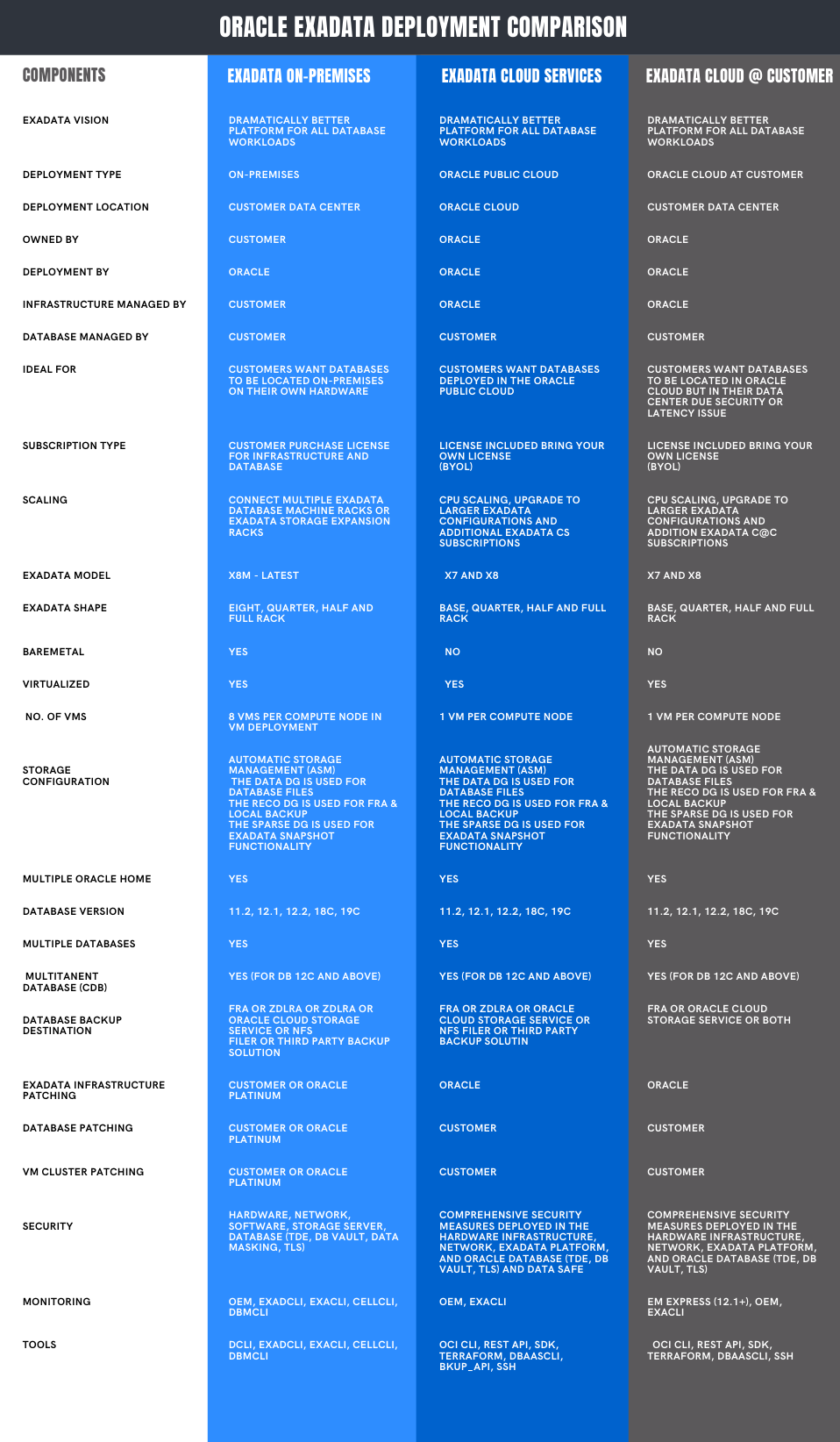
    Oracle Exadata Deployment Option Chart | Netsoftmate

    eBook - Oracle Exadata X8M Patching Recipes | Netsoftmate

  • 5 Reasons Why you Should Run your Oracle Database on Oracle Exadata

    5 Reasons Why you Should Run your Oracle Database on Oracle Exadata

    If you are looking for highest levels of database performance for your Oracle database then, Oracle Exadata is an outstanding solution. It delivers finest performance for mixed data, data warehousing (DW), analytics, and OLTP (online transaction processing) workloads. Enriched with a variety of deployment options, it lets you run your Oracle Database and other data workloads anywhere you need, whether its on-premises or in the Oracle Cloud. Oracle Exadata storage provides a cutting-edge technology which is simple to use, manage and provides mission-critical accessibility and reliability. Here are 5 reasons stating why should you run the Oracle Database on Oracle Exadata.

    5 Reasons Why you Should Run Your Oracle Database on Oracle Exadata | Netsoftmate

    1. Bespoke for Oracle Database

    Following a standard approach to build your database infrastructure will hamper your business growth. With time, databases grow, which means, your business needs more servers, more storage solutions and more labor to manage it. As a result, the management cost will go up and there is a huge exposure to risk of errors, ultimately hampering your business growth. That’s why each business, big or small, needs a new approach that’s engineered to cater the critical database workloads.
    The only technique to handle these critical database workloads is through Oracle Exadata. It is specially equipped to provide high storage bandwidth to seamlessly manage the Oracle Database and other data workloads. Oracle Exadata, as a part of Oracle Engineered System offers a highly integrated platform that delivers more power with less hardware. It eliminates the IT complexity while supplying greater performance, scalability, security and data protection.

    5 Reasons Why you Should Run Your Oracle Database on Oracle Exadata | Netsoftmate

    2. Increase Employee Productivity

    Timely delivery of persuasive data that supports business operations and lessens the time required to deliver new business applications will surely result in better revenue. Oracle Exadata’s congregated and optimized infrastructure platform for database workloads helps the IT staff to spend less time on everyday operations and work more towards other IT development efforts. Accidental outages have less effect on employees and business operations that have lesser database related failures.
    The consolidated Oracle Exadata platform provides an economical base for Oracle database operations. It increases employee productivity and helps grow revenues with less cost and complexity. With an enhanced performance up to 100X faster, accessing the data becomes easy and you can engage with customers quickly. With the same power, you can consolidate your databases onto a single platform, and deliver more than four times the density

    5 Reasons Why you Should Run Your Oracle Database on Oracle Exadata | Netsoftmate

    3. Achieve Operational Benefits

    Businesses that rely on multiple vendors may face problems in managing a complex database infrastructure. Retaining and managing each database and server overstrains IT staff, and establishing new applications can take longer than usual. You may also need IT specialists to take care of each different component. As the number of applications and their associated databases increases, your admin costs go up, and so will your data center footprint.
    Oracle Exadata delivers greater database and application performance with less hardware—and fewer licenses. Oracle Exadata, from Oracle Engineered Systems means easier upgrades, tuning, patching, observing and support, so you can manage your costs. They process transactions faster, complete queries in less time, and have decreased load and backup recovery times.

    5 Reasons Why you Should Run Your Oracle Database on Oracle Exadata | Netsoftmate

    4. Maximize Accessibility

    Positive data security and database uptime are critical components that directly impact the business operations and revenue progress. Database collapse makes it tough to establish dependable security, plan and policies for sensitive data. There are too many points of control to monitor and maintain. A larger base is vulnerable to attack and there’s hardly enough budget for the specialist skills vital to manage it.
    That’s the reason; businesses use Oracle Exadata to run their most important Oracle database and other data workloads. With software and hardware operational together, Oracle Exadata eliminates system downtime, using its in-built flexibility and redundancy. With Oracle Maximum Availability Architecture, you can get the ultimate in invincible uptime. The benefits include, less business impact from outages, less IT impact in managing downtime and reliable application and developer productivity.

    5 Reasons Why you Should Run Your Oracle Database on Oracle Exadata | Netsoftmate

    5. Invest in the Cloud

    Businesses always plan for a simple and comprehensive cloud strategy and application. Ideally, businesses strategize to invest in an architecture offering an apt pathway to a cloud consumption model for the future. A full-proof plan that is flexible to mix and match on-premises deployment with a well-matched public cloud option, whether that’s for development, improvement and testing or ensuring business endurance.
    Oracle Exadata offers the best of both worlds for the database and the business. Businesses can either purchase and manage on-premises Oracle Exadata or choose an Oracle Database Cloud Exadata Service. Oracle Cloud service is equivalent to an on-premises Oracle Exadata, just with a different consumption model. That’s why all the components of Oracle Engineered System are a powerful set of options. They are designed with the same architecture, with all the same benefits. All you need to do is choose which consumption model works best for you.

    About Netsoftmate Technologies Inc.

    Netsoftmate is an Oracle Gold Partner and a boutique IT services company specializing in installation, implementation and 24/7 support for Oracle Engineered Systems like Oracle Exadata, Oracle Database Appliance, Oracle ZDLRA, Oracle ZFS Storage and Oracle Private Cloud Appliance. Apart from OES, we have specialized teams of  experts providing round the clock remote database administration support for any type of database and cyber security compliance and auditing services.


    Feel free to get in touch with us by signing up on the link below –

    Priority Suport for Oracle Engineered Systems | Netsoftmate

  • 10 Easy Steps To Patch Oracle Exadata X8M RoCE Switch

    10 Easy Steps To Patch Oracle Exadata X8M RoCE Switch

    The Oracle Exadata X8M release implements 100 Gb/sec RoCE network fabric, making the world’s fastest database machine even faster.

    Oracle Exadata Database Machine X8M introduces a brand new high-bandwidth low-latency 100 Gb/sec RDMA over Converged Ethernet (RoCE) Network Fabric that connects all the components inside an Exadata Database Machine. Specialized database networking protocols deliver much lower latency and higher bandwidth than is possible with generic communication protocols for faster response time for OLTP operations and higher throughput for analytic workloads.

    The ORacle Exadata X8M release provides the next generation in ultra-fast cloud scale networking fabric, RDMA over Converged Ethernet (RoCE). RDMA (Remote Direct Memory Access) allows one computer to directly access data from another without Operating System or CPU involvement, for high bandwidth and low latency. The network card directly reads/writes memory with no extra copying or buffering and very low latency.

    RDMA is an integral part of the Exadata high-performance architecture, and has been tuned and enhanced over the past decade, underpinning several Exadata-only technologies such as Exafusion Direct-to-Wire Protocol and Smart Fusion Block Transfer. As the RoCE API infrastructure is identical to InfiniBand’s, all existing Exadata performance features are available on RoCE.


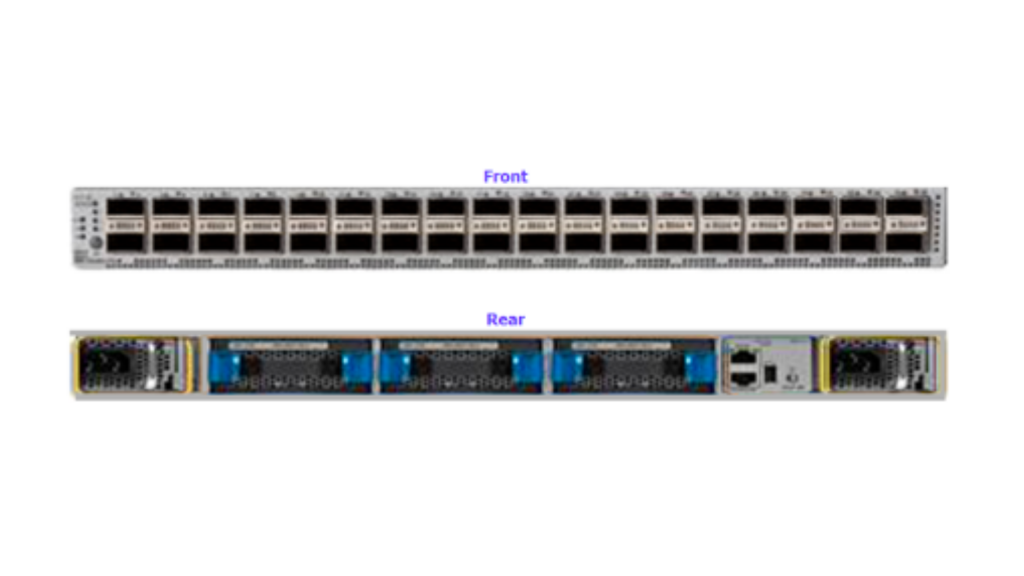
    Oracle Exadata RoCE Switch Image:Oracle Exadata RoCE Switch Front & Back | Netsoftmate
    In this article we see practically how to patch Exadata X8M RoCE Switches


    1. Create a file containing RoCE switch hostname

    [root@dm01dbadm01 ~]# cat roce_list

    dm01sw-rocea01

    dm01sw-roceab1


    2. Get the current RoCE Switch software version

    [root@dm01dbadm01 ~]# ssh admin@dm01sw-rocea01 show version

    User Access Verification

    Cisco Nexus Operating System (NX-OS) Software

    TAC support: http://www.cisco.com/tac

    Copyright (C) 2002-2019, Cisco and/or its affiliates.

    All rights reserved.

    The copyrights to certain works contained in this software are

    owned by other third parties and used and distributed under their own

    licenses, such as open source.  This software is provided “as is,” and unless

    otherwise stated, there is no warranty, express or implied, including but not

    limited to warranties of merchantability and fitness for a particular purpose.

    Certain components of this software are licensed under

    the GNU General Public License (GPL) version 2.0 or

    GNU General Public License (GPL) version 3.0  or the GNU

    Lesser General Public License (LGPL) Version 2.1 or

    Lesser General Public License (LGPL) Version 2.0.

    A copy of each such license is available at

    http://www.opensource.org/licenses/gpl-2.0.php and

    http://opensource.org/licenses/gpl-3.0.html and

    http://www.opensource.org/licenses/lgpl-2.1.php and

    http://www.gnu.org/licenses/old-licenses/library.txt.


    Software

      BIOS: version 05.39

      NXOS: version 7.0(3)I7(6)

      BIOS compile time:  08/30/2019

      NXOS image file is: bootflash:///nxos.7.0.3.I7.6.bin

      NXOS compile time:  3/5/2019 13:00:00 [03/05/2019 22:04:55]


    Hardware

      cisco Nexus9000 C9336C-FX2 Chassis

      Intel(R) Xeon(R) CPU D-1526 @ 1.80GHz with 24571632 kB of memory.

      Processor Board ID FDO23380VQS


      Device name: dm01sw-rocea01

      bootflash:  115805708 kB

    Kernel uptime is 8 day(s), 3 hour(s), 14 minute(s), 49 second(s)


    Last reset at 145297 usecs after Wed Apr  1 09:29:43 2020

      Reason: Reset Requested by CLI command reload

      System version: 7.0(3)I7(6)

      Service:

    plugin

      Core Plugin, Ethernet Plugin


    Active Package(s):

    [root@dm01dbadm01 ~]#  ssh admin@dm01sw-rocea01 show version | grep “System version:”

    User Access Verification

      System version: 7.0(3)I7(6)
    eBook - Oracle Exadata X8M Patching Recipes | Netsoftmate

    3. Download the the RoCE switch software from MOS note 888828.1 and copy it Exadata compute node 1

    [root@dm01dbadm01 ~]# cd /u01/stage/ROCE/


    [root@dm01dbadm01 ROCE]# ls -ltr

    total 2773832

    -rw-r–r– 1 root root 2840400612 Apr  9 00:42 p30893922_193000_Linux-x86-64.zip


    4. Unzip the RoCE patch

    [root@dm01dbadm01 ROCE]# unzip p30893922_193000_Linux-x86-64.zip

    Archive:  p30893922_193000_Linux-x86-64.zip

       creating: patch_switch_19.3.6.0.0.200317/

      inflating: patch_switch_19.3.6.0.0.200317/dcli

      inflating: patch_switch_19.3.6.0.0.200317/exadata.img.hw

      inflating: patch_switch_19.3.6.0.0.200317/sundcs_36p_repository_2.2.7_2.pkg

      inflating: patch_switch_19.3.6.0.0.200317/imageLogger

      inflating:

     patch_switch_19.3.6.0.0.200317/roce_switch_templates/roce_leaf_switch_multi.cfg

      inflating: patch_switch_19.3.6.0.0.200317/sundcs_36p_repository_2.2.14_1.pkg

      inflating: patch_switch_19.3.6.0.0.200317/README.txt


    5. Verify the patch directory content after unzip

    [root@dm01dbadm01 ROCE]# cd patch_switch_19.3.6.0.0.200317/


    [root@dm01dbadm01 patch_switch_19.3.6.0.0.200317]# ls -ltr

    total 2794980

    -r-xr-x— 1 root root      50674 Mar 18 05:48 exadata.img.hw

    -r–r–r– 1 root root       8664 Mar 18 05:48 exadata.img.env

    -r–r–r– 1 root root      45349 Mar 18 05:48 imageLogger

    -r–r—– 1 root root       6133 Mar 18 05:48 ExaXMLNode.pm

    -r–r—– 1 root root      51925 Mar 18 05:48 exadata_img_pylogger.py

    -r-xr-xr-x 1 root root      17482 Mar 18 05:48 libxcp.so.1

    -r-xr-xr-x 1 root root       4385 Mar 18 05:48 kernelupgrade_oldbios.sh

    -r-xr-xr-x 1 root root     176994 Mar 18 05:48 installfw_exadata_ssh

    -r-xr-xr-x 1 root root        426 Mar 18 05:48 fwverify

    -r-xr-xr-x 1 root root       1570 Mar 18 05:48 ExadataSendNotification.pm

    -r-xr-xr-x 1 root root      62499 Mar 18 05:48 ExadataImageNotification.pl

    -r-xr-xr-x 1 root root      51616 Mar 18 05:48 dcli

    -rw-r–r– 1 root root 1011037696 Mar 18 05:48 nxos.7.0.3.I7.6.bin

    -r-xr-xr-x 1 root root      16544 Mar 18 05:48 patchmgr_functions

    -rwxr-xr-x 1 root root      11600 Mar 18 05:48 patch_bug_26678971

    -rw-r–r– 1 root root  975383040 Mar 18 05:48 nxos.7.0.3.I7.7.bin

    -r-xr-xr-x 1 root root  171545108 Mar 18 05:48 sundcs_36p_repository_2.2.13_2.pkg

    -r-xr-xr-x 1 root root  172863012 Mar 18 05:48 sundcs_36p_repository_2.2.14_1.pkg

    -rwxr-xr-x 1 root root  172946493 Mar 18 05:48 sundcs_36p_repository_2.2.7_2.pkg

    -rwxr-xr-x 1 root root  172947929 Mar 18 05:48 sundcs_36p_repository_2.2.7_2_signed.pkg

    -r-xr-xr-x 1 root root      15001 Mar 18 05:48 xcp

    -rwxr-xr-x 1 root root  184111553 Mar 18 05:48 sundcs_36p_repository_upgrade_2.1_to_2.2.7_2.pkg

    -r-xr-xr-x 1 root root     168789 Mar 18 06:05 upgradeIBSwitch.sh

    drwxr-xr-x 2 root root        103 Mar 18 06:05 roce_switch_templates

    drwxr-xr-x 2 root root         98 Mar 18 06:05 roce_switch_api

    drwxr-xr-x 6 root root       4096 Mar 18 06:05 ibdiagtools

    drwxrwxr-x 3 root root         20 Mar 18 06:05 etc

    -r-xr-xr-x 1 root root     457738 Mar 18 06:05 patchmgr

    -rw-rw-r– 1 root root       5156 Mar 18 06:05 md5sum_files.lst

    -rwxrwxrwx 1 root root        822 Mar 18 07:15 README.txt


    6. Navigate to the patch directory and execute the following to get the patch syntax

    [root@dm01dbadm01 patch_switch_19.3.6.0.0.200317]# ./patchmgr -h

    Usage:

    ./patchmgr –roceswitches [roceswitch_list_file]

               –upgrade [–verify-config [yes|no]] [–roceswitch-precheck] [–force]  |

               –downgrade [–verify-config [yes|no]]  [–roceswitch-precheck] [–force]  |

               –verify-config [yes|no]

               [-log_dir <fullpath> ]


    ./patchmgr –ibswitches [ibswitch_list_file]

              <–upgrade | –downgrade> [–ibswitch_precheck] [–unkey] [–force [yes|no]]


    7. Execute the following command to perform configuration verification

    Note:  The patching should be performed by a non-root user. In this case I am using oracle user to perform the patching


    [root@dm01dbadm01 stage]# chown -R oracle:oinstall ROCE/


    [root@dm01dbadm01 stage]# su – oracle

    Last login: Thu Apr  9 16:17:25 +03 2020


    [oracle@dm01dbadm01 ~]$ cd /u01/stage/ROCE/


    [oracle@dm01dbadm01 ROCE]$ ls -ltr

    total 2773836

    -rw-r–r– 1 oracle oinstall 2840400612 Apr  9 00:42 p30893922_193000_Linux-x86-64.zip

    drwxrwxr-x 6 oracle oinstall       4096 Apr  9 16:31 patch_switch_19.3.6.0.0.200317

    [oracle@dm01dbadm01 ROCE]$ cd patch_switch_19.3.6.0.0.200317/


    [oracle@dm01dbadm01 ~]$ vi roce_list

    dm01sw-rocea01

    dm01sw-roceab1


    [oracle@dm01dbadm01 ~]$ cd /u01/stage/ROCE/patch_switch_19.3.6.0.0.200317


    [oracle@dm01dbadm01 patch_switch_19.3.6.0.0.200317]$ ./patchmgr –roceswitches ~/roce_list –verify-config –log_dir /u01/stage/ROCE


    2020-04-09 16:59:52 +0300        :Working: Initiate config verify on RoCE switches from . Expect up to 6 minutes for each switch


    2020-04-09 16:59:53 +0300 1 of 2 :Verifying config on switch dm01sw-rocea01


    2020-04-09 16:59:53 +0300:        [INFO     ] Dumping current running config locally as file: /u01/stage/ROCE/run.dm01sw-rocea01.cfg

    2020-04-09 16:59:54 +0300:        [SUCCESS  ] Backed up switch config successfully

    2020-04-09 16:59:54 +0300:        [INFO     ] Validating running config against template [1/3]: /u01/stage/ROCE/patch_switch_19.3.6.0.0.200317/roce_switch_templates/roce_leaf_switch.cfg

    2020-04-09 16:59:54 +0300:        [INFO     ] Config matches template: /u01/stage/ROCE/patch_switch_19.3.6.0.0.200317/roce_switch_templates/roce_leaf_switch.cfg

    2020-04-09 16:59:54 +0300:        [SUCCESS  ] Config validation successful!


    2020-04-09 16:59:54 +0300 2 of 2 :Verifying config on switch dm01sw-roceb01


    2020-04-09 16:59:54 +0300:        [INFO     ] Dumping current running config locally as file: /u01/stage/ROCE/run.dm01sw-roceb01.cfg

    2020-04-09 16:59:55 +0300:        [SUCCESS  ] Backed up switch config successfully

    2020-04-09 16:59:55 +0300:        [INFO     ] Validating running config against template [1/3]: /u01/stage/ROCE/patch_switch_19.3.6.0.0.200317/roce_switch_templates/roce_leaf_switch.cfg

    2020-04-09 16:59:55 +0300:        [INFO     ] Config matches template: /u01/stage/ROCE/patch_switch_19.3.6.0.0.200317/roce_switch_templates/roce_leaf_switch.cfg

    2020-04-09 16:59:55 +0300:        [SUCCESS  ] Config validation successful!


    2020-04-09 16:59:55 +0300        :SUCCESS: Config check on RoCE switch(es)

    2020-04-09 16:59:56 +0300        :SUCCESS: Completed run of command: ./patchmgr –roceswitches /home/oracle/roce_list –verify-config –log_dir /u01/stage/ROCE

    2020-04-09 16:59:56 +0300        :INFO   : config attempted on nodes in file /home/oracle/roce_list: [dm01sw-rocea01 dm01sw-roceb01]

    2020-04-09 16:59:56 +0300        :INFO   : For details, check the following files in /u01/stage/ROCE:

    2020-04-09 16:59:56 +0300        :INFO   :  – updateRoceSwitch.log

    2020-04-09 16:59:56 +0300        :INFO   :  – updateRoceSwitch.trc

    2020-04-09 16:59:56 +0300        :INFO   :  – patchmgr.stdout

    2020-04-09 16:59:56 +0300        :INFO   :  – patchmgr.stderr

    2020-04-09 16:59:56 +0300        :INFO   :  – patchmgr.log

    2020-04-09 16:59:56 +0300        :INFO   :  – patchmgr.trc

    2020-04-09 16:59:56 +0300        :INFO   : Exit status:0

    2020-04-09 16:59:56 +0300        :INFO   : Exiting.


    8. Execute the following command to perform prerequisite checks.

    Note: During this step it will prompt you setup the SSH between oracle user and RoCE switch. Please enter the admin user password of RoCE switch.


    [oracle@dm01dbadm01 patch_switch_19.3.6.0.0.200317]$ ./patchmgr –roceswitches ~/roce_list –upgrade –roceswitch-precheck –log_dir /u01/stage/ROCE


    [NOTE     ] Password equivalency is NOT setup for user ‘oracle’ to dm01sw-rocea01 from ‘dm01dbadm01.netsoftmate.com’. Set it up? (y/n): y


    enter switch ‘admin’ password:


    checking if ‘dm01sw-rocea01’ is reachable… [OK]

    setting up SSH equivalency for ‘oracle’ from dm01dbadm01.netsoftmate.com to ‘dm01sw-rocea01’… [OK]


    [NOTE     ] Password equivalency is NOT setup for user ‘oracle’ to dm01sw-roceb01 from ‘dm01dbadm01.netsoftmate.com’. Set it up? (y/n): y


    enter switch ‘admin’ password:


    checking if ‘dm01sw-roceb01’ is reachable… [OK]

    setting up SSH equivalency for ‘oracle’ from dm01dbadm01.netsoftmate.com to ‘dm01sw-roceb01’… [OK]

    2020-04-09 16:47:46 +0300        :Working: Initiate pre-upgrade validation check on 2 RoCE switch(es).


    2020-04-09 16:47:47 +0300 1 of 2 :Updating switch dm01sw-rocea01


    2020-04-09 16:47:49 +0300:        [INFO     ] Switch dm01sw-rocea01 will be upgraded from nxos.7.0.3.I7.6.bin to nxos.7.0.3.I7.7.bin

    2020-04-09 16:47:49 +0300:        [INFO     ] Checking for free disk space on switch

    2020-04-09 16:47:50 +0300:        [INFO     ] disk is 96.00% free,  available: 112371744768 bytes

    2020-04-09 16:47:50 +0300:        [SUCCESS  ] There is enough disk space to proceed

    2020-04-09 16:47:52 +0300:        [INFO     ] Copying nxos.7.0.3.I7.7.bin onto dm01sw-rocea01 (eta: 1-5 minutes)

    2020-04-09 16:50:40 +0300:        [SUCCESS  ] Finished copying image to switch

    2020-04-09 16:50:40 +0300:        [INFO     ] Verifying sha256sum of bin file on switch

    2020-04-09 16:50:54 +0300:        [SUCCESS  ] sha256sum matches: dce664f1a90927e9dbd86419681d138d3a7a83c5ea7222718c3f6565488ac6d0

    2020-04-09 16:50:54 +0300:        [INFO     ] Performing FW install pre-check of nxos.7.0.3.I7.7.bin (eta: 2-3 minutes)

    2020-04-09 16:52:55 +0300:        [SUCCESS  ] FW install pre-check completed successfully


    2020-04-09 16:52:55 +0300 2 of 2 :Updating switch dm01sw-roceb01


    2020-04-09 16:58:26 +0300:        [INFO     ] Dumping current running config locally as file: /u01/stage/ROCE/run.dm01sw-roceb01.cfg

    2020-04-09 16:58:27 +0300:        [SUCCESS  ] Backed up switch config successfully

    2020-04-09 16:58:27 +0300:        [INFO     ] Validating running config against template [1/3]: /u01/stage/ROCE/patch_switch_19.3.6.0.0.200317/roce_switch_templates/roce_leaf_switch.cfg

    2020-04-09 16:58:27 +0300:        [INFO     ] Config matches template: /u01/stage/ROCE/patch_switch_19.3.6.0.0.200317/roce_switch_templates/roce_leaf_switch.cfg

    2020-04-09 16:58:27 +0300:        [SUCCESS  ] Config validation successful!


    2020-04-09 16:58:27 +0300        :SUCCESS: Config check on RoCE switch(es)


    2020-04-09 16:58:27 +0300        :SUCCESS: Initiate pre-upgrade validation check on RoCE switch(es).

    2020-04-09 16:58:27 +0300        :SUCCESS: Completed run of command: ./patchmgr –roceswitches /home/oracle/roce_list –upgrade –roceswitch-precheck –log_dir /u01/stage/ROCE

    2020-04-09 16:58:27 +0300        :INFO   : upgrade attempted on nodes in file /home/oracle/roce_list: [dm01sw-rocea01 dm01sw-roceb01]

    2020-04-09 16:58:27 +0300        :INFO   : For details, check the following files in /u01/stage/ROCE:

    2020-04-09 16:58:27 +0300        :INFO   :  – updateRoceSwitch.log

    2020-04-09 16:58:27 +0300        :INFO   :  – updateRoceSwitch.trc

    2020-04-09 16:58:27 +0300        :INFO   :  – patchmgr.stdout

    2020-04-09 16:58:27 +0300        :INFO   :  – patchmgr.stderr

    2020-04-09 16:58:27 +0300        :INFO   :  – patchmgr.log

    2020-04-09 16:58:27 +0300        :INFO   :  – patchmgr.trc

    2020-04-09 16:58:27 +0300        :INFO   : Exit status:0

    • 6:58:27 +0300 :INFO : Exiting.


    9. Execute the following command to patch RoCE switches.


    [oracle@dm01dbadm01 patch_switch_19.3.6.0.0.200317]$ ./patchmgr –roceswitches ~/roce_list –upgrade –log_dir /u01/stage/ROCE


    [NOTE     ] Password equivalency is NOT setup for user ‘oracle’ to dm01sw-rocea01 from ‘dm01dbadm01.netsoftmate.com’. Set it up? (y/n): y


    enter switch ‘admin’ password:


    checking if ‘dm01sw-rocea01’ is reachable… [OK]

    setting up SSH equivalency for ‘oracle’ from dm01dbadm01.netsoftmate.com to ‘dm01sw-rocea01’… [OK]


    [NOTE     ] Password equivalency is NOT setup for user ‘oracle’ to dm01sw-roceb01 from ‘dm01dbadm01.netsoftmate.com’. Set it up? (y/n): y


    enter switch ‘admin’ password:


    checking if ‘dm01sw-roceb01’ is reachable… [OK]

    setting up SSH equivalency for ‘oracle’ from dm01dbadm01.netsoftmate.com to ‘dm01sw-roceb01’… [OK]

    2020-04-09 17:02:26 +0300        :Working: Initiate upgrade of 2 RoCE switches to 7.0(3)I7(7) Expect up to 15 minutes for each switch


    2020-04-09 17:02:26 +0300 1 of 2 :Updating switch dm01sw-rocea01


    2020-04-09 17:02:28 +0300:        [INFO     ] Switch dm01sw-rocea01 will be upgraded from nxos.7.0.3.I7.6.bin to nxos.7.0.3.I7.7.bin

    2020-04-09 17:02:28 +0300:        [INFO     ] Checking for free disk space on switch

    2020-04-09 17:02:28 +0300:        [INFO     ] disk is 95.00% free,  available: 111395401728 bytes

    2020-04-09 17:02:28 +0300:        [SUCCESS  ] There is enough disk space to proceed

    2020-04-09 17:02:29 +0300:        [INFO     ] Found  nxos.7.0.3.I7.7.bin on switch, skipping download

    2020-04-09 17:02:29 +0300:        [INFO     ] Verifying sha256sum of bin file on switch

    2020-04-09 17:02:43 +0300:        [SUCCESS  ] sha256sum matches: dce664f1a90927e9dbd86419681d138d3a7a83c5ea7222718c3f6565488ac6d0

    2020-04-09 17:02:43 +0300:        [INFO     ] Performing FW install pre-check of nxos.7.0.3.I7.7.bin (eta: 2-3 minutes)

    2020-04-09 17:04:44 +0300:        [SUCCESS  ] FW install pre-check completed successfully

    2020-04-09 17:04:44 +0300:        [INFO     ] Performing FW install of nxos.7.0.3.I7.7.bin on dm01sw-rocea01 (eta: 3-7 minutes)

    2020-04-09 17:09:51 +0300:        [SUCCESS  ] FW install completed

    2020-04-09 17:09:51 +0300:        [INFO     ] Waiting for switch to come back online (eta: 6-8 minutes)

    2020-04-09 17:17:51 +0300:        [INFO     ] Verifying if FW install is successful

    2020-04-09 17:17:53 +0300:        [SUCCESS  ] dm01sw-rocea01 has been successfully  upgraded to nxos.7.0.3.I7.7.bin!


    2020-04-09 17:17:53 +0300 2 of 2 :Updating switch dm01sw-roceb01


    2020-04-09 17:17:56 +0300:        [INFO     ] Switch dm01sw-roceb01 will be upgraded from nxos.7.0.3.I7.6.bin to nxos.7.0.3.I7.7.bin

    2020-04-09 17:17:56 +0300:        [INFO     ] Checking for free disk space on switch

    2020-04-09 17:17:57 +0300:        [INFO     ] disk is 95.00% free,  available: 111542112256 bytes

    2020-04-09 17:17:57 +0300:        [SUCCESS  ] There is enough disk space to proceed

    2020-04-09 17:17:58 +0300:        [INFO     ] Found  nxos.7.0.3.I7.7.bin on switch, skipping download

    2020-04-09 17:17:58 +0300:        [INFO     ] Verifying sha256sum of bin file on switch

    2020-04-09 17:18:12 +0300:        [SUCCESS  ] sha256sum matches: dce664f1a90927e9dbd86419681d138d3a7a83c5ea7222718c3f6565488ac6d0

    2020-04-09 17:18:12 +0300:        [INFO     ] Performing FW install pre-check of nxos.7.0.3.I7.7.bin (eta: 2-3 minutes)

    2020-04-09 17:20:12 +0300:        [SUCCESS  ] FW install pre-check completed successfully

    2020-04-09 17:20:12 +0300:        [INFO     ] Checking if previous switch dm01sw-rocea01 is fully up before proceeding (attempt 1 of 3)

    2020-04-09 17:20:13 +0300:        [SUCCESS  ] dm01sw-rocea01 switch is fully up and running

    2020-04-09 17:20:13 +0300:        [INFO     ] Performing FW install of nxos.7.0.3.I7.7.bin on dm01sw-roceb01 (eta: 3-7 minutes)

    2020-04-09 17:23:20 +0300:        [SUCCESS  ] FW install completed

    2020-04-09 17:23:20 +0300:        [INFO     ] Waiting for switch to come back online (eta: 6-8 minutes)

    2020-04-09 17:31:20 +0300:        [INFO     ] Verifying if FW install is successful

    2020-04-09 17:31:22 +0300:        [SUCCESS  ] dm01sw-roceb01 has been successfully  upgraded to nxos.7.0.3.I7.7.bin!

    2020-04-09 17:31:22 +0300        :Working: Initiate config verify on RoCE switches from . Expect up to 6 minutes for each switch


    2020-04-09 17:31:25 +0300 1 of 2 :Verifying config on switch dm01sw-rocea01


    2020-04-09 17:31:25 +0300:        [INFO     ] Dumping current running config locally as file: /u01/stage/ROCE/run.dm01sw-rocea01.cfg

    2020-04-09 17:31:26 +0300:        [SUCCESS  ] Backed up switch config successfully

    2020-04-09 17:31:26 +0300:        [INFO     ] Validating running config against template [1/3]: /u01/stage/ROCE/patch_switch_19.3.6.0.0.200317/roce_switch_templates/roce_leaf_switch.cfg

    2020-04-09 17:31:26 +0300:        [INFO     ] Config matches template: /u01/stage/ROCE/patch_switch_19.3.6.0.0.200317/roce_switch_templates/roce_leaf_switch.cfg

    2020-04-09 17:31:26 +0300:        [SUCCESS  ] Config validation successful!


    2020-04-09 17:31:26 +0300 2 of 2 :Verifying config on switch dm01sw-roceb01


    2020-04-09 17:31:26 +0300:        [INFO     ] Dumping current running config locally as file: /u01/stage/ROCE/run.dm01sw-roceb01.cfg

    2020-04-09 17:31:27 +0300:        [SUCCESS  ] Backed up switch config successfully

    2020-04-09 17:31:27 +0300:        [INFO     ] Validating running config against template [1/3]: /u01/stage/ROCE/patch_switch_19.3.6.0.0.200317/roce_switch_templates/roce_leaf_switch.cfg

    2020-04-09 17:31:27 +0300:        [INFO     ] Config matches template: /u01/stage/ROCE/patch_switch_19.3.6.0.0.200317/roce_switch_templates/roce_leaf_switch.cfg

    2020-04-09 17:31:27 +0300:        [SUCCESS  ] Config validation successful!


    2020-04-09 17:31:27 +0300        :SUCCESS: Config check on RoCE switch(es)


    2020-04-09 17:31:27 +0300        :SUCCESS: upgrade 2 RoCE switch(es) to 7.0(3)I7(7)

    2020-04-09 17:31:27 +0300        :SUCCESS: Completed run of command: ./patchmgr –roceswitches /home/oracle/roce_list –upgrade –log_dir /u01/stage/ROCE

    2020-04-09 17:31:27 +0300        :INFO   : upgrade attempted on nodes in file /home/oracle/roce_list: [dm01sw-rocea01 dm01sw-roceb01]

    2020-04-09 17:31:27 +0300        :INFO   : For details, check the following files in /u01/stage/ROCE:

    2020-04-09 17:31:27 +0300        :INFO   :  – updateRoceSwitch.log

    2020-04-09 17:31:27 +0300        :INFO   :  – updateRoceSwitch.trc

    2020-04-09 17:31:27 +0300        :INFO   :  – patchmgr.stdout

    2020-04-09 17:31:27 +0300        :INFO   :  – patchmgr.stderr

    2020-04-09 17:31:27 +0300        :INFO   :  – patchmgr.log

    2020-04-09 17:31:27 +0300        :INFO   :  – patchmgr.trc

    2020-04-09 17:31:27 +0300        :INFO   : Exit status:0

    2020-04-09 17:31:27 +0300        :INFO   : Exiting.


    10. Verify the new patch version on both RoCE switches

    [oracle@dm01dbadm01 patch_switch_19.3.6.0.0.200317]$  ssh admin@dm01sw-rocea01 show version

    The authenticity of host ‘dm01sw-rocea01 (dm01sw-rocea01)’ can’t be established.

    RSA key fingerprint is SHA256:N3/OT3xe4A8xi1zd+bkTfDyqE6yibk2zVlhXHvCk/Jk.

    RSA key fingerprint is MD5:c4:1f:ef:f5:f5:ab:f1:29:c0:de:42:19:0e:f3:14:8c.

    Are you sure you want to continue connecting (yes/no)? yes

    Warning: Permanently added ‘dm01sw-rocea01’ (RSA) to the list of known hosts.

    User Access Verification

    Password:

    Cisco Nexus Operating System (NX-OS) Software

    TAC support: http://www.cisco.com/tac

    Copyright (C) 2002-2019, Cisco and/or its affiliates.

    All rights reserved.

    The copyrights to certain works contained in this software are

    owned by other third parties and used and distributed under their own

    licenses, such as open source.  This software is provided “as is,” and unless

    otherwise stated, there is no warranty, express or implied, including but not

    limited to warranties of merchantability and fitness for a particular purpose.

    Certain components of this software are licensed under

    the GNU General Public License (GPL) version 2.0 or

    GNU General Public License (GPL) version 3.0  or the GNU

    Lesser General Public License (LGPL) Version 2.1 or

    Lesser General Public License (LGPL) Version 2.0.

    A copy of each such license is available at

    http://www.opensource.org/licenses/gpl-2.0.php and

    http://opensource.org/licenses/gpl-3.0.html and

    http://www.opensource.org/licenses/lgpl-2.1.php and

    http://www.gnu.org/licenses/old-licenses/library.txt.


    Software

      BIOS: version 05.39

      NXOS: version 7.0(3)I7(7)

      BIOS compile time:  08/30/2019

      NXOS image file is: bootflash:///nxos.7.0.3.I7.7.bin

      NXOS compile time:  3/5/2019 13:00:00 [03/05/2019 22:04:55]


    Hardware

      cisco Nexus9000 C9336C-FX2 Chassis

      Intel(R) Xeon(R) CPU D-1526 @ 1.80GHz with 24571632 kB of memory.

      Processor Board ID FDO23380VQS


      Device name: dm01sw-rocea01

      bootflash:  115805708 kB

    Kernel uptime is 8 day(s), 5 hour(s), 1 minute(s), 41 second(s)


    Last reset at 145297 usecs after Wed Apr  1 09:29:43 2020

      Reason: Reset Requested by CLI command reload

      System version: 7.0(3)I7(7)

      Service:


    plugin

      Core Plugin, Ethernet Plugin


    Active Package(s):


    [oracle@dm01dbadm01 patch_switch_19.3.6.0.0.200317]$ ssh admin@dm01sw-rocea01 show version | grep “System version:”

    User Access Verification

    Password:

      System version: 7.0(3)I7(7)


    Conclusion


    In this article we have learned how to patch an Exadata X8M RoCE switches. Oracle continues to use the patchmgr utility to patch the Exadata RoCE switch to simplify the process. The Exadata X8M 100 Gb/sec RoCE network fabric, making the world’s fastest database machine even faster.

    About Netsoftmate: 

    Netsoftmate is an Oracle Gold Partner and a boutique IT services company specializing in installation, implementation and 24/7 support for Oracle Engineered Systems like Oracle Exadata, Oracle Database Appliance, Oracle ZDLRA, Oracle ZFS Storage and Oracle Private Cloud Appliance. Apart from OES, we have specialized teams of  experts providing round the clock remote database administration support for any type of database and cyber security compliance and auditing services.


    Feel free to get in touch with us by signing up on the link below – 

    Priority Suport for Oracle Engineered Systems | Netsoftmate

  • How to Restore Compute node from Snapshot Backup for Oracle Exadata

    How to Restore Compute node from Snapshot Backup for Oracle Exadata

    Netsoftmate experts are back again with another interesting article which will help you setup and restore compute node from snapshot backup of Oracle Exadata. In our previous blog we have demonstrated a step-by-step process of how to take a snapshot based back-up of compute node to NFS share.

    If you haven’t yet read the previous article, here’s the link for reference – 

    Step-by-step guide of exadata sanpshot based backup of compute node to nfs share

    In this article, we will be focussing on how to setup and restore the compute node from the snapshot backup on a live Oracle Exadata Database Machine. 

    Introduction

    You have Oracle Exadata compute snapshot backup, but you don’t know the procedure to restore the compute node. How would you restore your compute node?

    Snapshot backup is very helpful in case of OS failure or any other failure that causes Compute node failure. With the snapshot backup you can restore the compute node with few simple steps without having to go through the complex Oracle Exadata BareMetal restore.

    Environment Details


    Exadata Model

    X5-2 Full Rack

    Exadata Components

    8 – Compute nodes, 14 – Storage cells & 2 – IB switches

    Exadata Storage cells

    DBM01CEL01 – DBM01CEL14

    Exadata Compute nodes

    DBM01DB01 – DBM01DB08

    Exadata Software Version

    12.1.2.3

    Exadata DB Version

    11.2.0.4.180717

    Prerequisites


    • – Root user access on Compute nodes
    • – Snapshot backup taken before the failure
    • – NFS mount storing the snapshot backup
    •  

    Note: We can’t use Infiniband interface to mount the NFS file system. Only Management interface can be used to mount the NFS file system.

    Step 1  


    Copy snapshot backup to the NFS mount mounted using management interface.

    In this example: I have mounted the NFS share using the following directory


    /nfssa/dm01/os_snapshot


    [root@dm01db07 os_snapshot]# cd /nfssa/dm01/os_snapshot


    [root@dm01db07 os_snapshot]# ls -lrt|grep Rt_U01

    -rw-r–r– 1 4294967294 4294967294 24268161485 Jun 17 04:36 Rt_U01_20190617_dm01db07_bkp.tar.bz2


    Step 2

    Copy diag.iso from MOS or from another goo compute node to the NFS mount.


    [root@dm01db07 os_snapshot]# cd /nfssa/dm01/os_snapshot


     [root@dm01db07 os_snapshot]# ls -lrt|grep diag.iso

    -r–r—– 1 4294967294 4294967294    78139392 Jul 12  2019 diag.iso


    Step 3:


    During the restore process you will be prompted to provide the following details. Make a note of these inputs before proceeding to the next step


    i. The full path of the backup 

    10.10.2.21:/export/dm01/os_snapshot/ Rt_U01_20190617_dm01db07_bkp.tar.bz2

    ii. Host IP:  10.2.15

    • iii. Netmask: 255.255.192
    •  
    • iii. Gateway: 10.2.100


    Step 4


    Login to the serial ILOM server of the node in question, load the diag.iso image and reboot the server as follows:


    a) Log in to the Oracle ILOM CLI


    [root@dm01db06 ~]# ssh dm01db06-ilom

    Password:

    Oracle(R) Integrated Lights Out Manager

    Version 3.2.8.24 r114580

    Copyright (c) 2016, Oracle and/or its affiliates. All rights reserved.

    Warning: HTTPS certificate is set to factory default.

    Hostname: dm01db06-ilom


    b) Run the following command on CLI to mount ISO from NFS server


    -> cd /SP/services/kvms/host_storage_device/remote/

    /SP/services/kvms/host_storage_device/remote


    -> set server_URI=nfs://10.10.2.21:/export/dm01/os_snapshot/diag.iso

    Set ‘server_URI’ to ‘nfs://10.10.2.21:/export/dm01/os_snapshot/diag.iso’


    -> show server_URI

      /SP/services/kvms/host_storage_device/remote

        Properties:

            server_URI = nfs://10.10.2.21:/export/dm01/os_snapshot/diag.iso


    c) Enable storage redirection by typing:


    -> set /SP/services/kvms/host_storage_device/ mode=remote

    Set ‘mode’ to ‘remote’


    To view the status of redirection, type the command:


    -> show /SP/services/kvms/host_storage_device/ status

      /SP/services/kvms/host_storage_device

        Properties:

            status = operational


    Note – Redirection is active if the status is set to either Operational or Connecting.


    d) Set the next boot device to cdrom


    -> set /HOST boot_device=cdrom

    Set ‘boot_device’ to ‘cdrom’


    To ensure next boot device, check


    -> show /HOST


     /HOST

        Targets:

            console

            diag

            provisioning


        Properties:

            boot_device = cdrom

            generate_host_nmi = (Cannot show property)


        Commands:

            cd

            set

            show


    e) Reboot Server


    -> reset /SYS

    Are you sure you want to reset /SYS (y/n)? y

    Performing hard reset on /SYS


    Step 5


    Start the serial console using the command below:


    -> start /SP/console
    Are you sure you want to start /SP/console (y/n)? y


    Serial console started. To stop, type ESC (


    Note: optionally you can also start the Remote direction using Web ILOM.


    Wait for the server to boot from the diag.iso

    On both the Remote Console window and the putty/SSH session window you will see the server going through  BIOS POST, then the kernel boot messages.

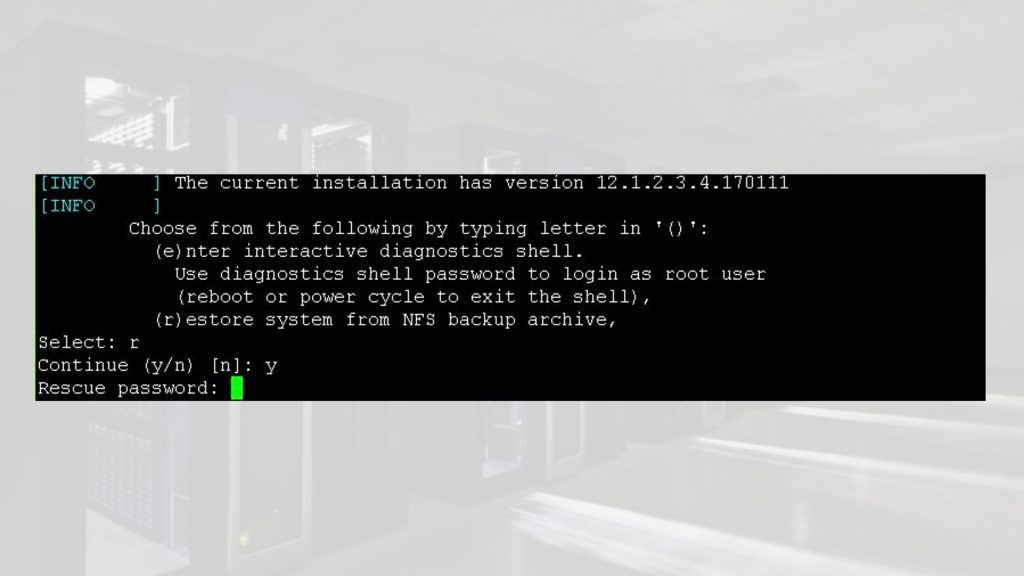
    At the end of the boot up sequence, there should be the menu prompt such as the one below.:

    • – Input (r) for restore
    • – ‘y’ to continue
    • – Rescue password: sos1Exadata

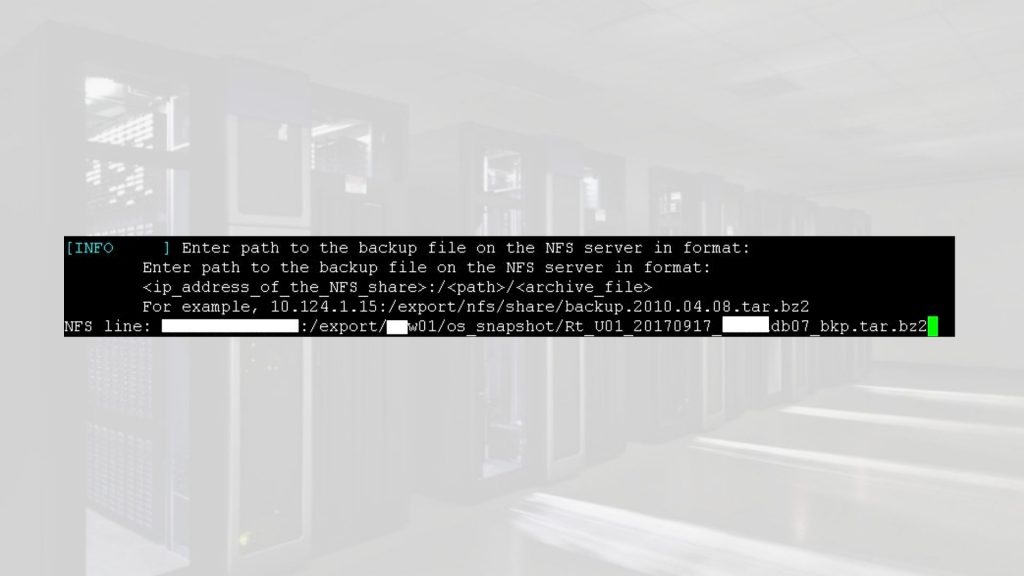
    Next prompt would be for path of backup file provide as follows from Step 3:

    10.10.2.21:/export/dm01/os_snapshot/ Rt_U01_20190617_dm01db07_bkp.tar.bz2

    Restore Compute node from Snapshot Backup

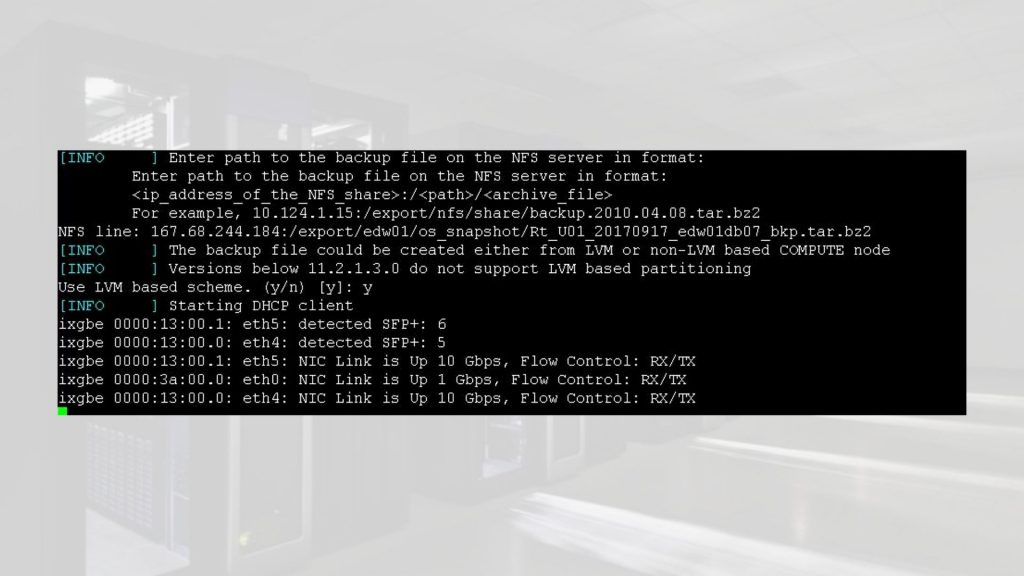
    Next prompt for LVM schema say (y). Type y and hit return

    Restore Compute node from Snapshot Backup

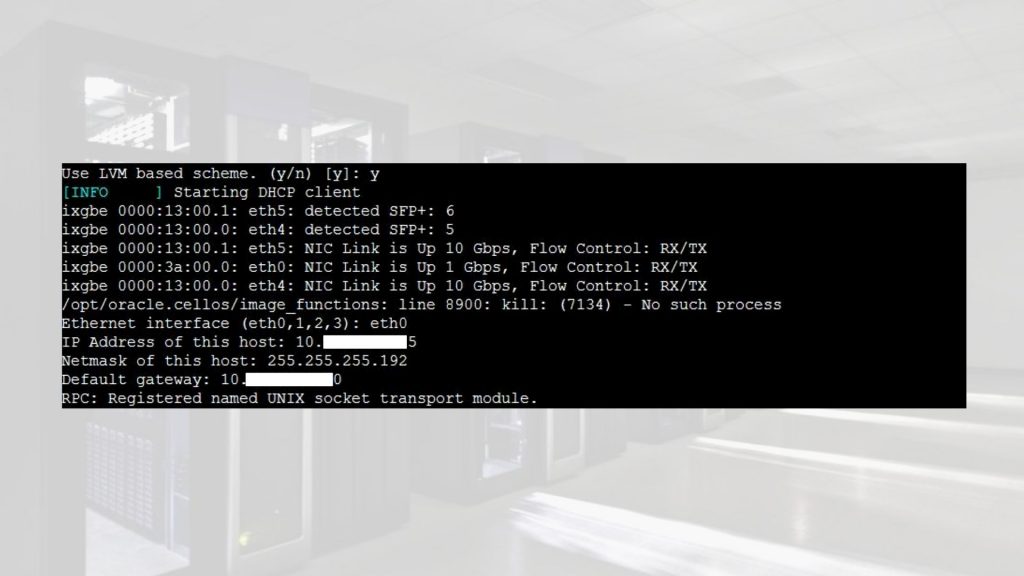
    Next prompt input interface, IP address of host and gateway taken from Step 3

    Restore Compute node from Snapshot Backup

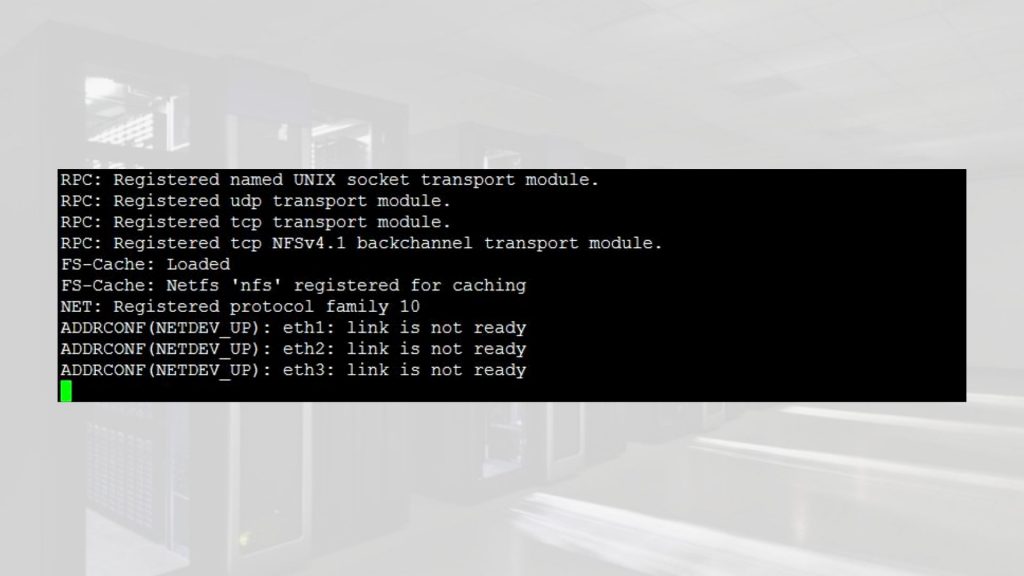
    At the end of this step, the server would enter recovery phase which may take about 3 hours.

    Restore Compute node from Snapshot Backup

    Step 6:


    When the recovery completes, the login screen appears. Verify the file system.

    Restore Compute node from Snapshot Backup

    This concludes a successful recovery


    Step 7:


    Disable cd redirection


    -> set /SP/services/kvms/host_storage_device/ mode=disabled

    Set ‘mode’ to ‘disabled’


    -> show /SP/services/kvms/host_storage_device/ mode


      /SP/services/kvms/host_storage_device

        Properties:

            mode = disabled


    -> set /SP/services/kvms/host_storage_device/remote server_URI=”

    Set ‘server_URI’ to ”


    -> show /SP/services/kvms/host_storage_device/remote server_URI


      /SP/services/kvms/host_storage_device/remote

        Properties:

            server_URI = (none)


    -> show /HOST


    /HOST

        Targets:

            console

            diag

            provisioning


        Properties:

            boot_device = default

            generate_host_nmi = (Cannot show property)


        Commands:

            cd

            set

            show

    Reboot server to use default BIO image


    -> reset /SYS

    Are you sure you want to reset /SYS (y/n)? y

    Performing hard reset on /SYS


    Step 8:


    Verify server


    [root@dm01db07 ~]# imageinfo 
    Kernel version: 2.6.39-400.294.1.el6uek.x86_64 #1 SMP Wed Jan 11 08:46:38 PST 2017 x86_64 
    Image kernel version: 2.6.39-400.294.1.el6uek 
    Image version: 12.1.2.3.4.170111 
    Image activated: 2017-09-19 13:23:57 -0500 
    Image status: success
    System partition on device: /dev/mapper/VGExaDb-LVDbSys1 

    If the image status post restore shows failure then perform the following addition steps to make it success.


    Image status: failure


    • # /usr/sbin/ubiosconfig export all -x /tmp/bios_current.xml –expert_mode -y
    • If it still fails, then try reset the SP and try above the command again.
    • If the command ran successful without error, then reboot the system.
    • After system comes back up, wait for approximately 10min, and check and confirm that the output of imageinfo command is “Image status: success”


    Conclusion:

    In this article we have learned how to restore an Exadata Compute node from Exadata Compute node snapshot backup

  • Step-by-step Guide of Exadata Snapshot Based Backup of Compute Node to NFS Share

    Step-by-step Guide of Exadata Snapshot Based Backup of Compute Node to NFS Share


    Backing up file systems on Oracle Exadata compute can be a daunting task if you are unaware of the prerequisites and best practices. To help you backup your file systems effectively and with least discrepancies, we are bringing you this interesting step-by-step guide on how to back up your file system using Oracle Exadata Sanpshot Based Backup of Compute Node to NFS Share    


    It is very important to take file system backup on Oracle Exadata compute nodes before we make any major changes to the operating system or critical software. On Oracle Exadata Compute nodes / (root) and /u01 file systems contains the operating system and GI/DB software respectively. These are the most critical file systems on Oracle Exadata computes.


    By default, the / (root) and /u01 file system are sized 30GB and 100GB respectively.


    Scenarios in which we must take file system backup are:


    • – Operating System Patching or Upgrade
    •  
    • – Grid Infrastructure Patching or Upgrade
    •  
    • – Database Patching or Upgrade
    •  
    • – Operating System configuration changes
    •  
    • – Increasing/decreasing file system size


    In this article, we will demonstrate how to backup file system on Oracle Exadata Compute nodes running Linux Operating System to external storage NFS Share.

    eBook - Oracle Exadata X8M Patching Recipes | Netsoftmate

    Environment Details


    Exadata Model

    X4-2 Half Rack HP 4 TB

    Exadata Components

    4 – Compute nodes, 7 – Storage cells & 2 – IB switches

    Exadata Storage cells

    DBM01CEL01 – DBM01CEL07

    Exadata Compute nodes

    DBM01DB01 – DBM01DB04

    Exadata Software Version

    19.2.3.0

    Exadata DB Version

    11.2.0.4.180717


    Prerequisites


    • – Root user access on Compute nodes
    •  
    • – NFS mount with sufficient storage to storing file system backup

    Current root and /u01 file system sizes


    [root@ip01db01 ~]# df -h / /u01

    Filesystem Size  Used Avail Use% Mounted on

    /dev/mapper/VGExaDb-LVDbSys1   59G   39G   18G  70% /

    /dev/mapper/VGExaDb-LVDbOra1  197G  171G   17G  92% /u01

    NFS share details


    10.10.10.1:/nfs/backup/


    • 1. As root user, log in to the Exadata Compute node you wish to backup


    [root@ip01db01 ~]# id root

    uid=0(root) gid=0(root) groups=0(root),1(bin),2(daemon),3(sys),4(adm),6(disk),10(wheel)


    • 2. Create a mount point to mount NFS share


    [root@dm01db01 ~]# mkdir -p /mnt/backup

    [root@dm01db01 ~]# mount -t nfs -o rw,intr,soft,proto=tcp,nolock 10.10.10.1:/nfs/backup/ /mnt/backup


    3. Determine the file system type extension root and u01 file system


    [root@ip01db01 ~]# mount -l

    sysfs on /sys type sysfs (rw,relatime)

    proc on /proc type proc (rw,relatime)

    devtmpfs on /dev type devtmpfs (rw,nosuid,size=131804372k,nr_inodes=32951093,mode=755)

    securityfs on /sys/kernel/security type securityfs (rw,nosuid,nodev,noexec,relatime)

    tmpfs on /dev/shm type tmpfs (rw,size=264225792k)

    /dev/mapper/VGExaDb-LVDbSys1 on / type ext3 (rw,relatime,errors=continue,barrier=1,data=ordered) [DBSYS]

    /dev/mapper/VGExaDb-LVDbOra1 on /u01 type ext3 (rw,nodev,relatime,errors=continue,barrier=1,data=ordered) [DBORA]

    /dev/sda1 on /boot type ext3 (rw,nodev,relatime,errors=continue,barrier=1,data=ordered) [BOOT]


    4.  Note down the file system type for root and /u01: ext3. Take a snapshot-based of the root and u01 directories, Label the snapshot and Mount the snapshot


    [root@dm01db01 ~]# lvcreate -L5G -s -n root_snap /dev/VGExaDb/LVDbSys1

      Logical volume “root_snap” created.


    [root@dm01db01 ~]# lvcreate -L5G -s -n u01_snap /dev/VGExaDb/LVDbOra1

      Logical volume “u01_snap” created.

    [root@dm01db01 ~]# e2label /dev/VGExaDb/root_snap DBSYS_SNAP

    [root@dm01db01 ~]# e2label /dev/VGExaDb/u01_snap DBORA_SNAP


    [root@dm01db01 ~]# mkdir -p /mnt/snap/root

    [root@dm01db01 ~]# mkdir -p /mnt/snap/u01


    [root@dm01db01 ~]# mount /dev/VGExaDb/root_snap /mnt/snap/root -t ext3

    [root@dm01db01 ~]# mount /dev/VGExaDb/u01_snap /mnt/snap/u01 -t ext3


    [root@dm01db01 ~]# df -h /mnt/snap/root

    [root@dm01db01 ~]# df -h /mnt/snap/u01


    • 5. Change to the directory for the backup and Create the backup file


    [root@dm01db01 ~]#  cd /mnt/backup


    [root@dm01db01 ~]#  tar -pjcvf /mnt/backup/mybackup.tar.bz2 * /boot –exclude /mnt/backup/mybackup.tar.bz2 > /tmp/backup_tar.stdout 2> /tmp/backup_tar.stderr


    • 6. Monitor the /tmp/backup_tar.stderr file for errors. Errors such as failing to tar open sockets can be ignored.


    • 7. Unmount the snapshots and remove the snapshots for the root and /01 directories.


    [root@dm01db01 ~]# cd /


    [root@dm01db01 /]# umount /mnt/snap/u01


    [root@dm01db01 /]# umount /mnt/snap/root


    [root@dm01db01 /]# df -h /mnt/snap/u01

    [root@dm01db01 /]# df -h /mnt/snap/root


    [root@dm01db01 /]# ls -l /mnt/snap


    [root@dm01db01 /]# rm -rf /mnt/snap


    [root@dm01db01 /]# lvremove /dev/VGExaDb/u01_snap

    Do you really want to remove active logical volume u01_snap? [y/n]: y

      Logical volume “u01_snap” successfully removed


    [root@dm01db01 /]# lvremove /dev/VGExaDb/root_snap

    Do you really want to remove active logical volume root_snap? [y/n]: y

      Logical volume “root_snap” successfully removed


    • 8. Unmount the NFS share


    [root@dm01db01 /] umount /mnt/backup


    • Repeat the above steps on the remaining compute nodes to backup root & u01 file system

    We hope this article helps you smoothly backup your file system on Oracle Exadata Compute node running Oracle Linux using NFS Share. Stay tuned for more step-by-step guides on implementing and using Oracle Database Systems exclusively on Netsoftmate

    Netsoftmate provides the best standard services when it comes to Oracle databases management, covering all comples database products. Sign-up for a free 30 minutes call by clicking on the link below –

    Click here and fill the contact us form for a free 30 minutes consultation


  • Step By Step Exadata Storage Cell Rescue Process

    Step By Step Exadata Storage Cell Rescue Process

     
    You will end up performing storage cell rescue under the following situations:

    • Improper Battery Replacement
    • Improper Card Seating
    • Card Damage During Battery Replacement
    • Corrupted Root File System
    In this article we will demonstrate step by step process to Rescue an Exadata Storage Cell or server.
     
    Open a browser and enter the ILOM hostname or IP address of the Storage cell you want to rescue
    https://dm01cel02-ilom.netsoftmate.com
     
    Enter root crendentials

     
    On the left pane under “Remote Control”, click “Redirection”. Select “Use video redirection” and click “Launch Remote Console” button

     
    Click OK
     
     Click OK

     
    Click Continue

     
    Click Run

     
    Click Continue (not recommended)

     
    From the ILOM video console we can see that the root file system can’t be mounted due to corruption and it will be rebooted again in 60 seconds

     
    On the left pane under “Host Management” click on “Power Control”. From the drop down list Select “Power Cycle”

     
    Click Save

     
    Click OK

     
    Rebooting in progress

     
    Server is no rebooting


    Immediately press Ctrl+S on keyboard 

     
    Select the “CELL_USB_BOOT_CELLBOOT_usb_in_rescue_mode

     
    At the point, we will have continue the rescue process using serial ILOM

     
    As root, ssh to the storage cell ILOM and start the serial console

     
    Enter r and hit return

     
    Enter y and hit return

     
    Enter the rescue password sos1exadata. Enter n and hit return

     
    Enter the root user password 

     
    We are into the rescue mode. At this moment check to make sure that the there are no file system issue. Fix any other issue you may have. Consult Oracle if required
     
    Reboot the server again to complete the rescue process

     
    Hit return

     
    The server is powered off

     
    Power on the server using web ILOM as shown below

     
    Rescue process is completed and we got the root login prompt


    Login to the server as root user and perform the post rescue steps

      
    Verify the image version of the storage cell


    Post Storage Cell Rescue steps:
     
    [root@dm01cel02 ~]# imageinfo

    Kernel version: 4.1.12-94.8.4.el6uek.x86_64 #2 SMP Sat May 5 16:14:51 PDT 2018 x86_64
    Cell version: OSS_18.1.7.0.0AUG_LINUX.X64_180821
    Cell rpm version: cell-18.1.7.0.0_LINUX.X64_180821-1.x86_64

    Active image version: 18.1.7.0.0.180821
    Active image kernel version: 4.1.12-94.8.4.el6uek
    Active image activated: 2019-03-17 03:27:41 -0500
    Active image status: success
    Active system partition on device: /dev/md5
    Active software partition on device: /dev/md7

    Cell boot usb partition: /dev/sdm1
    Cell boot usb version: 18.1.7.0.0.180821

    Inactive image version: undefined
    Rollback to the inactive partitions: Impossible

    CellCLI> import celldisk all force
    No cell disks qualified for this import operation

    CellCLI> list physicaldisk
             12:0            PST0XV          normal
             12:1            PZNDSV          normal
             12:2            PT5Z4V          normal
             12:3            PU3XLV          normal
             12:4            PYAKLV          normal
             12:5            PV828V          normal
             12:6            PZE5NV          normal
             12:7            PYV0YV          normal
             12:8            PZKUXV          normal
             12:9            PYD86V          normal
             12:10           PZL15V          normal
             12:11           PZPLAV          normal
             FLASH_1_1       S2T7NCAHA00958  normal
             FLASH_2_1       S2T7NCAHA00986  normal
             FLASH_4_1       S2T7NCAHA00956  normal
             FLASH_5_1       S2T7NCAHA00947  normal

    CellCLI> list celldisk
             CD_00_dm01cel02        normal
             CD_01_dm01cel02        normal
             CD_02_dm01cel02        normal
             CD_03_dm01cel02        normal
             CD_04_dm01cel02        normal
             CD_05_dm01cel02        normal
             CD_06_dm01cel02        normal
             CD_07_dm01cel02        normal
             CD_08_dm01cel02        normal
             CD_09_dm01cel02        normal
             CD_10_dm01cel02        normal
             CD_11_dm01cel02        normal
             FD_00_dm01cel02        normal
             FD_01_dm01cel02        normal
             FD_02_dm01cel02        normal
             FD_03_dm01cel02        normal

    CellCLI> list griddisk
             DATA_DM01_CD_00_dm01cel02     active
             DATA_DM01_CD_01_dm01cel02     active
             DATA_DM01_CD_02_dm01cel02     active
             DATA_DM01_CD_03_dm01cel02     active
             DATA_DM01_CD_04_dm01cel02     active
             DATA_DM01_CD_05_dm01cel02     active
             DATA_DM01_CD_06_dm01cel02     active
             DATA_DM01_CD_07_dm01cel02     active
             DATA_DM01_CD_08_dm01cel02     active
             DATA_DM01_CD_09_dm01cel02     active
             DATA_DM01_CD_10_dm01cel02     active
             DATA_DM01_CD_11_dm01cel02     active
             DBFS_DG_CD_02_dm01cel02       active
             DBFS_DG_CD_03_dm01cel02       active
             DBFS_DG_CD_04_dm01cel02       active
             DBFS_DG_CD_05_dm01cel02       active
             DBFS_DG_CD_06_dm01cel02       active
             DBFS_DG_CD_07_dm01cel02       active
             DBFS_DG_CD_08_dm01cel02       active
             DBFS_DG_CD_09_dm01cel02       active
             DBFS_DG_CD_10_dm01cel02       active
             DBFS_DG_CD_11_dm01cel02       active
             RECO_DM01_CD_00_dm01cel02     active
             RECO_DM01_CD_01_dm01cel02     active
             RECO_DM01_CD_02_dm01cel02     active
             RECO_DM01_CD_03_dm01cel02     active
             RECO_DM01_CD_04_dm01cel02     active
             RECO_DM01_CD_05_dm01cel02     active
             RECO_DM01_CD_06_dm01cel02     active
             RECO_DM01_CD_07_dm01cel02     active
             RECO_DM01_CD_08_dm01cel02     active
             RECO_DM01_CD_09_dm01cel02     active
             RECO_DM01_CD_10_dm01cel02     active
             RECO_DM01_CD_11_dm01cel02     active

    [root@dm01cel02 ~]# cellcli -e list flashcache detail
             name:                   dm01cel02_FLASHCACHE
             cellDisk:               FD_03_dm01cel02,FD_01_dm01cel02,FD_02_dm01cel02,FD_00_dm01cel02
             creationTime:           2019-03-17T03:19:43-05:00
             degradedCelldisks:
             effectiveCacheSize:     11.64312744140625T
             id:                     574c3bd1-7a35-42ba-a03b-75f3a93edac7
             size:                   11.64312744140625T
             status:                 normal

    [root@dm01cel02 ~]# cellcli -e list flashlog detail
             name:                   dm01cel02_FLASHLOG
             cellDisk:               FD_03_dm01cel02,FD_00_dm01cel02,FD_01_dm01cel02,FD_02_dm01cel02
             creationTime:           2019-03-17T03:19:43-05:00
             degradedCelldisks:
             effectiveSize:          512M
             efficiency:             100.0
             id:                     73cd8288-c6d8-42c3-95a1-97ce287cf7d0
             size:                   512M
             status:                 normal

     
    SQL> select a.name,b.path,b.state,b.mode_status,b.failgroup
        from v$asm_diskgroup a, v$asm_disk b
        where a.group_number=b.group_number
        and b.failgroup=’dm01cel02′
        order by 2,1;

    no rows selected

    SQL> alter diskgroup DBFS_DG add disk ‘o/192.168.1.1;192.168.1.2/DBFS_DG_*_dm01cel02’ force;

    Diskgroup altered.


    SQL> alter diskgroup DATA_DM01 add disk ‘o/192.168.1.1;192.168.1.2/DATA_DM01_*_dm01cel02’ force;

    Diskgroup altered.


    SQL> alter diskgroup RECO_DM01 add disk ‘o/192.168.1.1;192.168.1.2/RECO_DM01_*_dm01cel02’ force;

    Diskgroup altered.


    SQL> select * from v$asm_operation;

    GROUP_NUMBER OPERA STAT      POWER     ACTUAL      SOFAR   EST_WORK   EST_RATE EST_MINUTES ERROR_CODE
    ———— —– —- ———- ———- ———- ———- ———- ———– ——————————————–
               1 REBAL RUN           4          4     204367    3521267      13041         254
               3 REBAL WAIT          4


    SQL> select * from v$asm_operation;

    no rows selected

    SQL> col path for a70
    SQL> set lines 200
    SQL> set pages 200
    SQL> select a.name,b.path,b.state,b.mode_status,b.failgroup
        from v$asm_diskgroup a, v$asm_disk b
        where a.group_number=b.group_number
        and b.failgroup=’dm01cel02′
        order by 2,1;  2    3    4    5

    NAME                           PATH                                                                   STATE    MODE_ST FAILGROUP
    —————————— ———————————————————————- ——– ——- ——————————
    DATA_DM01                     o/192.168.1.1;192.168.1.2/DATA_DM01_CD_00_dm01cel02              NORMAL   ONLINE  dm01cel02
    DATA_DM01                     o/192.168.1.1;192.168.1.2/DATA_DM01_CD_01_dm01cel02              NORMAL   ONLINE  dm01cel02
    DATA_DM01                     o/192.168.1.1;192.168.1.2/DATA_DM01_CD_02_dm01cel02              NORMAL   ONLINE  dm01cel02
    DATA_DM01                     o/192.168.1.1;192.168.1.2/DATA_DM01_CD_03_dm01cel02              NORMAL   ONLINE  dm01cel02
    DATA_DM01                     o/192.168.1.1;192.168.1.2/DATA_DM01_CD_04_dm01cel02              NORMAL   ONLINE  dm01cel02
    DATA_DM01                     o/192.168.1.1;192.168.1.2/DATA_DM01_CD_05_dm01cel02              NORMAL   ONLINE  dm01cel02
    DATA_DM01                     o/192.168.1.1;192.168.1.2/DATA_DM01_CD_06_dm01cel02              NORMAL   ONLINE  dm01cel02
    DATA_DM01                     o/192.168.1.1;192.168.1.2/DATA_DM01_CD_07_dm01cel02              NORMAL   ONLINE  dm01cel02
    DATA_DM01                     o/192.168.1.1;192.168.1.2/DATA_DM01_CD_08_dm01cel02              NORMAL   ONLINE  dm01cel02
    DATA_DM01                     o/192.168.1.1;192.168.1.2/DATA_DM01_CD_09_dm01cel02              NORMAL   ONLINE  dm01cel02
    DATA_DM01                     o/192.168.1.1;192.168.1.2/DATA_DM01_CD_10_dm01cel02              NORMAL   ONLINE  dm01cel02
    DATA_DM01                     o/192.168.1.1;192.168.1.2/DATA_DM01_CD_11_dm01cel02              NORMAL   ONLINE  dm01cel02
    DBFS_DG                        o/192.168.1.1;192.168.1.2/DBFS_DG_CD_02_dm01cel02                 NORMAL   ONLINE  dm01cel02
    DBFS_DG                        o/192.168.1.1;192.168.1.2/DBFS_DG_CD_03_dm01cel02                 NORMAL   ONLINE  dm01cel02
    DBFS_DG                        o/192.168.1.1;192.168.1.2/DBFS_DG_CD_04_dm01cel02                 NORMAL   ONLINE  dm01cel02
    DBFS_DG                        o/192.168.1.1;192.168.1.2/DBFS_DG_CD_05_dm01cel02                 NORMAL   ONLINE  dm01cel02
    DBFS_DG                        o/192.168.1.1;192.168.1.2/DBFS_DG_CD_06_dm01cel02                 NORMAL   ONLINE  dm01cel02
    DBFS_DG                        o/192.168.1.1;192.168.1.2/DBFS_DG_CD_07_dm01cel02                 NORMAL   ONLINE  dm01cel02
    DBFS_DG                        o/192.168.1.1;192.168.1.2/DBFS_DG_CD_08_dm01cel02                 NORMAL   ONLINE  dm01cel02
    DBFS_DG                        o/192.168.1.1;192.168.1.2/DBFS_DG_CD_09_dm01cel02                 NORMAL   ONLINE  dm01cel02
    DBFS_DG                        o/192.168.1.1;192.168.1.2/DBFS_DG_CD_10_dm01cel02                 NORMAL   ONLINE  dm01cel02
    DBFS_DG                        o/192.168.1.1;192.168.1.2/DBFS_DG_CD_11_dm01cel02                 NORMAL   ONLINE  dm01cel02
    RECO_DM01                     o/192.168.1.1;192.168.1.2/RECO_DM01_CD_00_dm01cel02              NORMAL   ONLINE  dm01cel02
    RECO_DM01                     o/192.168.1.1;192.168.1.2/RECO_DM01_CD_01_dm01cel02              NORMAL   ONLINE  dm01cel02
    RECO_DM01                     o/192.168.1.1;192.168.1.2/RECO_DM01_CD_02_dm01cel02              NORMAL   ONLINE  dm01cel02
    RECO_DM01                     o/192.168.1.1;192.168.1.2/RECO_DM01_CD_03_dm01cel02              NORMAL   ONLINE  dm01cel02
    RECO_DM01                     o/192.168.1.1;192.168.1.2/RECO_DM01_CD_04_dm01cel02              NORMAL   ONLINE  dm01cel02
    RECO_DM01                     o/192.168.1.1;192.168.1.2/RECO_DM01_CD_05_dm01cel02              NORMAL   ONLINE  dm01cel02
    RECO_DM01                     o/192.168.1.1;192.168.1.2/RECO_DM01_CD_06_dm01cel02              NORMAL   ONLINE  dm01cel02
    RECO_DM01                     o/192.168.1.1;192.168.1.2/RECO_DM01_CD_07_dm01cel02              NORMAL   ONLINE  dm01cel02
    RECO_DM01                     o/192.168.1.1;192.168.1.2/RECO_DM01_CD_08_dm01cel02              NORMAL   ONLINE  dm01cel02
    RECO_DM01                     o/192.168.1.1;192.168.1.2/RECO_DM01_CD_09_dm01cel02              NORMAL   ONLINE  dm01cel02
    RECO_DM01                     o/192.168.1.1;192.168.1.2/RECO_DM01_CD_10_dm01cel02              NORMAL   ONLINE  dm01cel02
    RECO_DM01                     o/192.168.1.1;192.168.1.2/RECO_DM01_CD_11_dm01cel02              NORMAL   ONLINE  dm01cel02

    34 rows selected.


    Conclusion
     
    In this article we have demonstrated step by step procedure to perform Storage Cell Rescue. You may have to perform the Storage cell rescue for multiple reasons such as root file system corrupted, Kernel panic, server rebooting continuously and so on. With the help of CELLBOOT usb one can perform the storage cell rescue very easily.
     
  • Steps to Deploy Exadata Database Machine on Oracle Cloud Infrastructure

    Steps to Deploy Exadata Database Machine on Oracle Cloud Infrastructure

    In this article we will demonstrate quick steps to deploy Exadata Database Machine in Oracle Cloud Infrastructure (OCI). 

    Prerequisites:

    • Exadata Cloud Subscription
    • Credentials to Login Oracle Cloud
    • Access to Deploy Exadata in OCI
    • Compartment
    • VCN & Subnet


    Steps to Deploy Exadata on OCI

    • Open a browser and enter the URL you have received from Oracle to connect to the Oracle Cloud
    •  

    • Enter your Oracle Cloud credentials
    •  

    • Click on “Create Instance”
    •  

    • Click on “All Services” and search for Exadata keyword. Click on Create.
    •  

    • Select your “Compartment” on left and Click on “Launch DB System”
    •  

    • Enter the details as per your requirement and the Exadata subscription procured
    •  

    • Browse and upload the public key
    •  

    • Choose your desired storage allocation and timezone
    •  

    • Fill in the required VCN and Subnet details. Work with your network engineer to gather the correct details on VCN and Subnet created for your environment
    •  

    • Fill the database details, name, version, CDB and Password
    •  

    • Select the Workload type and database character set for your database
    •  

    • Optionally specify the TAG Key and click “Launch DB System” to deploy Exadata DBM
    •  


    Conclusion

    In this article we have learned how to deploy an Exadata Database Machine in Oracle Cloud Infrastructure (OCI).

    Expert Support for Oracle Exadata | Netsoftmate


  • Exadata Hardware Generation at a Glance (V1 to X8)

    Exadata Hardware Generation at a Glance (V1 to X8)

    An engineered system comprising of Compute Nodes, Storage Cells and Infiniband  – all of it packaged inside a single physical cabinet called “Exadata Rack

    Exadata Hardware Generation At A Glance


    Exadata Database Machine X8-2

  • Quick Overview of Exadata Database Machine X8-2

    Quick Overview of Exadata Database Machine X8-2

    Oracle announced the next-generation Oracle Exadata X8 with significant hardware and software enhancements in overall performance, storage capacity, network bandwidth, and automation. Exadata X7 delivers extreme performance and reliability to run the largest, most business-critical database workloads.

    Oracle Exadata X8-2 quick glance:

    • – Latest Intel Xeon (8260) Processors (2.4GHz) 2*24 cores per database server (384 core in a Full Rack)
    •  
    • – Exadata X8 Capacity-on-Demand enables at least 14 cores per server
    •  
    • – Delivers up to 60 percent faster throughput than previous models
    •  
    • – NO changes in Database server Physical memory (upto 12TB in a full Rack)
    •  
    • – Latest Intel Xeon (5218) Processors (2.3GHz) 2*16 cores per Storage server (448 core in a Full Rack)
    •  
    • – NO increase in the capacity of Extreme Flash storage (716.8TB in a full Rack)
    •  
    • – 40% increase in disk capacity (2352TB in a full Rack)
    •  
    • – Exadata X8 introduces new Exadata storage option – Extended (XT) Storage Server
    •  
    • – Each Exadata XT Storage Server includes twelve 14 TB SAS disk drives
    •  
    • – A full rack Exadata X8-2 system has:
      •  
      • – Raw capacity of 2.3 petabytes of disk storage & 358.4TB Flash
      •  
      • – 720 terabytes of NVMe all-Flash storage
      •  
      • – Raw capacity of 2.3 petabytes of disk storage & No flash
    •  
    • – Additional network 2x 10/25 Gb optical Ethernet (client – optional)
    •  
    • – Available in Oracle Public Cloud – Oracle Database Exadata Cloud Service

    For more information please visit –

    https://www.oracle.com/a/ocom/docs/engineered-systems/exadata/exadata-x8-2-ds.pdf
     

    https://www.oracle.com/a/ocom/docs/engineered-systems/exadata/exadata-x8-8-ds.pdf


  • Step by Step Exadata Compute Node Patching 18c

    Step by Step Exadata Compute Node Patching 18c

    The patchmgr or dbnodeupdate.sh utility can be used for upgrading, rollback and backup Exadata Compute nodes. patchmgr utility can be used for upgrading Compute nodes in a rolling or non-rolling fashion. Compute nodes patches apply operating system, firmware, and driver updates.

    Launch patchmgr from the compute node that is node 1 that has user equivalence setup to all the Compute nodes. Patch all the compute nodes except node 1 and later patch node 1 alone.

    In this article I will demonstrate how to perform upgrade Exadata Compute nodes using patchmgr and dbnodeupdate.sh utilities.

    MOS Notes
    Read the following MOS notes carefully.

    • Exadata Database Machine and Exadata Storage Server Supported Versions (Doc ID 888828.1)
    • Exadata 18.1.12.0.0 release and patch (29194095) (Doc ID 2492012.1)   
    • Oracle Exadata Database Machine exachk or HealthCheck (Doc ID 1070954.1)dbnodeupdate.sh and dbserver.patch.zip: Updating Exadata Database Server Software using the DBNodeUpdate Utility and patchmgr (Doc ID 1553103.1)   


    Software Download
    Download the following patches required for Upgrading Compute nodes.

    • Patch 29181093 – Database server bare metal / domU ULN exadata_dbserver_18.1.12.0.0_x86_64_base OL6 channel ISO image (18.1.12.0.0.190111)
    • Download dbserver.patch.zip as p21634633_12*_Linux-x86-64.zip, which contains dbnodeupdate.zip and patchmgr for dbnodeupdate orchestration via patch 21634633


    Current Environment
    Exadata X4-2 Half Rack (4 Compute nodes, 7 Storage Cells and 2 IB Switches) running ESS version 12.2.1.1.6


    Prerequisites
     
    • Install and configure VNC Server on Exadata compute node 1. It is recommended to use VNC or screen utility for patching to avoid disconnections due network issues.


    • Enable blackout (OEM, crontab and so on)


    • Verify disk space on Compute nodes

    [root@dm01db01 ~]# dcli -g ~/dbs_group -l root ‘df -h /’
    dm01db01: Filesystem            Size  Used Avail Use% Mounted on
    dm01db01: /dev/mapper/VGExaDb-LVDbSys1
    dm01db01: 59G   40G   17G  70% /
    dm01db02: Filesystem            Size  Used Avail Use% Mounted on
    dm01db02: /dev/mapper/VGExaDb-LVDbSys1
    dm01db02: 59G   23G   34G  41% /
    dm01db03: Filesystem            Size  Used Avail Use% Mounted on
    dm01db03: /dev/mapper/VGExaDb-LVDbSys1
    dm01db03: 59G   42G   14G  76% /
    dm01db04: Filesystem            Size  Used Avail Use% Mounted on
    dm01db04: /dev/mapper/VGExaDb-LVDbSys1
    dm01db04: 59G   42G   15G  75% /

    [root@dm01db01 ~]# dcli -g ~/dbs_group -l root ‘df -h /u01’
    dm01db01: Filesystem            Size  Used Avail Use% Mounted on
    dm01db01: /dev/mapper/VGExaDb-LVDbOra1
    dm01db01: 197G  112G   76G  60% /u01
    dm01db02: Filesystem            Size  Used Avail Use% Mounted on
    dm01db02: /dev/mapper/VGExaDb-LVDbOra1
    dm01db02: 197G   66G  122G  36% /u01
    dm01db03: Filesystem            Size  Used Avail Use% Mounted on
    dm01db03: /dev/mapper/VGExaDb-LVDbOra1
    dm01db03: 197G   77G  111G  41% /u01
    dm01db04: Filesystem            Size  Used Avail Use% Mounted on
    dm01db04: /dev/mapper/VGExaDb-LVDbOra1
    dm01db04: 197G   61G  127G  33% /u01
     

    • Run Exachk before starting the actual patching. Correct any Critical issues and Failure that conflict with patching.


    • Verify hardware failure. Make sure there are no hardware failures before patching

    [root@dm01db01 ~]# dcli -g ~/dbs_group -l root ‘dbmcli -e list physicaldisk where status!=normal’

    [root@dm01db01 ~]# dcli -g ~/dbs_group -l root ‘ipmitool sunoem cli “show -d properties -level all /SYS fault_state==Faulted”‘
     

    • Clear or acknowledge alerts on db and cell nodes

    [root@dm01db01 ~]# dcli -l root -g ~/dbs_group “dbmcli -e  drop alerthistory all”
     

    • Download patches and copy them to the compute node 1 under staging directory

    Stage Directory: /u01/app/oracle/software/exa_patches
    p21634633_191200_Linux-x86-64.zip
    p29181093_181000_Linux-x86-64.zip


    • Read the readme file and document the steps for storage cell patching.

    eBook - Oracle Exadata X8M Patching Recipes | Netsoftmate


    Steps to Upgrade Exadata Compute nodes


    • Copy the compute node patches to all the nodes

    [root@dm01db01 exa_patches]# dcli -g ~/dbs_group -l root ‘mkdir -p /u01/app/oracle/software/exa_patches/dbnode’

    [root@dm01db01 exa_patches]# cp p21634633_191200_Linux-x86-64.zip p29181093_181000_Linux-x86-64.zip dbnode/

    [root@dm01db01 dbnode]# dcli -g ~/dbs_group -l root -d /u01/app/oracle/software/exa_patches/dbnode -f p21634633_191200_Linux-x86-64.zip

    [root@dm01db01 dbnode]# dcli -g ~/dbs_group -l root -d /u01/app/oracle/software/exa_patches/dbnode -f p29181093_181000_Linux-x86-64.zip

    [root@dm01db01 dbnode]# dcli -g ~/dbs_group -l root ls -ltr /u01/app/oracle/software/exa_patches/dbnode

    • Unzip tool patch

    [root@dm01db01 dbnode]# unzip p21634633_191200_Linux-x86-64.zip

    [root@dm01db01 dbnode]# ls -ltr

    [root@dm01db01 dbnode]# cd dbserver_patch_19.190204/

    [root@dm01db01 dbserver_patch_19.190204]# ls -ltr

    [root@dm01db01 dbserver_patch_19.190204]# unzip dbnodeupdate.zip

    [root@dm01db01 dbserver_patch_19.190204]# ls -ltr

    NOTE: DO NOT unzip the ISO patch. IT will be extracted automatically by dbnodeupdate.sh utility

    • Umount all external file systems on all Compute nodes

    [root@dm01db01 ~]# dcli -g ~/dbs_group -l root umount /zfssa/dm01/backup1

    • Get the current version

    [root@dm01db01 dbnode]# imageinfo

    Kernel version: 4.1.12-94.7.8.el6uek.x86_64 #2 SMP Thu Jan 11 20:41:01 PST 2018 x86_64
    Image kernel version: 4.1.12-94.7.8.el6uek
    Image version: 12.2.1.1.6.180125.1
    Image activated: 2018-05-15 21:37:09 -0500
    Image status: success
    System partition on device: /dev/mapper/VGExaDb-LVDbSys1

    • Perform pre check on all nodes except node 1.

    [root@dm01db01 dbserver_patch_19.190204]# ./patchmgr -dbnodes  dbs_group-1 -precheck -iso_repo /u01/app/oracle/software/exa_patches/dbnode/p29181093_181000_Linux-x86-64.zip -target_version 18.1.12.0.0.190111

    ************************************************************************************************************
    NOTE    patchmgr release: 19.190204 (always check MOS 1553103.1 for the latest release of dbserver.patch.zip)
    NOTE
    WARNING Do not interrupt the patchmgr session.
    WARNING Do not resize the screen. It may disturb the screen layout.
    WARNING Do not reboot database nodes during update or rollback.
    WARNING Do not open logfiles in write mode and do not try to alter them.
    ************************************************************************************************************
    2019-02-11 04:26:37 -0600        :Working: DO: Initiate precheck on 3 node(s)
    2019-02-11 04:27:29 -0600        :Working: DO: Check free space and verify SSH equivalence for the root user to node(s)
    2019-02-11 04:29:44 -0600        :SUCCESS: DONE: Check free space and verify SSH equivalence for the root user to node(s)
    2019-02-11 04:31:06 -0600        :Working: DO: dbnodeupdate.sh running a precheck on node(s).
    2019-02-11 04:32:53 -0600        :SUCCESS: DONE: Initiate precheck on node(s).

    • Perform compute node backup

    [root@dm01db01 dbserver_patch_19.190204]# ./patchmgr -dbnodes dbs_group-1 -backup -iso_repo /u01/app/oracle/software/exa_patches/dbnode/p29181093_181000_Linux-x86-64.zip -target_version 18.1.12.0.0.190111

    ************************************************************************************************************
    NOTE    patchmgr release: 19.190204 (always check MOS 1553103.1 for the latest release of dbserver.patch.zip)
    NOTE
    WARNING Do not interrupt the patchmgr session.
    WARNING Do not resize the screen. It may disturb the screen layout.
    WARNING Do not reboot database nodes during update or rollback.
    WARNING Do not open logfiles in write mode and do not try to alter them.
    ************************************************************************************************************
    2019-02-11 04:43:16 -0600        :Working: DO: Initiate backup on 3 node(s).
    2019-02-11 04:43:16 -0600        :Working: DO: Check free space and verify SSH equivalence for the root user to node(s)
    2019-02-11 04:45:31 -0600        :SUCCESS: DONE: Check free space and verify SSH equivalence for the root user to node(s)
    2019-02-11 04:46:16 -0600        :Working: DO: dbnodeupdate.sh running a backup on node(s).
    2019-02-11 04:58:03 -0600        :SUCCESS: DONE: Initiate backup on node(s).
    2019-02-11 04:58:03 -0600        :SUCCESS: DONE: Initiate backup on 3 node(s)

    • Execute compute node upgrade

    [root@dm01db01 dbserver_patch_19.190204]# ./patchmgr -dbnodes dbs_group-1 -upgrade -iso_repo /u01/app/oracle/software/exa_patches/dbnode/p29181093_181000_Linux-x86-64.zip -target_version 18.1.12.0.0.190111

    ************************************************************************************************************
    NOTE    patchmgr release: 19.190204 (always check MOS 1553103.1 for the latest release of dbserver.patch.zip)
    NOTE
    NOTE    Database nodes will reboot during the update process.
    NOTE
    WARNING Do not interrupt the patchmgr session.
    WARNING Do not resize the screen. It may disturb the screen layout.
    WARNING Do not reboot database nodes during update or rollback.
    WARNING Do not open logfiles in write mode and do not try to alter them.
    ************************************************************************************************************
    2019-02-11 05:05:24 -0600        :Working: DO: Initiate prepare steps on node(s).
    2019-02-11 05:05:29 -0600        :Working: DO: Check free space and verify SSH equivalence for the root user to node(s)
    2019-02-11 05:07:44 -0600        :SUCCESS: DONE: Check free space and verify SSH equivalence for the root user to node(s)
    2019-02-11 05:09:35 -0600        :SUCCESS: DONE: Initiate prepare steps on node(s).
    2019-02-11 05:09:35 -0600        :Working: DO: Initiate update on 3 node(s).
    2019-02-11 05:09:35 -0600        :Working: DO: dbnodeupdate.sh running a backup on 3 node(s).
    2019-02-11 05:21:06 -0600        :SUCCESS: DONE: dbnodeupdate.sh running a backup on 3 node(s).
    2019-02-11 05:21:06 -0600        :Working: DO: Initiate update on node(s)
    2019-02-11 05:21:11 -0600        :Working: DO: Get information about any required OS upgrades from node(s).
    2019-02-11 05:21:22 -0600        :SUCCESS: DONE: Get information about any required OS upgrades from node(s).
    2019-02-11 05:21:22 -0600        :Working: DO: dbnodeupdate.sh running an update step on all nodes.
    2019-02-11 05:32:58 -0600        :INFO   : dm01db02 is ready to reboot.
    2019-02-11 05:32:58 -0600        :INFO   : dm01db03 is ready to reboot.
    2019-02-11 05:32:58 -0600        :INFO   : dm01db04 is ready to reboot.
    2019-02-11 05:32:58 -0600        :SUCCESS: DONE: dbnodeupdate.sh running an update step on all nodes.
    2019-02-11 05:33:26 -0600        :Working: DO: Initiate reboot on node(s)
    2019-02-11 05:34:13 -0600        :SUCCESS: DONE: Initiate reboot on node(s)
    2019-02-11 05:34:13 -0600        :Working: DO: Waiting to ensure node(s) is down before reboot.
    2019-02-11 05:34:45 -0600        :SUCCESS: DONE: Waiting to ensure node(s) is down before reboot.
    2019-02-11 05:34:45 -0600        :Working: DO: Waiting to ensure node(s) is up after reboot.
    2019-02-11 05:39:51 -0600        :SUCCESS: DONE: Waiting to ensure node(s) is up after reboot.
    2019-02-11 05:39:51 -0600        :Working: DO: Waiting to connect to node(s) with SSH. During Linux upgrades this can take some time.
    2019-02-11 06:02:50 -0600        :SUCCESS: DONE: Waiting to connect to node(s) with SSH. During Linux upgrades this can take some time.
    2019-02-11 06:02:50 -0600        :Working: DO: Wait for node(s) is ready for the completion step of update.
    2019-02-11 06:04:14 -0600        :SUCCESS: DONE: Wait for node(s) is ready for the completion step of update.
    2019-02-11 06:04:30 -0600        :Working: DO: Initiate completion step from dbnodeupdate.sh on node(s)
    2019-02-11 06:24:40 -0600        :ERROR  : Completion step from dbnodeupdate.sh failed on one or more nodes
    2019-02-11 06:24:45 -0600        :SUCCESS: DONE: Initiate completion step from dbnodeupdate.sh on dm01db02
    2019-02-11 06:25:29 -0600        :SUCCESS: DONE: Get information about downgrade version from node.

        SUMMARY OF ERRORS FOR dm01db03:

    2019-02-11 06:25:29 -0600        :ERROR  : There was an error during the completion step on dm01db03.
    2019-02-11 06:25:29 -0600        :ERROR  : Please correct the error and run “/u01/dbnodeupdate.patchmgr/dbnodeupdate.sh -c” on dm01db03 to complete the update.
    2019-02-11 06:25:29 -0600        :ERROR  : The dbnodeupdate.log and diag files can help to find the root cause.
    2019-02-11 06:25:29 -0600        :ERROR  : DONE: Initiate completion step from dbnodeupdate.sh on dm01db03
    2019-02-11 06:25:29 -0600        :SUCCESS: DONE: Initiate completion step from dbnodeupdate.sh on dm01db04
    2019-02-11 06:26:38 -0600        :INFO   : SUMMARY FOR ALL NODES:
    2019-02-11 06:25:28 -0600        :       : dm01db02 has state: SUCCESS
    2019-02-11 06:25:29 -0600        :ERROR  : dm01db03 has state: COMPLETE STEP FAILED
    2019-02-11 06:26:12 -0600        :       : dm01db04 has state: SUCCESS
    2019-02-11 06:26:38 -0600        :FAILED : For details, check the following files in the /u01/app/oracle/software/exa_patches/dbnode/dbserver_patch_19.190204:
    2019-02-11 06:26:38 -0600        :FAILED :  – <dbnode_name>_dbnodeupdate.log
    2019-02-11 06:26:38 -0600        :FAILED :  – patchmgr.log
    2019-02-11 06:26:38 -0600        :FAILED :  – patchmgr.trc
    2019-02-11 06:26:38 -0600        :FAILED : DONE: Initiate update on node(s).

    [INFO     ] Collected dbnodeupdate diag in file: Diag_patchmgr_dbnode_upgrade_110219050516.tbz
    -rw-r–r– 1 root root 10358047 Feb 11 06:26 Diag_patchmgr_dbnode_upgrade_110219050516.tbz

    Note: The compute node upgrade failed for the node 3.

    Review the logs to identify the cause of upgrade failure on node 3.

    [root@dm01db01 dbserver_patch_19.190204]# cd /u01/app/oracle/software/exa_patches/dbnode/dbserver_patch_19.190204

    [root@dm01db01 dbserver_patch_19.190204]# view dm01db03_dbnodeupdate.log

    [1549886671][2019-02-11 06:24:34 -0600][ERROR][/u01/dbnodeupdate.patchmgr/dbnodeupdate.sh][PrintGenError][]  Unable to start stack, see /var/log/cellos/dbnodeupdate.log for more info. Re-run dbnodeupdate.sh -c after resolving the issue. If you wish to skip relinking append an extra ‘-i’ flag. Exiting…

    From the above log file and error message, we can see that the upgrade failed while trying to start the Clusterware.

    Solution: Connect to node 3 and stop the clusterware and execute the command “/u01/dbnodeupdate.patchmgr/dbnodeupdate.sh -c -s” to complete the upgrade on node 3.

    [root@dm01db01 dbserver_patch_19.190204]# ssh dm01db03
    Last login: Mon Feb 11 04:13:00 2019 from dm01db01.netsoftmate.com

    [root@dm01db03 ~]# uptime
     06:34:55 up 35 min,  1 user,  load average: 0.02, 0.11, 0.19

    [root@dm01db03 ~]# /u01/app/11.2.0.4/grid/bin/crsctl check crs
    CRS-4638: Oracle High Availability Services is online
    CRS-4535: Cannot communicate with Cluster Ready Services
    CRS-4530: Communications failure contacting Cluster Synchronization Services daemon
    CRS-4534: Cannot communicate with Event Manager

    [root@dm01db03 ~]# /u01/app/11.2.0.4/grid/bin/crsctl stop crs -f
    CRS-2791: Starting shutdown of Oracle High Availability Services-managed resources on ‘dm01db03’
    CRS-2673: Attempting to stop ‘ora.crf’ on ‘dm01db03’
    CRS-2673: Attempting to stop ‘ora.mdnsd’ on ‘dm01db03’
    CRS-2673: Attempting to stop ‘ora.diskmon’ on ‘dm01db03’
    CRS-2677: Stop of ‘ora.crf’ on ‘dm01db03’ succeeded
    CRS-2673: Attempting to stop ‘ora.gipcd’ on ‘dm01db03’
    CRS-2677: Stop of ‘ora.mdnsd’ on ‘dm01db03’ succeeded
    CRS-2677: Stop of ‘ora.diskmon’ on ‘dm01db03’ succeeded
    CRS-2677: Stop of ‘ora.gipcd’ on ‘dm01db03’ succeeded
    CRS-2673: Attempting to stop ‘ora.gpnpd’ on ‘dm01db03’
    CRS-2677: Stop of ‘ora.gpnpd’ on ‘dm01db03’ succeeded
    CRS-2793: Shutdown of Oracle High Availability Services-managed resources on ‘dm01db03’ has completed
    CRS-4133: Oracle High Availability Services has been stopped.
    [root@dm01db03 ~]# /u01/app/11.2.0.4/grid/bin/crsctl start crs
    CRS-4123: Oracle High Availability Services has been started.

    [root@dm01db03 ~]# /u01/dbnodeupdate.patchmgr/dbnodeupdate.sh -c -s
      (*) 2019-02-11 06:42:42: Initializing logfile /var/log/cellos/dbnodeupdate.log
    ##########################################################################################################################
    #                                                                                                                        #
    # Guidelines for using dbnodeupdate.sh (rel. 19.190204):                                                                 #
    #                                                                                                                        #
    # – Prerequisites for usage:                                                                                             #
    #         1. Refer to dbnodeupdate.sh options. See MOS 1553103.1                                                         #
    #         2. Always use the latest release of dbnodeupdate.sh. See patch 21634633                                        #
    #         3. Run the prereq check using the ‘-v’ flag.                                                                   #
    #         4. Run the prereq check with the ‘-M’ to allow rpms being removed and preupdated to make precheck work.        #
    #                                                                                                                        #
    #   I.e.:  ./dbnodeupdate.sh -u -l /u01/my-iso-repo.zip -v  (may see rpm conflicts)                                      #
    #          ./dbnodeupdate.sh -u -l http://my-yum-repo -v -M (resolved known rpm comflicts)                               #
    #                                                                                                                        #
    # – Prerequisite rpm dependency check failures can happen due to customization:                                          #
    #     – The prereq check detects dependency issues that need to be addressed prior to running a successful update.       #
    #     – Customized rpm packages may fail the built-in dependency check and system updates cannot proceed until resolved. #
    #     – Prereq check may fail because -M flag was not used and known conflicting rpms were not removed.                  #
    #                                                                                                                        #
    #   When upgrading to releases 11.2.3.3.0 or later:                                                                      #
    #      – When ‘exact’ package dependency check fails ‘minimum’ package dependency check will be tried.                   #
    #      – When ‘minimum’ package dependency check fails, conflicting packages should be removed before proceeding.        #
    #                                                                                                                        #
    # – As part of the prereq checks and as part of the update, a number of rpms will be removed.                            #
    #   This removal is required to preserve Exadata functioning. This should not be confused with obsolete packages.        #
    #   Running without -M at prereq time may result in a Yum dependency prereq checks fail                                  #
    #                                                                                                                        #
    # – In case of any problem when filing an SR, upload the following:                                                      #
    #      – /var/log/cellos/dbnodeupdate.log                                                                                #
    #      – /var/log/cellos/dbnodeupdate.<runid>.diag                                                                       #
    #      – where <runid> is the unique number of the failing run.                                                          #
    #                                                                                                                        #
    #                                                                                                                        #
    ##########################################################################################################################
    Continue ? [y/n] y

      (*) 2019-02-11 06:42:45: Unzipping helpers (/u01/dbnodeupdate.patchmgr/dbupdate-helpers.zip) to /opt/oracle.SupportTools/dbnodeupdate_helpers
      (*) 2019-02-11 06:42:48: Collecting system configuration settings. This may take a while…

    Active Image version   : 18.1.12.0.0.190111
    Active Kernel version  : 4.1.12-94.8.10.el6uek
    Active LVM Name        : /dev/mapper/VGExaDb-LVDbSys1
    Inactive Image version : 12.2.1.1.6.180125.1
    Inactive LVM Name      : /dev/mapper/VGExaDb-LVDbSys2
    Current user id        : root
    Action                 : finish-post (validate image status, fix known issues, cleanup, relink and enable crs to auto-start)
    Shutdown stack         : Yes (Currently stack is up)
    Logfile                : /var/log/cellos/dbnodeupdate.log (runid: 110219064242)
    Diagfile               : /var/log/cellos/dbnodeupdate.110219064242.diag
    Server model           : SUN SERVER X4-2
    dbnodeupdate.sh rel.   : 19.190204 (always check MOS 1553103.1 for the latest release of dbnodeupdate.sh)

    The following known issues will be checked for but require manual follow-up:
      (*) – Yum rolling update requires fix for 11768055 when Grid Infrastructure is below 11.2.0.2 BP12

    Continue ? [y/n] y

      (*) 2019-02-11 06:46:55: Verifying GI and DB’s are shutdown
      (*) 2019-02-11 06:46:56: Shutting down GI and db
      (*) 2019-02-11 06:47:39: No rpms to remove
      (*) 2019-02-11 06:47:43: EM agent in /u01/app/oracle/product/Agent12c/core/12.1.0.4.0 stopped
      (*) 2019-02-11 06:47:48: EM agent in /opt/OracleHomes/agent_home/core/12.1.0.4.0 stopped
      (*) 2019-02-11 06:47:48: Relinking all homes
      (*) 2019-02-11 06:47:48: Unlocking /u01/app/11.2.0.4/grid
      (*) 2019-02-11 06:47:57: Relinking /u01/app/11.2.0.4/grid as oracle (with rds option)
      (*) 2019-02-11 06:48:04: Relinking /u01/app/oracle/product/11.2.0.4/dbhome_1 as oracle (with rds option)
      (*) 2019-02-11 06:48:09: Locking and starting Grid Infrastructure (/u01/app/11.2.0.4/grid)
      (*) 2019-02-11 06:50:40: Sleeping another 60 seconds while stack is starting (1/15)
      (*) 2019-02-11 06:50:40: Stack started
      (*) 2019-02-11 06:51:08: TFA Started
      (*) 2019-02-11 06:51:08: Enabling stack to start at reboot. Disable this when the stack should not be starting on a next boot
      (*) 2019-02-11 06:51:21: EM agent in /u01/app/oracle/product/Agent12c/core/12.1.0.4.0 started
      (*) 2019-02-11 06:52:56: EM agent in /opt/OracleHomes/agent_home/core/12.1.0.4.0 started
      (*) 2019-02-11 06:52:56: Purging any extra jdk packages.
      (*) 2019-02-11 06:52:56: No jdk package cleanup needed. Retained jdk package installed: jdk1.8-1.8.0_191.x86_64
      (*) 2019-02-11 06:52:56: Retained the required kernel-transition package: kernel-transition-2.6.32-0.0.0.3.el6
      (*) 2019-02-11 06:53:09: Capturing service status and file attributes. This may take a while…
      (*) 2019-02-11 06:53:09: Service status and file attribute report in: /etc/exadata/reports
      (*) 2019-02-11 06:53:09: All post steps are finished.

    • Monitoring compute node upgrade.

    [root@dm01db01 dbserver_patch_19.190204]# tail -f patchmgr.trc

    • Now patch node 1 using dbnodeupdate.sh or patchmgr. Here we will use the dbnodeupdate.sh utility to patch node 1.

    [root@dm01db01 dbserver_patch_19.190204]# ./dbnodeupdate.sh -u -l /u01/app/oracle/software/exa_patches/dbnode/p29181093_181000_Linux-x86-64.zip -v
      (*) 2019-02-11 06:59:59: Initializing logfile /var/log/cellos/dbnodeupdate.log
    ##########################################################################################################################
    #                                                                                                                        #
    # Guidelines for using dbnodeupdate.sh (rel. 19.190204):                                                                 #
    #                                                                                                                        #
    # – Prerequisites for usage:                                                                                             #
    #         1. Refer to dbnodeupdate.sh options. See MOS 1553103.1                                                         #
    #         2. Always use the latest release of dbnodeupdate.sh. See patch 21634633                                        #
    #         3. Run the prereq check using the ‘-v’ flag.                                                                   #
    #         4. Run the prereq check with the ‘-M’ to allow rpms being removed and preupdated to make precheck work.        #
    #                                                                                                                        #
    #   I.e.:  ./dbnodeupdate.sh -u -l /u01/my-iso-repo.zip -v  (may see rpm conflicts)                                      #
    #          ./dbnodeupdate.sh -u -l http://my-yum-repo -v -M (resolved known rpm comflicts)                               #
    #                                                                                                                        #
    # – Prerequisite rpm dependency check failures can happen due to customization:                                          #
    #     – The prereq check detects dependency issues that need to be addressed prior to running a successful update.       #
    #     – Customized rpm packages may fail the built-in dependency check and system updates cannot proceed until resolved. #
    #     – Prereq check may fail because -M flag was not used and known conflicting rpms were not removed.                  #
    #                                                                                                                        #
    #   When upgrading to releases 11.2.3.3.0 or later:                                                                      #
    #      – When ‘exact’ package dependency check fails ‘minimum’ package dependency check will be tried.                   #
    #      – When ‘minimum’ package dependency check fails, conflicting packages should be removed before proceeding.        #
    #                                                                                                                        #
    # – As part of prereq check without specifying -M flag NO rpms will be removed. This may result in prereq check failing. #
    #        The following file lists the commands that would have been executed for removing rpms when specifying -M flag.  #
    #        File: /var/log/cellos/nomodify_results.110219065959.sh.                                                         #
    #                                                                                                                        #
    # – In case of any problem when filing an SR, upload the following:                                                      #
    #      – /var/log/cellos/dbnodeupdate.log                                                                                #
    #      – /var/log/cellos/dbnodeupdate.<runid>.diag                                                                       #
    #      – where <runid> is the unique number of the failing run.                                                          #
    #                                                                                                                        #
    #      *** This is a verify only run without -M specified, no changes will be made to make prereq check work. ***        #
    #                                                                                                                        #
    ##########################################################################################################################
    Continue ? [y/n] y

      (*) 2019-02-11 07:00:11: Unzipping helpers (/u01/app/oracle/software/exa_patches/dbnode/dbserver_patch_19.190204/dbupdate-helpers.zip) to /opt/oracle.SupportTools/dbnodeupdate_helpers
      (*) 2019-02-11 07:00:14: Collecting system configuration settings. This may take a while…
      (*) 2019-02-11 07:01:01: Validating system settings for known issues and best practices. This may take a while…
      (*) 2019-02-11 07:01:01: Checking free space in /u01/app/oracle/software/exa_patches/dbnode/iso.stage
      (*) 2019-02-11 07:01:01: Unzipping /u01/app/oracle/software/exa_patches/dbnode/p29181093_181000_Linux-x86-64.zip to /u01/app/oracle/software/exa_patches/dbnode/iso.stage, this may take a while
      (*) 2019-02-11 07:01:11: Generating Exadata repository file /etc/yum.repos.d/Exadata-computenode.repo
      (*) 2019-02-11 07:01:50: Validating the specified source location.
      (*) 2019-02-11 07:01:51: Cleaning up the yum cache.
      (*) 2019-02-11 07:01:53: Performing yum package dependency check for ‘exact’ dependencies. This may take a while…
      (*) 2019-02-11 07:02:00: ‘Exact’ package dependency check succeeded.
      (*) 2019-02-11 07:02:00: ‘Minimum’ package dependency check succeeded.

    —————————————————————————————————————————–
    Running in prereq check mode. Flag -M was not specified this means NO rpms will be pre-updated or removed to make the prereq check work.
    —————————————————————————————————————————–
    Active Image version   : 12.2.1.1.6.180125.1
    Active Kernel version  : 4.1.12-94.7.8.el6uek
    Active LVM Name        : /dev/mapper/VGExaDb-LVDbSys1
    Inactive Image version : 12.1.2.3.6.170713
    Inactive LVM Name      : /dev/mapper/VGExaDb-LVDbSys2
    Current user id        : root
    Action                 : upgrade
    Upgrading to           : 18.1.12.0.0.190111 (to exadata-sun-computenode-exact)
    Baseurl                : file:///var/www/html/yum/unknown/EXADATA/dbserver/110219065959/x86_64/ (iso)
    Iso file               : /u01/app/oracle/software/exa_patches/dbnode/iso.stage/exadata_ol6_base_repo_18.1.12.0.0.190111.iso
    Create a backup        : Yes
    Shutdown EM agents     : Yes
    Shutdown stack         : No (Currently stack is up)
    Missing package files  : Not tested.
    RPM exclusion list     : Not in use (add rpms to /etc/exadata/yum/exclusion.lst and restart dbnodeupdate.sh)
    RPM obsolete lists     : /etc/exadata/yum/obsolete_nodeps.lst, /etc/exadata/yum/obsolete.lst (lists rpms to be removed by the update)
                           : RPM obsolete list is extracted from exadata-sun-computenode-18.1.12.0.0.190111-1.noarch.rpm
    Exact dependencies     : No conflicts
    Minimum dependencies   : No conflicts
    Logfile                : /var/log/cellos/dbnodeupdate.log (runid: 110219065959)
    Diagfile               : /var/log/cellos/dbnodeupdate.110219065959.diag
    Server model           : SUN SERVER X4-2
    dbnodeupdate.sh rel.   : 19.190204 (always check MOS 1553103.1 for the latest release of dbnodeupdate.sh)
    Note                   : After upgrading and rebooting run ‘./dbnodeupdate.sh -c’ to finish post steps.

    The following known issues will be checked for but require manual follow-up:
      (*) – Yum rolling update requires fix for 11768055 when Grid Infrastructure is below 11.2.0.2 BP12
       Prereq check finished successfully, check the above report for next steps.
       When needed: run prereq check with -M to remove known rpm dependency failures or execute the commands in dm01db01:/var/log/cellos/nomodify_results.110219065959.sh.

      (*) 2019-02-11 07:02:07: Cleaning up iso and temp mount points

    [root@dm01db01 dbserver_patch_19.190204]# 

    [root@dm01db01 dbserver_patch_19.190204]# ./dbnodeupdate.sh -u -l /u01/app/oracle/software/exa_patches/dbnode/p29181093_181000_Linux-x86-64.zip -s
      (*) 2019-02-11 07:12:44: Initializing logfile /var/log/cellos/dbnodeupdate.log
    ##########################################################################################################################
    #                                                                                                                        #
    # Guidelines for using dbnodeupdate.sh (rel. 19.190204):                                                                 #
    #                                                                                                                        #
    # – Prerequisites for usage:                                                                                             #
    #         1. Refer to dbnodeupdate.sh options. See MOS 1553103.1                                                         #
    #         2. Always use the latest release of dbnodeupdate.sh. See patch 21634633                                        #
    #         3. Run the prereq check using the ‘-v’ flag.                                                                   #
    #         4. Run the prereq check with the ‘-M’ to allow rpms being removed and preupdated to make precheck work.        #
    #                                                                                                                        #
    #   I.e.:  ./dbnodeupdate.sh -u -l /u01/my-iso-repo.zip -v  (may see rpm conflicts)                                      #
    #          ./dbnodeupdate.sh -u -l http://my-yum-repo -v -M (resolved known rpm comflicts)                               #
    #                                                                                                                        #
    # – Prerequisite rpm dependency check failures can happen due to customization:                                          #
    #     – The prereq check detects dependency issues that need to be addressed prior to running a successful update.       #
    #     – Customized rpm packages may fail the built-in dependency check and system updates cannot proceed until resolved. #
    #     – Prereq check may fail because -M flag was not used and known conflicting rpms were not removed.                  #
    #                                                                                                                        #
    #   When upgrading to releases 11.2.3.3.0 or later:                                                                      #
    #      – When ‘exact’ package dependency check fails ‘minimum’ package dependency check will be tried.                   #
    #      – When ‘minimum’ package dependency check fails, conflicting packages should be removed before proceeding.        #
    #                                                                                                                        #
    # – As part of the prereq checks and as part of the update, a number of rpms will be removed.                            #
    #   This removal is required to preserve Exadata functioning. This should not be confused with obsolete packages.        #
    #   Running without -M at prereq time may result in a Yum dependency prereq checks fail                                  #
    #                                                                                                                        #
    # – In case of any problem when filing an SR, upload the following:                                                      #
    #      – /var/log/cellos/dbnodeupdate.log                                                                                #
    #      – /var/log/cellos/dbnodeupdate.<runid>.diag                                                                       #
    #      – where <runid> is the unique number of the failing run.                                                          #
    #                                                                                                                        #
    #      *** This is an update run, changes will be made. ***                                                              #
    #                                                                                                                        #
    ##########################################################################################################################
    Continue ? [y/n] y

      (*) 2019-02-11 07:12:47: Unzipping helpers (/u01/app/oracle/software/exa_patches/dbnode/dbserver_patch_19.190204/dbupdate-helpers.zip) to /opt/oracle.SupportTools/dbnodeupdate_helpers
      (*) 2019-02-11 07:12:49: Collecting system configuration settings. This may take a while…
      (*) 2019-02-11 07:13:38: Validating system settings for known issues and best practices. This may take a while…
      (*) 2019-02-11 07:13:38: Checking free space in /u01/app/oracle/software/exa_patches/dbnode/iso.stage
      (*) 2019-02-11 07:13:38: Unzipping /u01/app/oracle/software/exa_patches/dbnode/p29181093_181000_Linux-x86-64.zip to /u01/app/oracle/software/exa_patches/dbnode/iso.stage, this may take a while
      (*) 2019-02-11 07:13:48: Generating Exadata repository file /etc/yum.repos.d/Exadata-computenode.repo
      (*) 2019-02-11 07:14:27: Validating the specified source location.
      (*) 2019-02-11 07:14:28: Cleaning up the yum cache.
      (*) 2019-02-11 07:14:31: Performing yum package dependency check for ‘exact’ dependencies. This may take a while…
      (*) 2019-02-11 07:14:38: ‘Exact’ package dependency check succeeded.
      (*) 2019-02-11 07:14:38: ‘Minimum’ package dependency check succeeded.

    Active Image version   : 12.2.1.1.6.180125.1
    Active Kernel version  : 4.1.12-94.7.8.el6uek
    Active LVM Name        : /dev/mapper/VGExaDb-LVDbSys1
    Inactive Image version : 12.1.2.3.6.170713
    Inactive LVM Name      : /dev/mapper/VGExaDb-LVDbSys2
    Current user id        : root
    Action                 : upgrade
    Upgrading to           : 18.1.12.0.0.190111 (to exadata-sun-computenode-exact)
    Baseurl                : file:///var/www/html/yum/unknown/EXADATA/dbserver/110219071244/x86_64/ (iso)
    Iso file               : /u01/app/oracle/software/exa_patches/dbnode/iso.stage/exadata_ol6_base_repo_18.1.12.0.0.190111.iso
    Create a backup        : Yes
    Shutdown EM agents     : Yes
    Shutdown stack         : Yes (Currently stack is up)
    Missing package files  : Not tested.
    RPM exclusion list     : Not in use (add rpms to /etc/exadata/yum/exclusion.lst and restart dbnodeupdate.sh)
    RPM obsolete lists     : /etc/exadata/yum/obsolete_nodeps.lst, /etc/exadata/yum/obsolete.lst (lists rpms to be removed by the update)
                           : RPM obsolete list is extracted from exadata-sun-computenode-18.1.12.0.0.190111-1.noarch.rpm
    Exact dependencies     : No conflicts
    Minimum dependencies   : No conflicts
    Logfile                : /var/log/cellos/dbnodeupdate.log (runid: 110219071244)
    Diagfile               : /var/log/cellos/dbnodeupdate.110219071244.diag
    Server model           : SUN SERVER X4-2
    dbnodeupdate.sh rel.   : 19.190204 (always check MOS 1553103.1 for the latest release of dbnodeupdate.sh)
    Note                   : After upgrading and rebooting run ‘./dbnodeupdate.sh -c’ to finish post steps.

    The following known issues will be checked for but require manual follow-up:
      (*) – Yum rolling update requires fix for 11768055 when Grid Infrastructure is below 11.2.0.2 BP12

    Continue ? [y/n] y

      (*) 2019-02-11 07:15:45: Verifying GI and DB’s are shutdown
      (*) 2019-02-11 07:15:45: Shutting down GI and db
      (*) 2019-02-11 07:17:00: Unmount of /boot successful
      (*) 2019-02-11 07:17:00: Check for /dev/sda1 successful
      (*) 2019-02-11 07:17:00: Mount of /boot successful
      (*) 2019-02-11 07:17:00: Disabling stack from starting
      (*) 2019-02-11 07:17:00: Performing filesystem backup to /dev/mapper/VGExaDb-LVDbSys2. Avg. 30 minutes (maximum 120) depends per environment………………………………………………………………………………………………………………………
      (*) 2019-02-11 07:28:38: Backup successful
      (*) 2019-02-11 07:28:39: ExaWatcher stopped successful
      (*) 2019-02-11 07:28:53: EM agent in /u01/app/oracle/product/Agent12c/core/12.1.0.4.0 stopped
      (*) 2019-02-11 07:29:06: EM agent in /opt/OracleHomes/agent_home/core/12.1.0.4.0 stopped
      (*) 2019-02-11 07:29:06: Auto-start of EM agents disabled
      (*) 2019-02-11 07:29:15: Capturing service status and file attributes. This may take a while…
      (*) 2019-02-11 07:29:16: Service status and file attribute report in: /etc/exadata/reports
      (*) 2019-02-11 07:29:27: MS stopped successful
      (*) 2019-02-11 07:29:31: Validating the specified source location.
      (*) 2019-02-11 07:29:33: Cleaning up the yum cache.
      (*) 2019-02-11 07:29:36: Performing yum update. Node is expected to reboot when finished.
      (*) 2019-02-11 07:33:41: Waiting for post rpm script to finish. Sleeping another 60 seconds (60 / 900)

    Remote broadcast message (Mon Feb 11 07:33:50 2019):

    Exadata post install steps started.
      It may take up to 15 minutes.
      (*) 2019-02-11 07:34:41: Waiting for post rpm script to finish. Sleeping another 60 seconds (120 / 900)
      (*) 2019-02-11 07:35:41: Waiting for post rpm script to finish. Sleeping another 60 seconds (180 / 900)
      (*) 2019-02-11 07:36:41: Waiting for post rpm script to finish. Sleeping another 60 seconds (240 / 900)

    Remote broadcast message (Mon Feb 11 07:37:08 2019):

    Exadata post install steps completed.
      (*) 2019-02-11 07:37:41: Waiting for post rpm script to finish. Sleeping another 60 seconds (300 / 900)
      (*) 2019-02-11 07:38:42: All post steps are finished.

      (*) 2019-02-11 07:38:42: System will reboot automatically for changes to take effect
      (*) 2019-02-11 07:38:42: After reboot run “./dbnodeupdate.sh -c” to complete the upgrade
      (*) 2019-02-11 07:39:04: Cleaning up iso and temp mount points
     
      (*) 2019-02-11 07:39:06: Rebooting now…

    WAIT FOR FEW MINUTES SO THE SEVER IS REBOOTED

    OPEN A NEW SESSION AND RUN THE FOLLOWING COMMAND TO COMPLETE THE NODE 1 UPGRADE.

    [root@dm01db01 ~]# cd /u01/app/oracle/software/exa_patches/dbnode/dbserver_patch_19.190204/

    [root@dm01db01 dbserver_patch_19.190204]# ./dbnodeupdate.sh -c -s
      (*) 2019-02-11 09:46:54: Initializing logfile /var/log/cellos/dbnodeupdate.log
    ##########################################################################################################################
    #                                                                                                                        #
    # Guidelines for using dbnodeupdate.sh (rel. 19.190204):                                                                 #
    #                                                                                                                        #
    # – Prerequisites for usage:                                                                                             #
    #         1. Refer to dbnodeupdate.sh options. See MOS 1553103.1                                                         #
    #         2. Always use the latest release of dbnodeupdate.sh. See patch 21634633                                        #
    #         3. Run the prereq check using the ‘-v’ flag.                                                                   #
    #         4. Run the prereq check with the ‘-M’ to allow rpms being removed and preupdated to make precheck work.        #
    #                                                                                                                        #
    #   I.e.:  ./dbnodeupdate.sh -u -l /u01/my-iso-repo.zip -v  (may see rpm conflicts)                                      #
    #          ./dbnodeupdate.sh -u -l http://my-yum-repo -v -M (resolved known rpm comflicts)                               #
    #                                                                                                                        #
    # – Prerequisite rpm dependency check failures can happen due to customization:                                          #
    #     – The prereq check detects dependency issues that need to be addressed prior to running a successful update.       #
    #     – Customized rpm packages may fail the built-in dependency check and system updates cannot proceed until resolved. #
    #     – Prereq check may fail because -M flag was not used and known conflicting rpms were not removed.                  #
    #                                                                                                                        #
    #   When upgrading to releases 11.2.3.3.0 or later:                                                                      #
    #      – When ‘exact’ package dependency check fails ‘minimum’ package dependency check will be tried.                   #
    #      – When ‘minimum’ package dependency check fails, conflicting packages should be removed before proceeding.        #
    #                                                                                                                        #
    # – As part of the prereq checks and as part of the update, a number of rpms will be removed.                            #
    #   This removal is required to preserve Exadata functioning. This should not be confused with obsolete packages.        #
    #   Running without -M at prereq time may result in a Yum dependency prereq checks fail                                  #
    #                                                                                                                        #
    # – In case of any problem when filing an SR, upload the following:                                                      #
    #      – /var/log/cellos/dbnodeupdate.log                                                                                #
    #      – /var/log/cellos/dbnodeupdate.<runid>.diag                                                                       #
    #      – where <runid> is the unique number of the failing run.                                                          #
    #                                                                                                                        #
    #                                                                                                                        #
    ##########################################################################################################################
    Continue ? [y/n] y

      (*) 2019-02-11 09:46:56: Unzipping helpers (/u01/app/oracle/software/exa_patches/dbnode/dbserver_patch_19.190204/dbupdate-helpers.zip) to /opt/oracle.SupportTools/dbnodeupdate_helpers
      (*) 2019-02-11 09:46:59: Collecting system configuration settings. This may take a while…

    Active Image version   : 18.1.12.0.0.190111
    Active Kernel version  : 4.1.12-94.8.10.el6uek
    Active LVM Name        : /dev/mapper/VGExaDb-LVDbSys1
    Inactive Image version : 12.2.1.1.6.180125.1
    Inactive LVM Name      : /dev/mapper/VGExaDb-LVDbSys2
    Current user id        : root
    Action                 : finish-post (validate image status, fix known issues, cleanup, relink and enable crs to auto-start)
    Shutdown stack         : Yes (Currently stack is up)
    Logfile                : /var/log/cellos/dbnodeupdate.log (runid: 110219094654)
    Diagfile               : /var/log/cellos/dbnodeupdate.110219094654.diag
    Server model           : SUN SERVER X4-2
    dbnodeupdate.sh rel.   : 19.190204 (always check MOS 1553103.1 for the latest release of dbnodeupdate.sh)

    The following known issues will be checked for but require manual follow-up:
      (*) – Yum rolling update requires fix for 11768055 when Grid Infrastructure is below 11.2.0.2 BP12

    Continue ? [y/n] y

      (*) 2019-02-11 09:54:33: Verifying GI and DB’s are shutdown
      (*) 2019-02-11 09:54:33: Shutting down GI and db
      (*) 2019-02-11 09:55:27: No rpms to remove
      (*) 2019-02-11 09:55:28: Relinking all homes
      (*) 2019-02-11 09:55:28: Unlocking /u01/app/11.2.0.4/grid
      (*) 2019-02-11 09:55:37: Relinking /u01/app/11.2.0.4/grid as oracle (with rds option)
      (*) 2019-02-11 09:55:52: Relinking /u01/app/oracle/product/11.2.0.4/dbhome_1 as oracle (with rds option)
      (*) 2019-02-11 09:56:06: Locking and starting Grid Infrastructure (/u01/app/11.2.0.4/grid)
      (*) 2019-02-11 09:58:36: Sleeping another 60 seconds while stack is starting (1/15)
      (*) 2019-02-11 09:58:36: Stack started
      (*) 2019-02-11 10:00:14: TFA Started
      (*) 2019-02-11 10:00:14: Enabling stack to start at reboot. Disable this when the stack should not be starting on a next boot
      (*) 2019-02-11 10:00:15: Auto-start of EM agents enabled
      (*) 2019-02-11 10:00:30: EM agent in /u01/app/oracle/product/Agent12c/core/12.1.0.4.0 started
      (*) 2019-02-11 10:00:53: EM agent in /opt/OracleHomes/agent_home/core/12.1.0.4.0 started
      (*) 2019-02-11 10:00:53: Purging any extra jdk packages.
      (*) 2019-02-11 10:00:53: No jdk package cleanup needed. Retained jdk package installed: jdk1.8-1.8.0_191.x86_64
      (*) 2019-02-11 10:00:54: Retained the required kernel-transition package: kernel-transition-2.6.32-0.0.0.3.el6
      (*) 2019-02-11 10:01:07: Capturing service status and file attributes. This may take a while…
      (*) 2019-02-11 10:01:07: Service status and file attribute report in: /etc/exadata/reports
      (*) 2019-02-11 10:01:08: All post steps are finished.

    • Verify the compute nodes new Image version

    [root@dm01db01 ~]# dcli -g dbs_group -l root ‘imageinfo | grep “Image version”‘
    dm01db01: Image version: 18.1.12.0.0.190111
    dm01db02: Image version: 18.1.12.0.0.190111
    dm01db03: Image version: 18.1.12.0.0.190111
    dm01db04: Image version: 18.1.12.0.0.190111


    [root@dm01db01 ~]# /u01/app/11.2.0.4/grid/bin/crsctl stat res -t | more
    ——————————————————————————–
    NAME           TARGET  STATE        SERVER                   STATE_DETAILS
    ——————————————————————————–
    Local Resources
    ——————————————————————————–
    ora.DATA_dm01.dg
                   ONLINE  ONLINE       dm01db01
                   ONLINE  ONLINE       dm01db02
                   ONLINE  ONLINE       dm01db03
                   ONLINE  ONLINE       dm01db04
    ora.DBFS_DG.dg
                   ONLINE  ONLINE       dm01db01
                   ONLINE  ONLINE       dm01db02
                   ONLINE  ONLINE       dm01db03
                   ONLINE  ONLINE       dm01db04
    ora.LISTENER.lsnr
                   ONLINE  ONLINE       dm01db01
                   ONLINE  ONLINE       dm01db02
                   ONLINE  ONLINE       dm01db03
                   ONLINE  ONLINE       dm01db04
    ora.RECO_dm01.dg
                   ONLINE  ONLINE       dm01db01
                   ONLINE  ONLINE       dm01db02
                   ONLINE  ONLINE       dm01db03
                   ONLINE  ONLINE       dm01db04
    ora.asm
                   ONLINE  ONLINE       dm01db01                 Started
                   ONLINE  ONLINE       dm01db02                 Started
                   ONLINE  ONLINE       dm01db03                 Started
                   ONLINE  ONLINE       dm01db04                 Started
    ora.gsd
                   OFFLINE OFFLINE      dm01db01
                   OFFLINE OFFLINE      dm01db02
                   OFFLINE OFFLINE      dm01db03
                   OFFLINE OFFLINE      dm01db04
    ora.net1.network
                   ONLINE  ONLINE       dm01db01
                   ONLINE  ONLINE       dm01db02
                   ONLINE  ONLINE       dm01db03
                   ONLINE  ONLINE       dm01db04
    ora.ons
                   ONLINE  ONLINE       dm01db01
                   ONLINE  ONLINE       dm01db02
                   ONLINE  ONLINE       dm01db03
                   ONLINE  ONLINE       dm01db04
    ora.registry.acfs
                   ONLINE  OFFLINE      dm01db01
                   ONLINE  OFFLINE      dm01db02
                   ONLINE  OFFLINE      dm01db03
                   ONLINE  OFFLINE      dm01db04
    ——————————————————————————–
    Cluster Resources
    ——————————————————————————–
    ora.LISTENER_SCAN1.lsnr
          1        ONLINE  ONLINE       dm01db02
    ora.LISTENER_SCAN2.lsnr
          1        ONLINE  ONLINE       dm01db04
    ora.LISTENER_SCAN3.lsnr
          1        ONLINE  ONLINE       dm01db03
    ora.cvu
          1        ONLINE  ONLINE       dm01db03
    ora.dbm01.db
          1        OFFLINE OFFLINE
          2        OFFLINE OFFLINE
          3        OFFLINE OFFLINE
          4        OFFLINE OFFLINE
    ora.dm01db01.vip
          1        ONLINE  ONLINE       dm01db01
    ora.dm01db02.vip
          1        ONLINE  ONLINE       dm01db02
    ora.dm01db03.vip
          1        ONLINE  ONLINE       dm01db03
    ora.dm01db04.vip
          1        ONLINE  ONLINE       dm01db04
    ora.oc4j
          1        ONLINE  ONLINE       dm01db03
    ora.orcldb.db
          1        ONLINE  ONLINE       dm01db01                 Open
          2        ONLINE  ONLINE       dm01db02                 Open
          3        ONLINE  ONLINE       dm01db03                 Open
          4        ONLINE  ONLINE       dm01db04                 Open
    ora.scan1.vip
          1        ONLINE  ONLINE       dm01db02
    ora.scan2.vip
          1        ONLINE  ONLINE       dm01db04
    ora.scan3.vip
          1        ONLINE  ONLINE       dm01db03


    Conclusion

    In this article we have learned how to perform upgrade Exadata Compute nodes using patchmgr & dbnodeupdate.sh utilities. The patchmgr utility can be used for upgrading, rollback and backup Exadata Compute nodes. patchmgr utility can be used for upgrading Exadata Compute nodes in a rolling or non-rolling fashion. Launch patchmgr from the compute node that is node 1 that has user equivalence setup to all the Compute nodes. Patch all the compute nodes except node 1 and later patch node 1 alone.